www.watchgas.eu
9
Detection
User Manual Single Sustainable Gas Detector PDM+
D e t e c t i on
5.2. STANDARD GAS CALIBRATION
Attach the calibration adapter to the PDM+ and to a gas cylinder with a concentration matching the
calibration concentration. Check 3.1. Display Mode to check the calibration concentration.
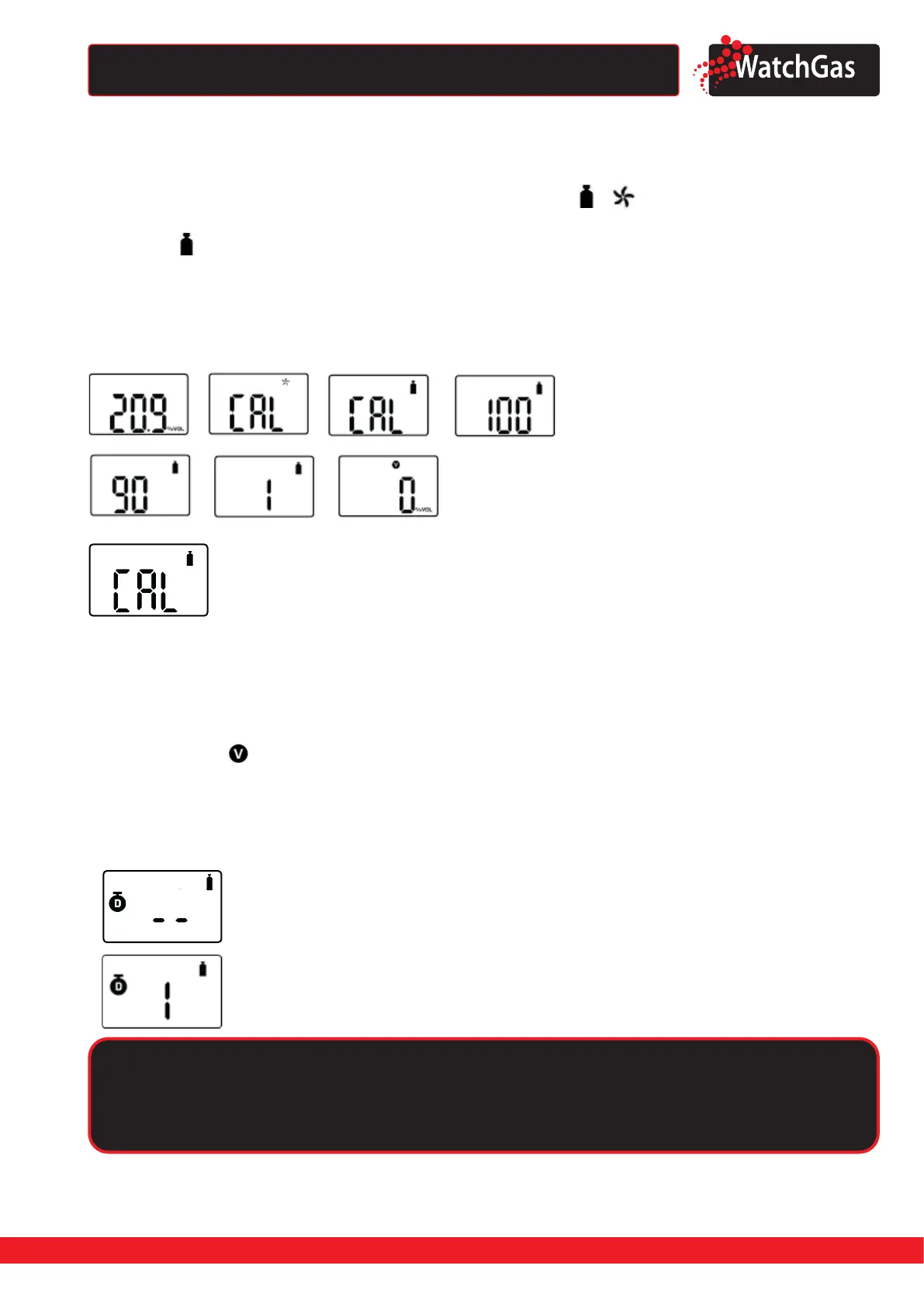
Press and hold the key for 5 seconds to enter calibration mode ( ),
icon and ‘CAL’ mark will
appear on the LCD. Press the key again for a second when CAL is displayed, to switch to standard gas
calibration, appears.
Start the ow of the gas cylinder by opening the valve.
Press the key for three seconds to initiate calibration. When calibration begins, a countdown will
appear on the screen. The duration of the countdown depends on the sensor type and can be change
by the IR link (congurable with WatchGas IR-Link). Conrm the calibration value by pressing the
button once.
To set the calibration setpoints, please follow the steps below.
• Press the button until the above calibration setpoint is displayed.
• Press and hold the button for three seconds and the rst digit of calibration setpoint starts to blink.
• To increase the value, press the button for one second .
• To save the calibration setpoints, press the button for 3 seconds.
• Calibration will start
Once completed, icon will appear several seconds on the display. Then, the device will return to
Detection mode.
5.3. REMAINING CALIBRATION DAY
In Measuring mode, scroll through the menu by pressing the button until the following is displayed:
The default setting is “N/A”.
To activate the remaining calibration day, set an interval on the
“Cal Interval(day)” via IR LINK.
If you set the calibration interval via IR LINK, the remaining day
will be displayed. To check the remaining day, press the button
until the above image is displayed.
Caution
Calibration should be performed in a fresh-air environment that is free for any contaminants
and other gases. Preferably, do not perform calibration in a conned space.


 To Next Page