WL3 IT Manual Page 6 - Revision: 6-8-2021
WL3 IT FEATURES AND BENEFITS
Cold, Ambient, and Hot Water
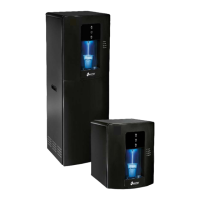
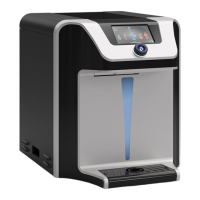
Counter Top and Tower Models come standard with Cold, Hot, Extra Hot, and Ambient Water
Selections to meet a wide range of customer demands.
High Volume Storage and Water Capacity
Tower Model has 4 liters of Cold Water Capacity and 1.5 Liters of Hot Water Capacity.
Counter Top has 2 liters of Cold Water Capacity and 1.5 Liters of Hot Water Capacity.
BioCote® Anti-Microbial Protection
Certain plastic, silicon, and painted surfaces surrounding the dispensing areas and
drip tray are infused with an exclusive additive called BioCote®. BioCote® provides
an effective barrier against microbes like bacteria and mold, which may cause odors
or staining
Large Dispense Area with Recessed Faucet
9.25 inch dispense height with BioCote® recessed faucet to protect from cross-contamination.
Leak Prevention
WL3 IT Water Treatment Systems are supplied with an extra solenoid to provide redundant
protection and reduces accident potential.
Child Safeguard
The WL3 IT Water Treatment System with Hot Water requires the Hot Water selection to be
double-tapped until the Red-Light flashes, and then pressed and held to dispense Hot Water.
Note there is a 2 second delay until hot water begins flowing. It will default back to the Cold
selection after 3 seconds of inactivity to prevent accidental dispensing of Hot Water.
In-Tank UV Purification
Industry leading In-Tank UV Purification prevents the growth of biofilm within the Stainless
Steel Cold Tank.
Energy Saver
The WL3 IT Water Treatment System comes from the factory with Energy Saver active. For the
WL3 IT to comply with Energy Star, the energy saver must come activated (ON) from the
factory. When no buttons are pressed on the front user interface panel for 3 hours, the
machine will automatically enter energy saver mode, and the heater to the hot tank will be
turned OFF. When any one of the front buttons are pressed while the system is in energy saver
mode, the WL3 IT will exit energy saver mode, and the hot tank will begin heating water. The
hot water tank will be at set temperature within 10-minutes after exiting energy saver mode.
Energy saver can be disabled by adjusting dipswitch #2, shown on Page 60 of this manual. While
the unit is in sleep mode, the “Power” LED will slowly fade then illuminate continuously, while
all other LEDs will be off.


 To Next Page
 Loading...