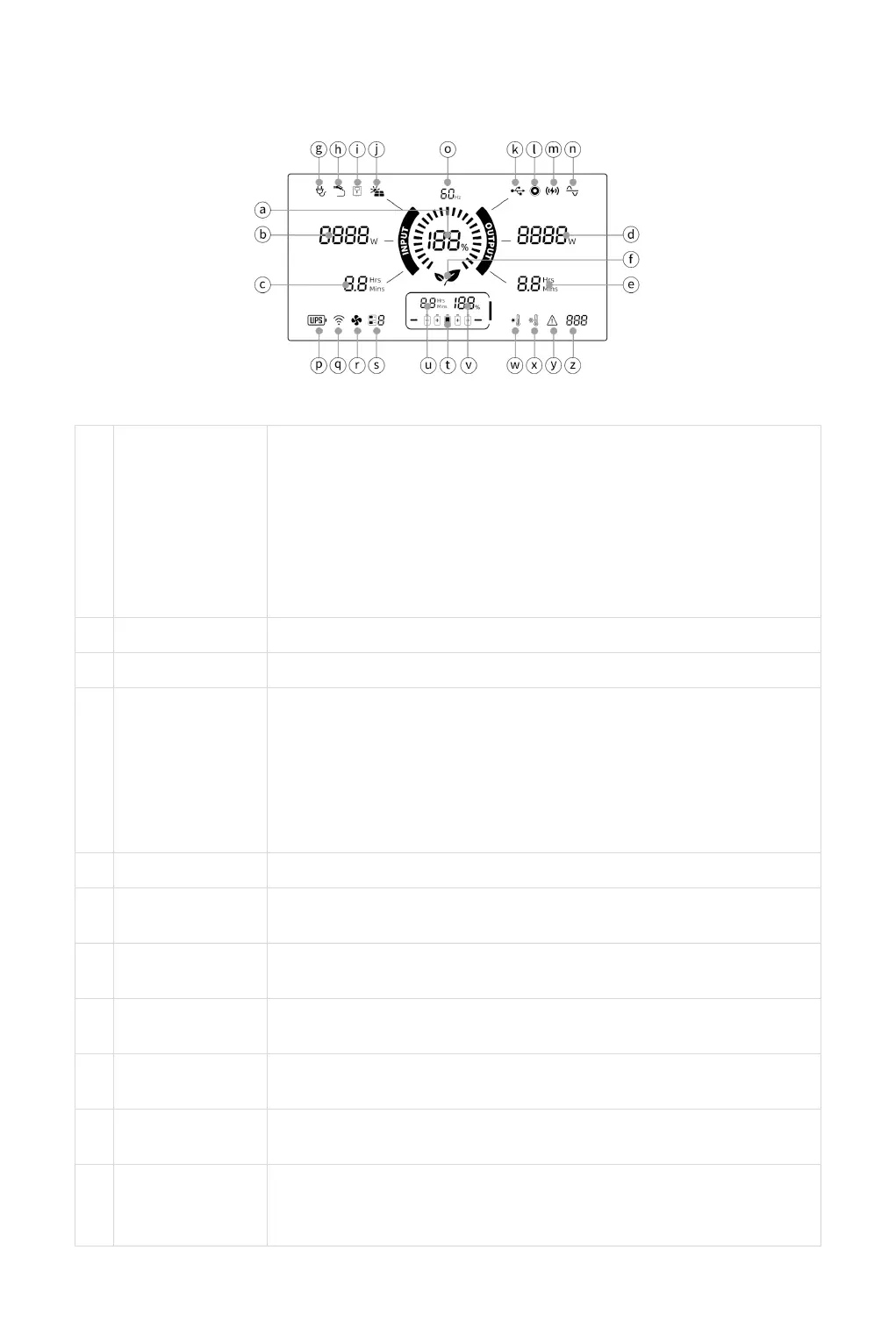
LCD DISPLAY
Displays the current battery level in the form of energy circle +
percentage. The main switch is turned on and the battery
quantity is displayed. During the charging process, the energy
circle is displayed dynamically.
⚠ Note: The LCD Screen will enter Sleep Mode after the 3mins of
inactivity and will wake up when inputting a charging cord or when
any button is pressed.
When charging, the display displays "INPUT" and charging power.
When charging, the display shows full remaining time.
Displays the total used power of DC output, USB-A, USB-C, and
AC output.
⚠ Note that this value can be adjusted multiple times as the
energy consumption of the connected device changes. This is
evident when the port is initially activated using a connected
device.
In the output state, the screen displays the remaining output time.
When the AC charging mode is used, the label is displayed when
the charging mode is switched to slow charge.
When the AC charging cable is inserted, this label is displayed on
the LCD.
When the EV charging cable is inserted, this label is displayed on
the LCD.
(Not available yet) When the Distribution box input, this label is
displayed on the LCD.
When the DC/PV charging cable is inserted, this label is displayed
on the LCD.
When the USB output is turned on, the icon lights up and shows
the total power used by the DC output, the current remaining time
and frequency.


 To Next Page