CommLink IV Technical Guide
12
Operator Interface
Finding What COM Port Number the
CommLink IV is Using
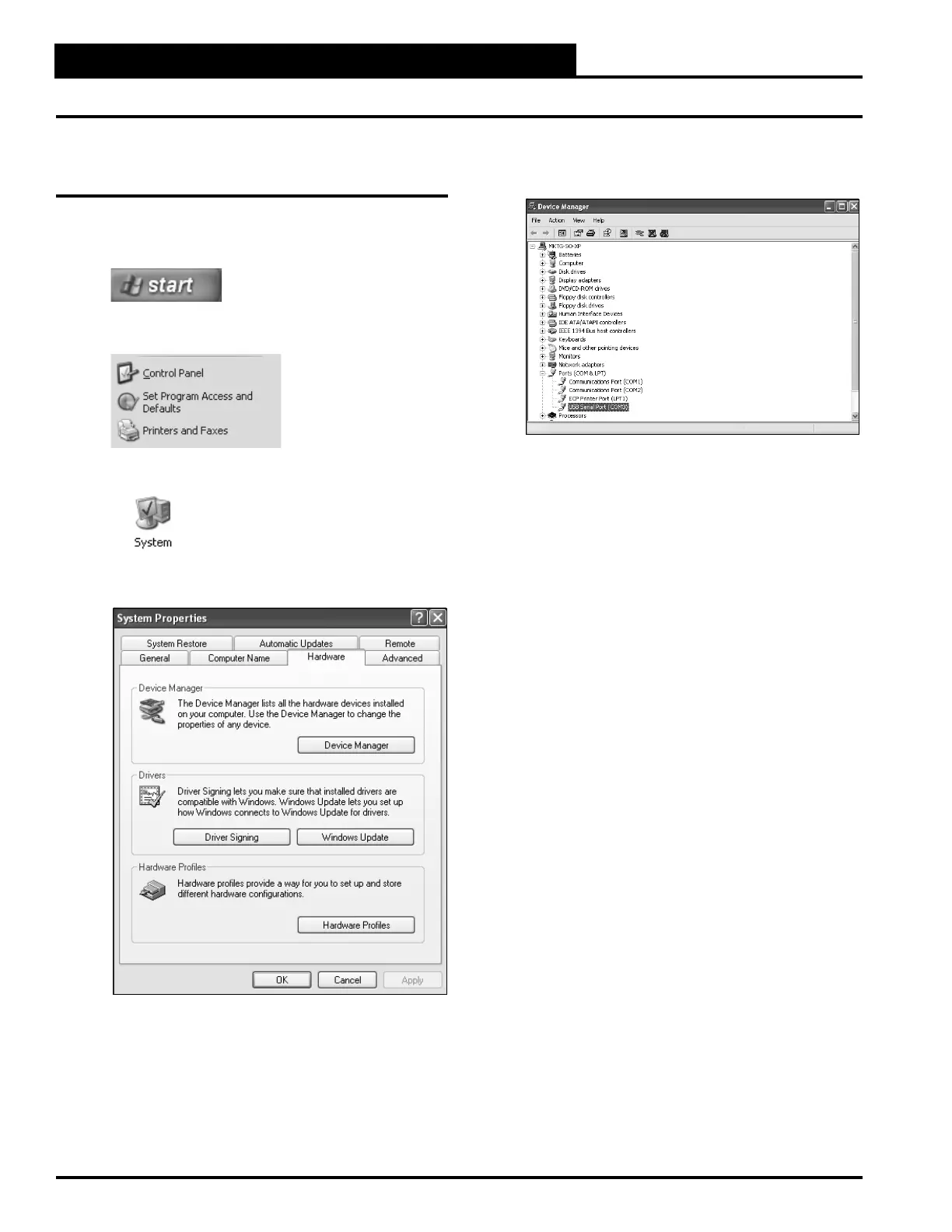
1. Left-click on <Start>, located on the bottom left of
the Windows Tool Bar.
2. Select <Control Panel>.
3. Double-click the System Icon.
4. Click the <Hardware> tab.
5. Click the <Device Manager> button.
6. Click on the plus sign next to Ports to see all of the
common ports.
7. Locate the USB Serial Port (COM#). The COM#
in parentheses is the port it is located on. Write this
COM port number down. You will need to know this
when setting up the Prism software.
8. If the COM port number is 10 or greater, go to
“Changing the USB COM Port Number” in
the Troubleshooting section on page 21; otherwise,
continue with the section “Prism Setup” on
page 13 or “Prism II Setup” on page 14.
Finding the COM Port Number in Windows
®
XP


 To Next Page