CommLink IV Technical Guide
13
Operator Interface
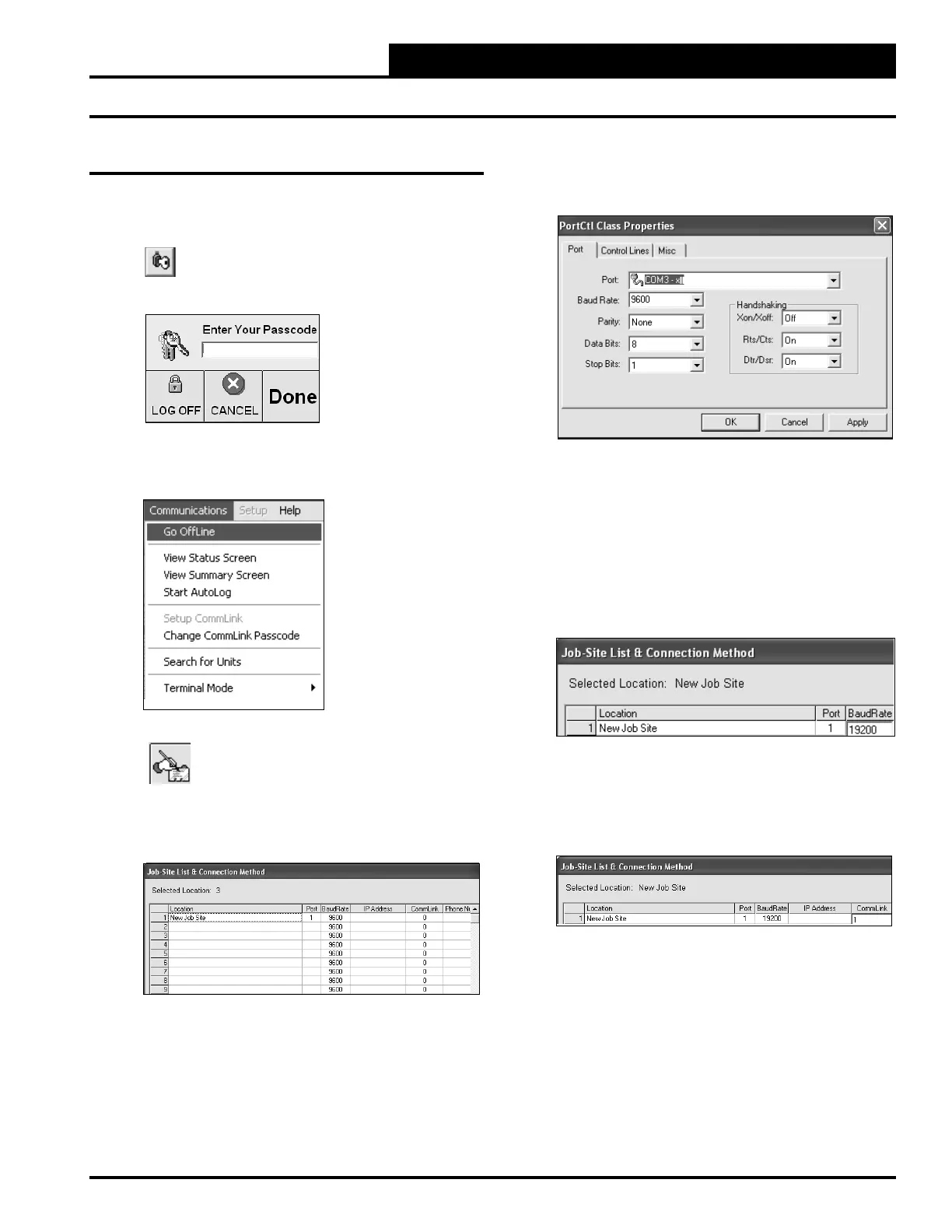
6. Double-click in the Port location on the same line as
the job name. The PortCtl Class Properties Window
will pop up.
7. Click on the down arrow on the Port pull down box
and select the COM port number that the CommLink
IV is using. This port number is the one you should
have found in the Device Manager (XP) or during
installation (Vista). Click <Apply> and then click
<OK>.
8. In the Job Site Window’s Baud Rate fi eld, type in the
baud rate 19200 and press <Enter>.
9. If you are using a single loop CommLink, type a “1”
in the CommLink fi eld in the Job Site Window and
press <Enter>. For all other confi gurations, leave “0”
in the fi eld.
10. Click <Done>.
11. Click <Communications> again and select <Go
OnLine>
.
Prism Set Up Instructions
Prism Set Up
1. Open your Prism software.
2. Click on the <Key> button and type in
your level 3 passcode (default “sm”).
Click <Done>.
3. If Prism is online, click <Communications> and
then click <Go Offl ine>.
4. Click on the <Edit Jobsite> button to enter
jobsite information.
5. Click on an empty location. Type in a job name and
press <Enter>.


 To Next Page