CommLink IV Technical Guide
15
Operator Interface
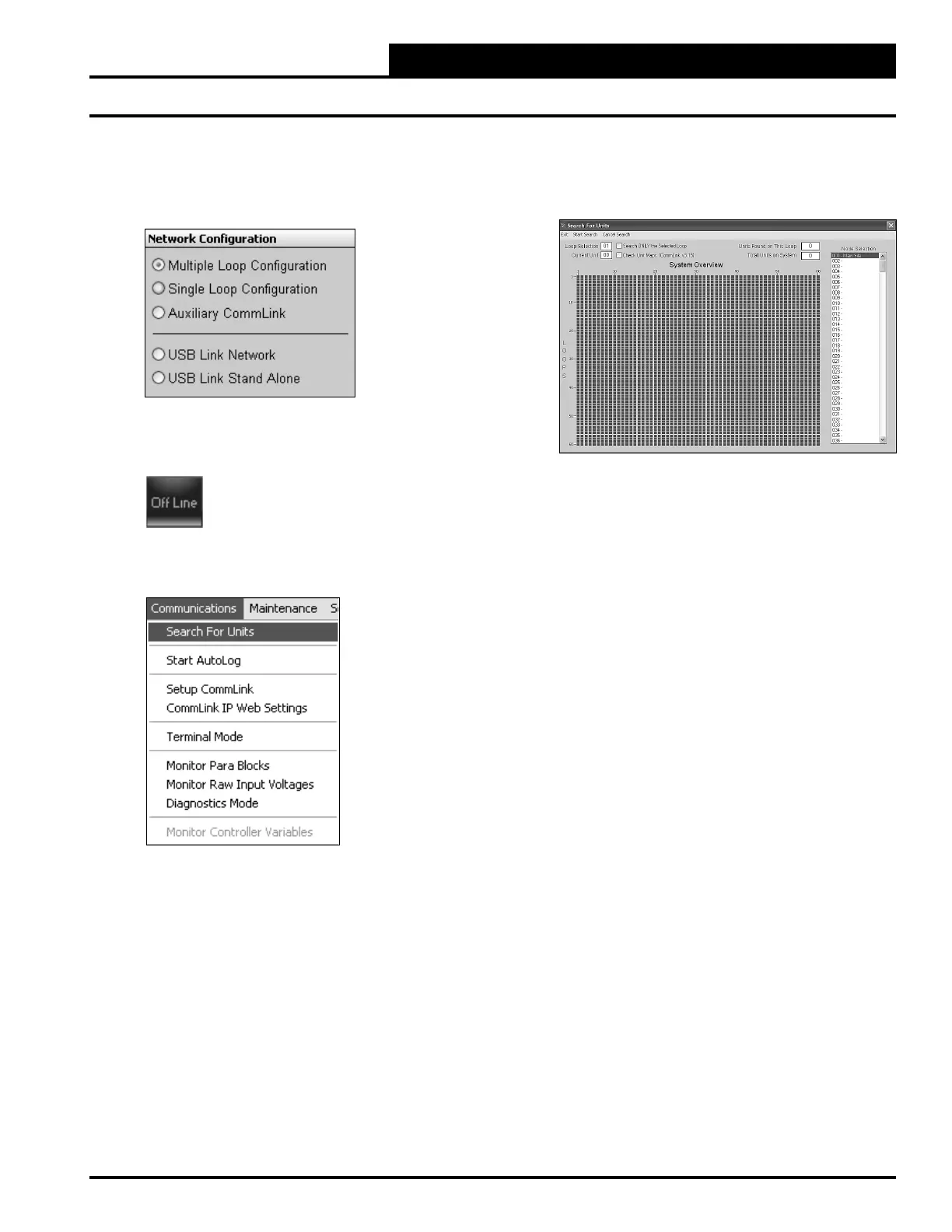
8. In the Network Confi guration selection box, select the
type of CommLink you are using. This will be either
Multiple Loop Confi guration or Single Loop
Confi guration.
9. Click <Exit> to close out of the Job Sites Window.
10. Click the <OFFLINE> button to go
<ON LINE>.
11. From the <Communications> menu, select
<Search for Units>.
Prism II Setup Instructions
12. The Search for Installed Units Window will pop up.
Click <Start Search> to initiate an automatic
detection of all installed controllers on your system.
13. If everything is working correctly, Units Found on
this Loop should increment.
14. If Units Found on this Loop stays at zero, check
the wiring to the CommLink IV and the AHU/RTU
Controllers and/or read through these directions again
to make sure all steps were followed.


 To Next Page