Then connect the micro USB cord of the MonitEM-Lab to the computer. The
driver should be installed automatically.
If any problems occur with installation of the driver, consult the Appendix 1:
Problem with drivers Installation.
5.2 Using the software
5.2.1 First connection
We highly recommend connecting the device for the rst time using only
the USB so that you can check the principal parameters, such as the alarm
conguration.
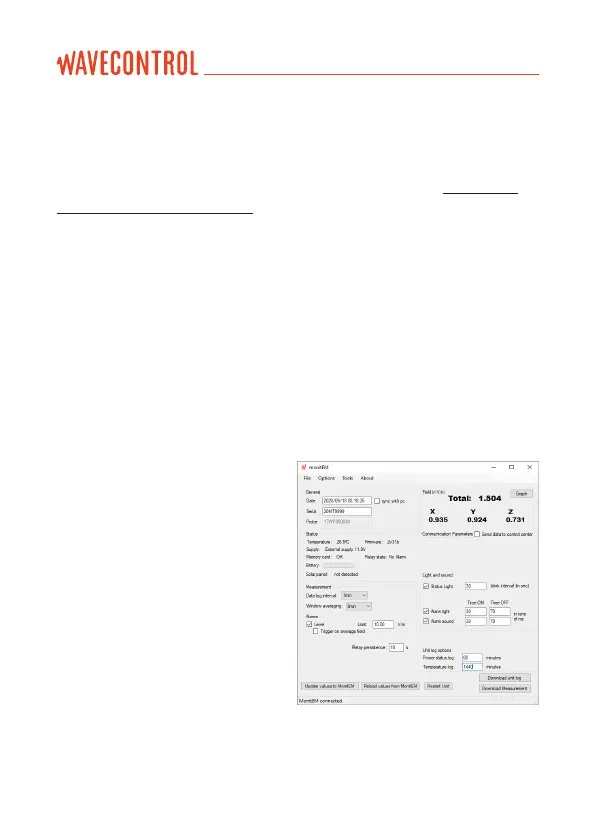
The program for managing the MonitEM-Lab is very easy to use. Start the
program and connect the device’s USB cord (sequence is not important). The
program itself will detect the device and display the conguration screen.
5.2.2 Parameters
We can distinguish between different
parts of the program:
• General: this indicates the time to
which the device is set along with
its serial number and the serial
number of the connected probe.
• Status: gives information on:
• Type of power supply.
• Temperature of the system.
• Firmware version.
• Relay state.
• Measurement: allows denition of:
• The interval of recording in
minutes or seconds.
• The window averaging: European recommendation is 6 minutes = 360
seconds. 0 means no average is done.
User’s Manual
Electromagnetic Radiation Monitoring Device MonitEM-Lab P. 10



 To Next Page