52 53
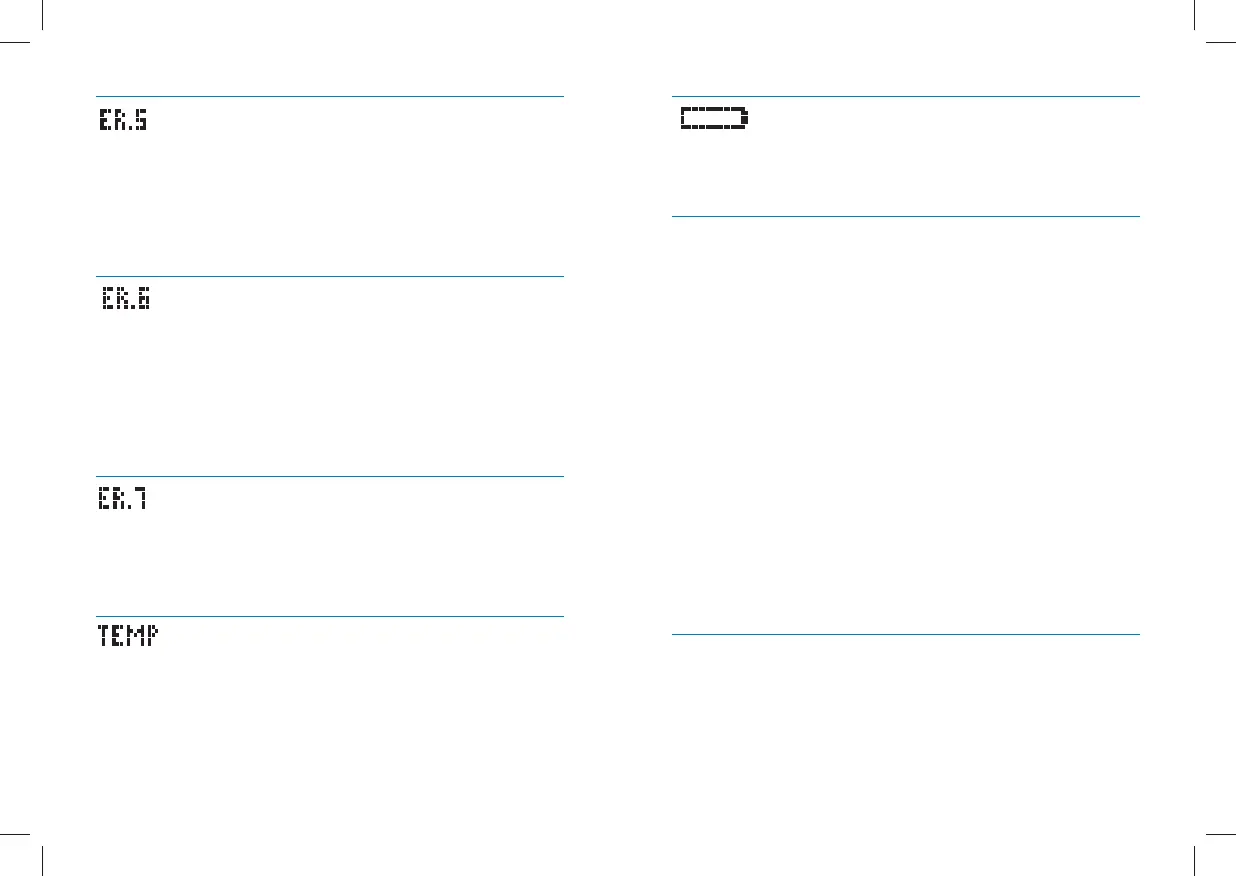
Battery Icon:
Battery #2 has died during test.
Replace battery #2 immediately before retesting.
Troubleshooting Situation #1: Meter does not enter the TEST
Mode after inserting a WaveSense Jazz Test Strip.
[1] CAUSE: The batteries have insufficient power. ACTION:
Replace the batteries, set time and date, and test.
[2] CAUSE: The batteries are installed incorrectly or there are no
batteries in the meter. ACTION: Check that both batteries are
installed correctly, with the positive (+) sign facing up towards you.
[3] CAUSE: WaveSense Jazz Test Strip has been inserted upside
down, wrong end in, or incompletely inserted into the meter.
ACTION: Insert the WaveSense Jazz Test Strip with the black side
up and the contact bars of the test strip in the meter. Ensure that
the test strip is fully inserted.
[4] CAUSE: Defective meter or defective WaveSense Jazz Test
Strips. ACTION: Call customer service.
[5] CAUSE: Blood or foreign objects introduced into the
WaveSense Jazz Meter strip port. ACTION: Please refer to
chapter 22. If problem persists, call customer service and have
the meter serial number available (located on back of the meter).
Troubleshooting Situation #2: The glucose test sequence
does not start after applying the blood sample.
[1] CAUSE: Defective test strip. ACTION: Repeat the test
with a new WaveSense Jazz Test Strip. If problem persists,
call customer service and have the test strip LOT number
Error 5:
The meter was unable to produce a reliable result.
[1] This may be caused by a non-blood sample, or a combina-
tion of high glucose and other medical conditions.
[2] If this error code persists on retesting, consult your health-
care professional.
Error 6:
The test strip has taken too long to generate a signal.
[1] This may be caused by a combination of cold operating
temperature and high hematocrit levels. Retest in a warmer
location.
[2] If this error code persists on retesting, consult your
healthcare professional.
Error 7:
Meter problems have occurred that are beyond your
control.
Contact customer service for assistance.
Temp Icon:
Test was performed outside the system operating
temperature range of 50 °F to 104 °F (10 °C to 40 °C).
Move to an area with an ambient temperature of 50 °F to 104
°F (10 °C to 40 °C). Wait for the meter and test strips to reach
the new temperature (usually 10-20 minutes) and retest.


 To Next Page