EasyManua.ls Logo

Wavetek 132 - Page 18

Default Icon
52 pages
Print Icon
To Next Page IconTo Next Page
To Previous Page IconTo Previous Page
Loading...
Frequency
Calibration
1.
Connect
counter to 50f2
OUT
connector.
2.
Set
FREQ
HZ selector
to
X10K
and
FREQ
VERNIER
fully cw.
3.
Align 2.0
dial
mark
with the
dial
indicator
index
and
alternately
switch
from X
1
0K
to X 1 K
range while
adjusting
R4
for a
balanced
error
between
the two
positions
of less
than
2%.
4.
Set FREQ
HZ
selector to
X100K
and
dial at
2.0.
5.
Adjust Cl
6
to
obtain
200.0
kHz
on
counter
display.
6.
Set
FREQ
HZ
selector to
X1M.
Adjust Cl 2
to
obtain 2.00
MHz on
counter
display.
7.
Dial
alignment
No
alignment is
necessary
if
the dial
is the
push-on
type.
If it
has
a
set
screw,
consult the
factory
for CAL
procedure.
Sine
Distortion,
Amplitude,
and
Balance
yj
1.
Set
FREQ
HZ selector
for
X1K, FREQ
VER-
NIER
fully cw,
function
selector
to
!
\j ,
and
frequency
dial
at 2.0.
2.
Connect
oscilloscope,
with
peak mV
plug-in,
to
orange
wire on
function
switch.
3.
Adjust R133
to
obtain 2.5
V
p-p
±25 mV
output.
4.
Adjust R
128 to
balance
output.
5.
Connect
the unit,
distortion
analyzer, and
oscil-
loscope
as
shown in
Figure
4-2.
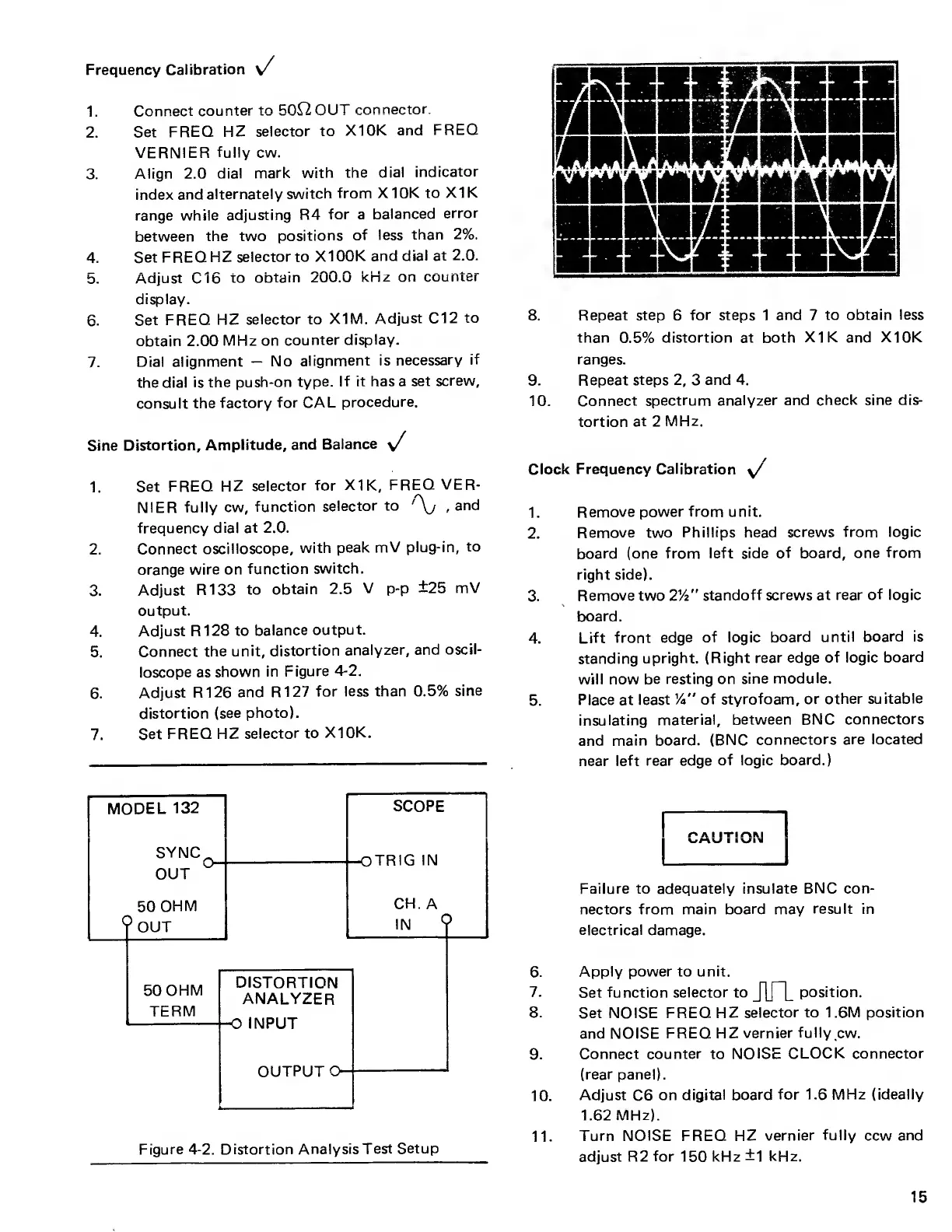
6.
Adjust
R126
and R127
for less than 0.5%
sine
distortion (see
photo).
7.
Set
FREQ HZ
selector
to
X10K.
Figure
4-2.
Distortion
Analysis Test
Setup
8.
Repeat step
6
for
steps 1
and
7
to obtain
less
than
0.5%
distortion at both
XI
K and
X10K
ranges.
9. Repeat
steps
2,
3
and 4.
10. Connect
spectrum
analyzer and
check sine dis-
tortion
at
2
MHz.
/
Clock
Frequency Calibration
\/
1.
Remove power
from unit.
2.
Remove two
Phillips head
screws from logic
board (one
from left side
of board, one
from
right side).
3.
Remove two
2%"
standoff screws
at rear
of
logic
board.
4.
Lift
front
edge of logic
board until board is
standing
upright.
(Right rear edge of
logic board
will now be
resting on sine
module.
5.
Place at least V'
of styrofoam, or
other
suitable
insulating
material, between
BNC
connectors
and main
board. (BNC
connectors
are located
near
left rear edge
of
logic board.)
CAUTION
Failure to adequately
insulate BNC con-
nectors from
main board may
result
in
electrical damage.
6.
Apply power to unit.
7.
Set
function selector to
J1T”L
position.
8.
Set NOISE FREQ
HZ
selector to 1.6M position
and NOISE
FREQ HZ
vernier
fully
cw.
9.
Connect counter to NOISE
CLOCK connector
(rear panel).
10.
Adjust
C6
on
digital board
for
1.6
MHz (ideally
1.62
MHz).
11.
Turn NOISE
FREQ
HZ
vernier
fully
ccw and
adjust R2
for
150 kHz
±1
kHz.
15

Other manuals for Wavetek 132

Related product manuals