EasyManua.ls Logo

Wavetek 142 - Page 12

Wavetek 142
40 pages
Print Icon
To Next Page IconTo Next Page
To Previous Page IconTo Previous Page
Loading...
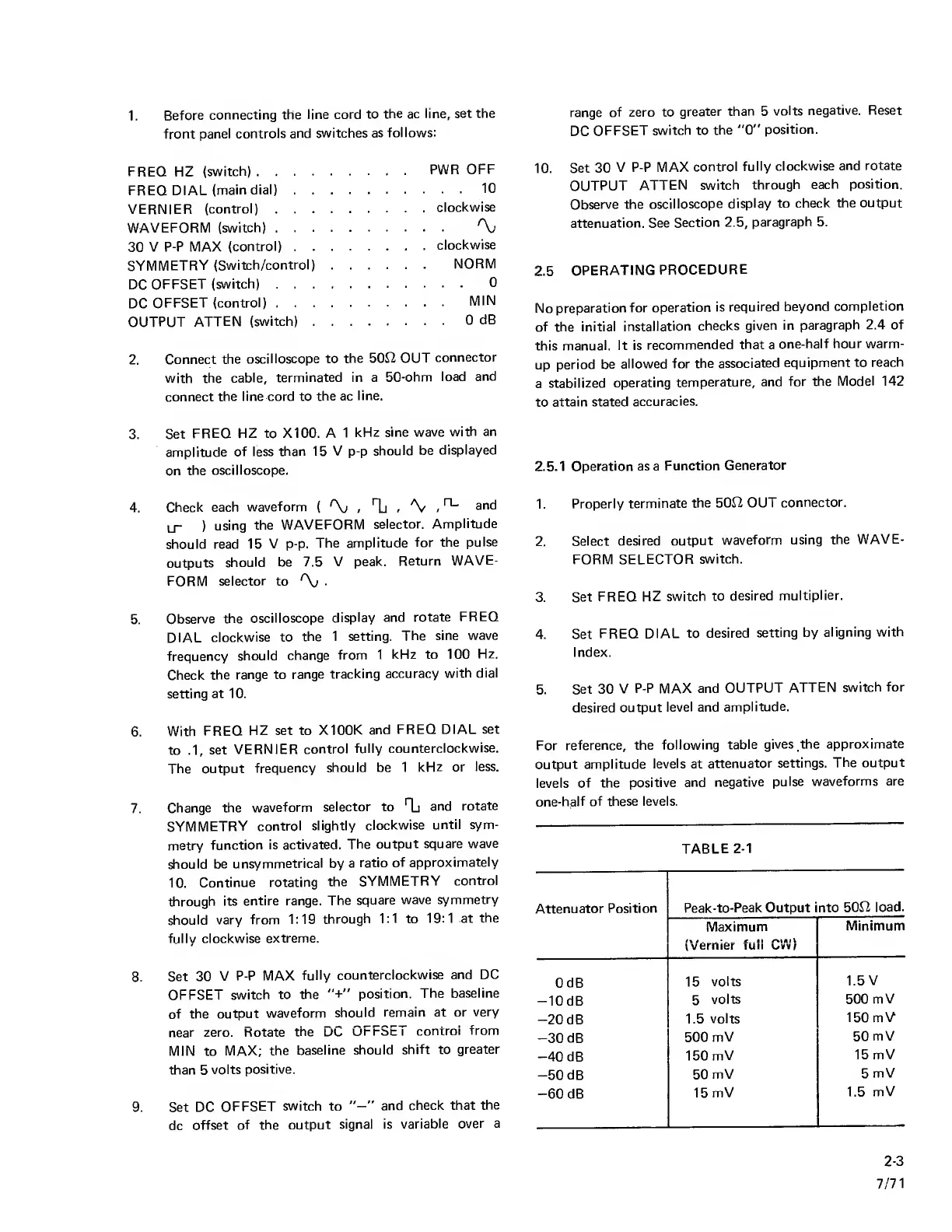
1.
Before
connecting the
line cord
to
the ac line,
set the
front
panel
controls and
switches
as
follows:
FREQ HZ
(switch)
PWR
OFF
FREQ DIAL
(main dial)
10
VERNIER
(control)
clockwise
WAVEFORM
(switch)
'Xj
30
V P-P MAX
(control)
clockwise
SYMMETRY
(Switch/control)
NORM
DC
OFFSET
(switch)
0
DC
OFFSET
(control)
MIN
OUTPUT
ATTEN
(switch)
0
dB
2.
Connect
the
oscilloscope to
the 50f2
OUT
connector
with
the
cable,
terminated in a
50-ohm
load
and
connect
the line cord to
the ac
line.
3.
Set
FREQ HZ to XI 00. A
1
kHz sine wave
with an
amplitude
of less
than 15 V
p-p
should
be
displayed
on
the oscilloscope.
4.
Check each
waveform
(
'\i
, 1j
, 'V
,
arid
LT
)
using
the
WAVEFORM
selector.
Amplitude
should read 15
V p-p.
The amplitude
for the
pulse
outputs
should
be 7.5
V
peak.
Return
WAVE-
FORM
selector
to
'\i
.
5.
Observe
the
oscilloscope
display
and
rotate
FREQ
DIAL
clockwise to
the 1 setting.
The
sine
wave
frequency
should
change
from
1
kHz to 100
Hz.
Check
the
range to
range
tracking
accuracy
with
dial
setting at 10.
6.
With
FREQ
HZ set to
X100K
and
FREQ DIAL
set
to
.1,
set
VERNIER
control
fully
counterclockwise.
The
output
frequency
should be
1
kHz or
less.
7.
Change the
waveform
selector to
Tj
and
rotate
SYMMETRY
control
slightly
clockwise
until sym-
metry
function
is activated.
The
output square
wave
should
be
unsymmetrical by
a
ratio
of approximately
10.
Continue rotating
the
SYMMETRY
control
through
its
entire range.
The
square
wave
symmetry
should
vary from
1:19 through
1:1
to
19:1 at
the
fully clockwise
extreme.
8.
Set 30
V
P-P MAX
fully
counterclockwise
and DC
OFFSET
switch
to
the
position.
The baseline
of the
output
waveform
should
remain at or
very
near
zero. Rotate
the
DC
OFFSET
control
from
MIN to
MAX;
the
baseline
should
shift to
greater
than
5
volts
positive.
9. Set DC
OFFSET
switch to
and
check that
the
dc
offset
of the
output
signal is
variable
over
a
range
of zero to
greater
than
5
volts
negative. Reset
DC
OFFSET
switch to the
"0"
position.
10.
Set 30
V P-P MAX
control
fully
clockwise
and rotate
OUTPUT
ATTEN
switch
through
each position.
Observe the
oscilloscope
display
to
check the output
attenuation. See
Section
2.5,
paragraph 5.
2.5
OPERATING
PROCEDURE
No
preparation
for
operation
is
required
beyond
completion
of the initial
installation
checks
given in
paragraph
2.4 of
this
manual. It is
recommended
that
a
one-half hour warm-
up
period
be
allowed for
the
associated
equipment to
reach
a
stabilized
operating
temperature,
and
for
the Model
142
to
attain stated
accuracies.
2.5.1
Operation as a
Function
Generator
1.
Properly
terminate
the 500 OUT
connector.
2.
Select
desired
output
waveform using
the
WAVE-
FORM
SELECTOR
switch.
3.
Set
FREQ HZ
switch to
desired
multiplier.
4. Set
FREQ DIAL
to desired
setting by
aligning
with
Index.
5.
Set 30
V
P-P MAX and
OUTPUT
ATTEN
switch
for
desired
output
level and
amplitude.
For
reference, the
following
table
gives the
approximate
output amplitude
levels
at
attenuator
settings. The
output
levels
of the
positive
and
negative
pulse
waveforms are
one-h^lf
of these levels.
TABLE
2-1
Attenuator
Position
Peak-to-Peak
Output into
500
load.
Maximum
!\ i i..ii
vvernier
luii uvv/
Minimum
OdB
15
volts
1.5
V
-lOdB
5
volts 500
mV
-20
dB
1.5
volts
150
mV
-30
dB
500
mV
50
mV
-40
dB
150
mV
15 mV
-50
dB
50
mV
5
mV
-60
dB
15 mV
i
1.5 mV
2-3
7/71

Related product manuals