EasyManua.ls Logo

Wavetek 180 - Operation; Controls and Connectors; Power;Frequency Controls; Amplitude Controls

Wavetek 180
33 pages
Print Icon
To Next Page IconTo Next Page
To Previous Page IconTo Previous Page
Loading...
3
SECTION
OPERATiON
3.1
CONTROLS
AND
CONNECTORS
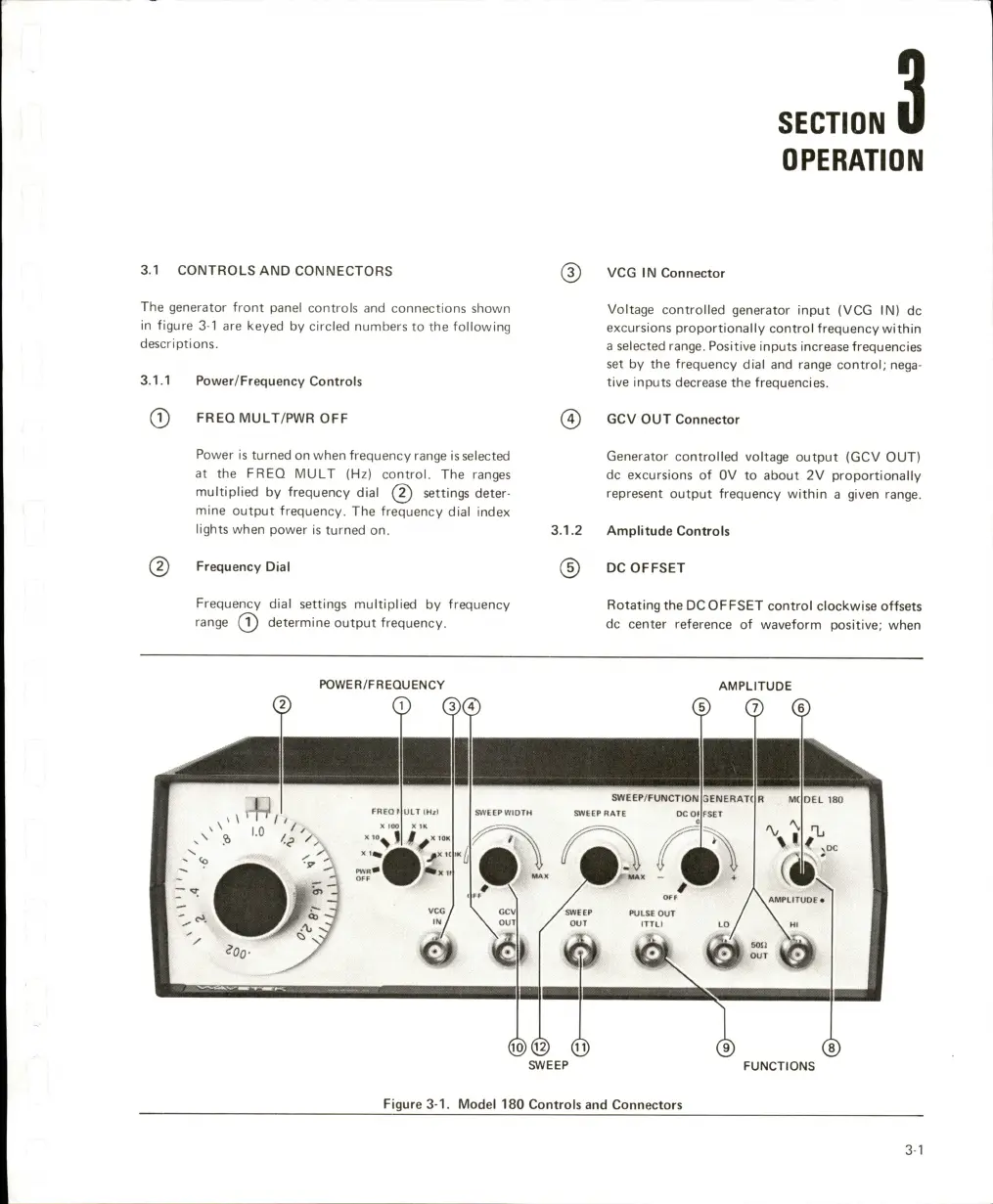
The
generator
front
panel
controls
and
connections
shown
in
figure
3-1
are
keyed
by
circled
numbers
to
the
following
descriptions.
3.1.1
Power/Frequency
Controls
(T)
FREQMULT/PWR
OFF
Power
is
turned
on
when
frequency
range
is
selected
at
the
FREQ
MULT
(Hz)
control.
The
ranges
multiplied
by
frequency
dial
settings
deter
mine
output
frequency.
The
frequency
dial
index
lights
when
power
is
turned
on.
(2)
Frequency
Dial
Frequency
dial
settings
multiplied
by
frequency
range
determine
output
frequency.
VCG
IN
Connector
Voltage
controlled
generator
input
(VCG
IN)
dc
excursions
proportionally
control
frequency
within
a
selected
range.
Positive
inputs
increase
frequencies
set
by
the
frequency
dial
and
range
control;
nega
tive
inputs
decrease
the
frequencies.
GCV
OUT
Connector
Generator
controlled
voltage
output
(GCV
OUT)
dc
excursions
of
OV
to
about
2V
proportionally
represent
output
frequency
within
a
given
range.
3.1.2
Amplitude
Controls
@
DC
OFFSET
Rotating
the
DC
OFFSET
control
clockwise
offsets
dc
center
reference
of
waveform
positive;
when
POWER/FREQUENCY
FREQ
UlTiH/t
SWEEP
WiOTH
SWEEP
AMPLITUDE
©
@
®
SWEEP/FUNCTION
a'VEEPRATE
DC
Of
\
^
iiv
F
\
/
OFF
\GCV
jTSiNeBP
PULSE
OUT
OUT
/
OUT
(TTLI
I
ENERATt
DEL
180
FUNCTIONS
Figure
3-1.
Model
180
Controls
and
Connectors
3-1

Related product manuals