Waydoo Flyer EVO USER GUIDES
© 2024 All rights reserved by Waydoo
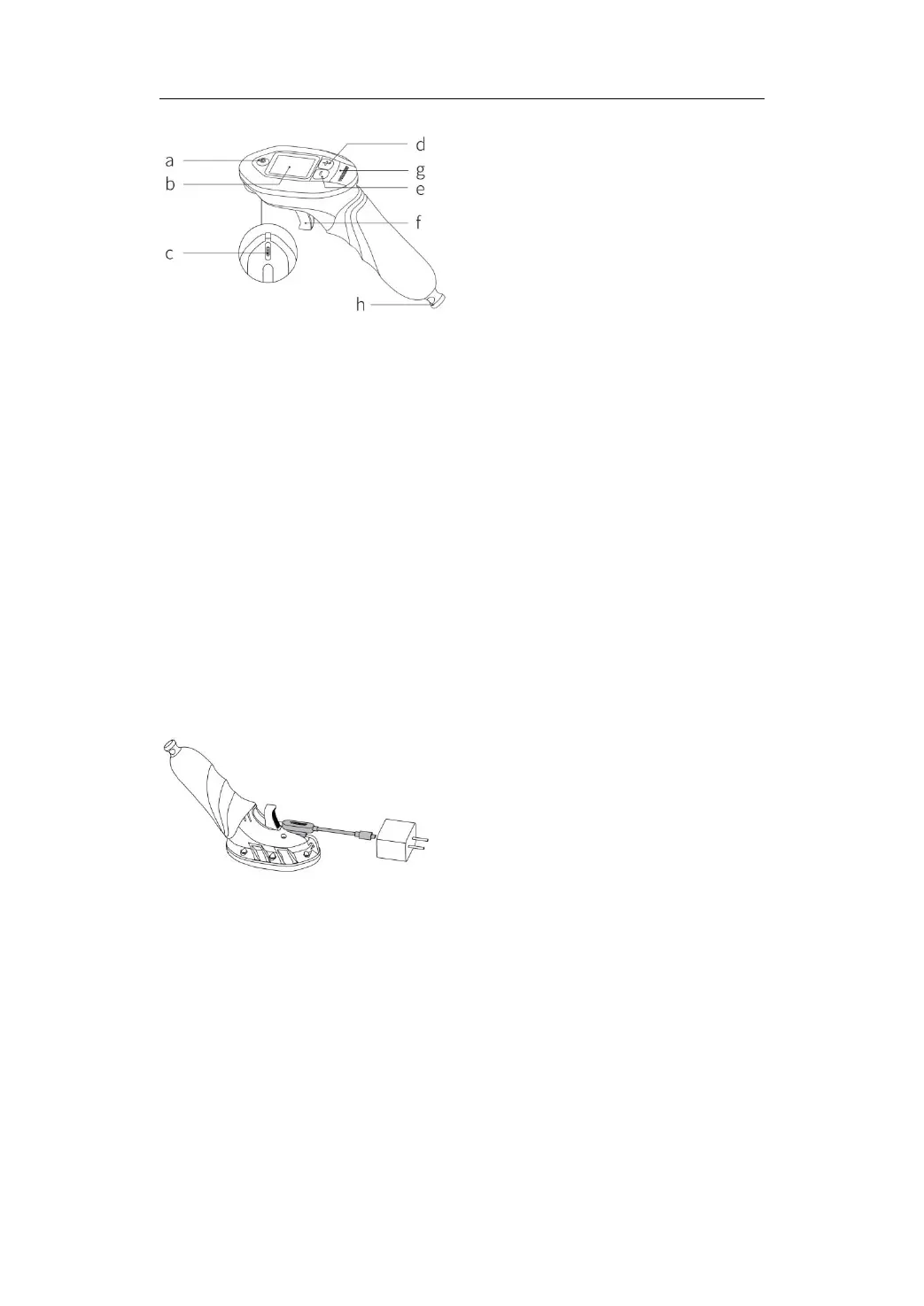
a.Power Button(Return Button)
b.LCD Display
c.Magnetic Charging Port
d."+" Speed Gear (Up Scroll Button)
e."-" Speed Gear(Down Scroll Button)
f.Trigger (Confirm Button)
g.Indicator Light
h.Battery Magnet
Turn EVO remote on/off
Press and hold the power button on the remote for 3 seconds to turn the
remote on/off.
EVO remote charging
1. Plug in a USB charger and attach the magnetic charging plug to the EVO
remote, ensuring the charging pins are connected.
2. When the remote is charging normally, the indicator light at the bottom
will light up, and the charging time is about 2 hours (5V/2A charger).
Tips: When the power of the remote is less than 20%, a low-battery warning
box appears, please charge it in time.
EVO remote connection
1. Press and hold the power button of the remote for about 3 seconds to
turn on the remote.


 To Next Page