Waydoo Flyer EVO USER GUIDES
© 2024 All rights reserved by Waydoo
2. Press and hold the power button and "-" speed gear button on the
remote at the same time for 2 seconds to open the Bluetooth connection
management interface.
3. In the Bluetooth connection management interface, a list of currently
connectable boards will be displayed.
4. Use the "+" and "-" speed gear buttons to select the board to be
connected.
5. Press the trigger to confirm to complete the remote connection.
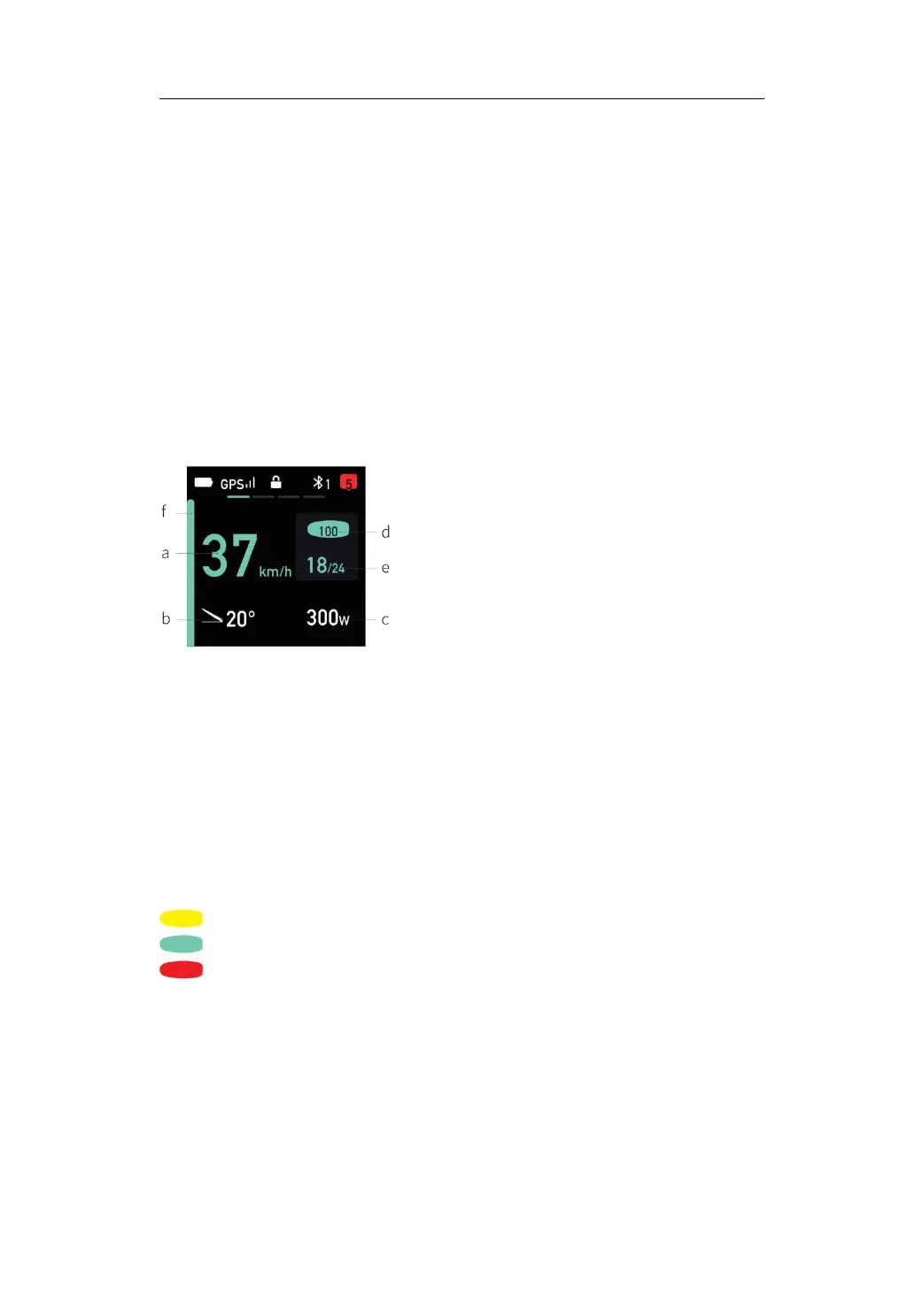
EVO remote display interface
Main interface
a. Current speed
b. Current inclination angle
c. Current power
d. Powerflight battery power
e. Gear information
f. Throttle indication
Tips:
Color of Powerflight battery level symbol:
Yellow: No battery data
Green: Battery data available
Red: No battery data, Bluetooth is not connected
The battery level symbol will flash when the battery power is below 20%.


 To Next Page