Waydoo Flyer EVO USER GUIDES
© 2024 All rights reserved by Waydoo
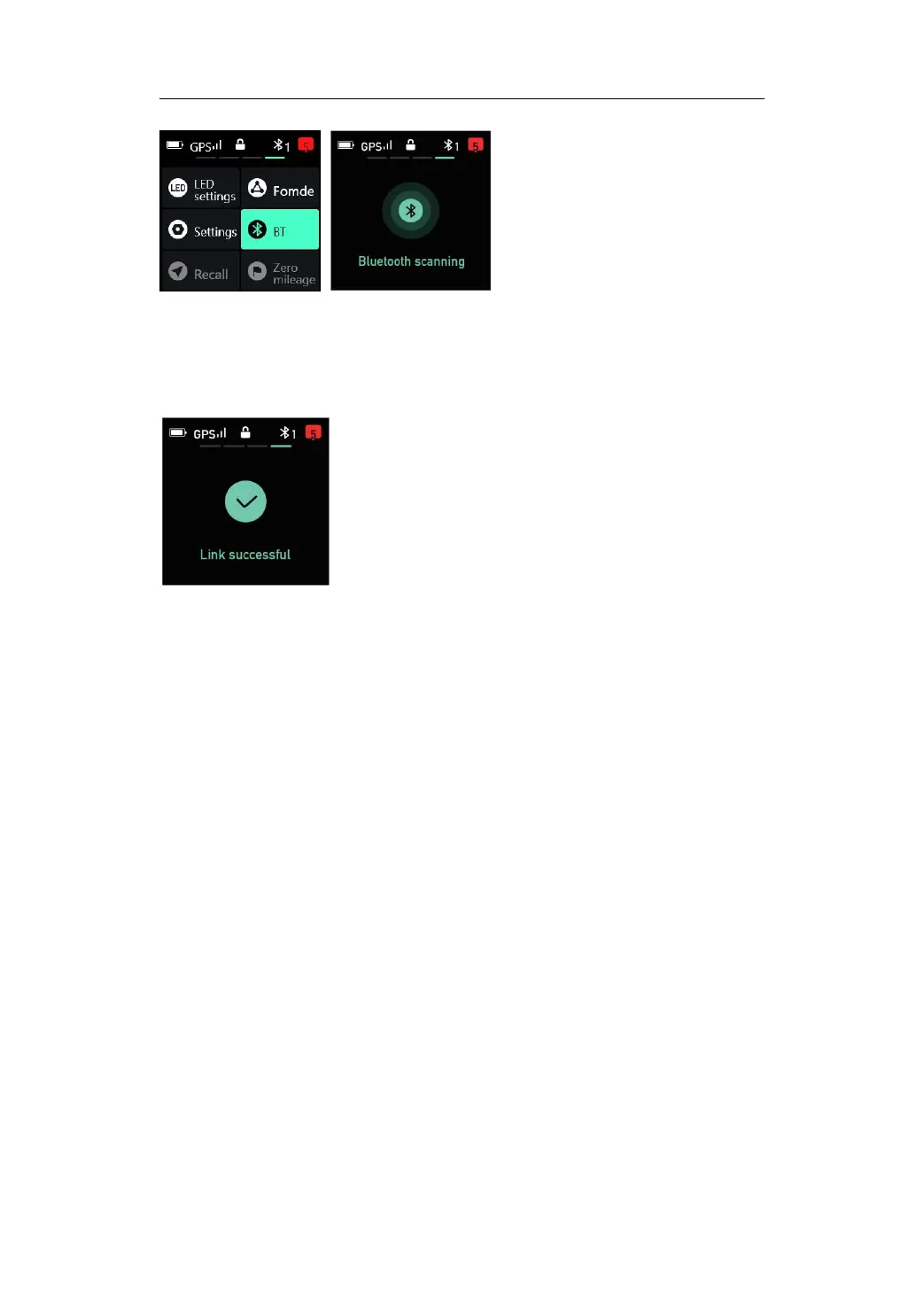
5. Press the "+" /"-" buttons to select the board you want to connect.
6. Press the trigger to confirm and it will prompt that the connection is
successful.
Tips:
1.If it is the first time to connect the remote, the remote screen will prompt
you to go to the Powerflight Battery to confirm the connection. Please use a
magnet to short tap on the power button of the Powerflight Battery once to
confirm the connection.
2.After the connection is successful, the remote display will automatically
return to the main interface.
3.If you press and hold the trigger when the remote is started, the throttle
range of the trigger may become smaller or the confirmation button
function may become invalid. If this happens, you can release the trigger
and restart the remote once, or long press the "+" button to enter the
trigger throttle calibration interface, and then follow the interface prompts
to calibrate the trigger.
Other interfaces
1. Flight data interface
a. Maximum speed
b. Mileage
c. Average power
d. Power Consumption


 To Next Page