15
375˚
F
550°
76°
Probe 1
Menu
Dashboard
Grill 350°F
Programs
Timers
375˚
F
550°
76°
Probe 1
79°
Probe 2
Probe 1
Add Program
Set Temperature Alert
Temperature 75°F
CONTROLLER SETTINGS
1
2
3
4
weber.com
NOTE: Download the WEBER CONNECT app to get the latest grill software and
controller features.
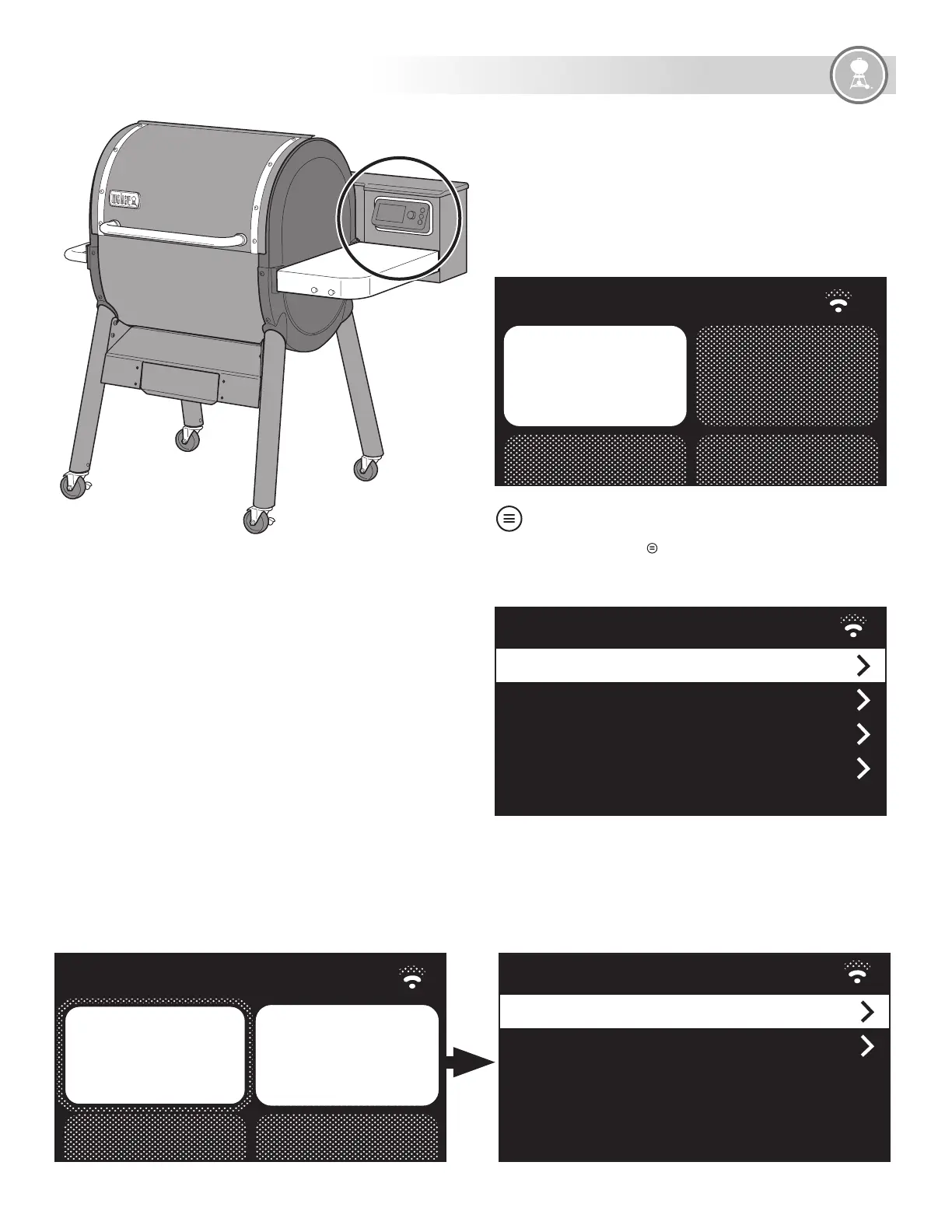
Dashboard
The dashboard shows all of the current grill info on the controller display.
Here you will find your current and target grill temperature, device
connectivity status, and separate tiles that can be setup to display guided
cook programs, timers and food temperature probe information.
Main Menu
Push the main menu button to navigate through all of the available
settings on the controller. Simply turn the dial and then push it to select
your options.
Setting Up A Probed Cook
Once you plug a food temperature probe into any of the four available
ports on the controller, turn and push the dial to select the tile that
corresponds with the probe number you want to set options for.
Probed Cook Settings
Once a food temperature probe is selected from the dashboard, you have
the option to select a cook program or simply set a temperature alarm to
notify you when your food has reached the desired temperature.






 To Next Page