EasyManua.ls Logo

Wedge Innovations SmartLevel - Operating the SmartLevel

Default Icon
13 pages
Print Icon
To Next Page IconTo Next Page
To Previous Page IconTo Previous Page
Loading...
Smart
Level®
Digital
Electronic
Level
SmartLevel
reads
all
angles
through
360,
0
displaying
these
measurements
in
four
different
modes:
angle,
slope,
pitch,
and
simulated
bubble.
ln
add)t)sm,
'j'V"\\
m.u'j
-&elect
the
Sm.urtl...e'lel
piec)-::,)on
needed
for
your
job,
0.1
or
0.2
degree
resolution.
And
SmartLevel's
reset
feature
allows
you
to
easily
recalibrate
SmartLevel
to
original
accuracy.
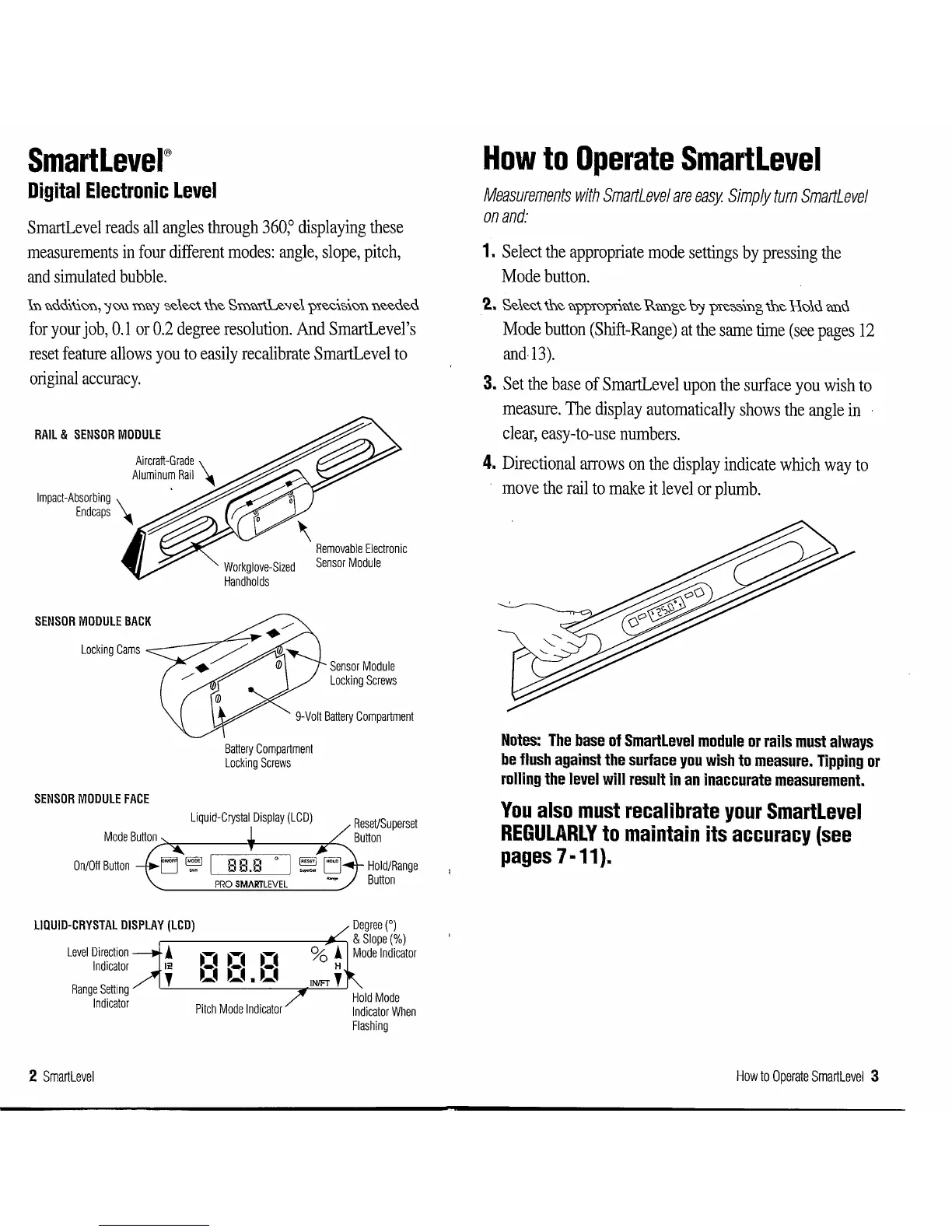
RAIL
&
SENSOR
MODULE
Aircraft-Grade
\
Aluminum
Rail
Impact-Absorbing
\
End
caps
SENSOR
MODULE
BACK
Locking
Cams
Sensor
Module
Locking
Screws
9-Volt
Battery
Compartment
SENSOR
MODULE
FACE
On/Off
Button
Battery
Compartment
Locking
Screws
Liquid-Crystal
Display
(LCD)
LIQUID-CRYSTAL
DISPLAY
(LCD)
Level
Direction
!
n n
~--.
Indicator
12
o
o.•~
Range
Setting
'
Indicator
Pitch
Mode
Indicator
2
Smartlevel
Hold/Range
Button
Hold
Mode
Indicator
When
Flashing
How
to
Operate
SmartLevel
Measurements
with
SmartLevel
are
easy
Simply
tum
SmartLevel
on
and:
1.
Select
the
appropriate
mode
settings
by
pressing
the
Mode
button.
2..
Select fue app1opnate
Runge
b':f
pie-;:,-;:,mg
fue Ho1u unu
Mode
button
(Shift-Range)
at
the
same
time
(see
pages
12
and-13).
3.
Set
the
base
of
SmartLevel
upon
the
surface
you
wish
to
measure.
The
display
automatically
shows
the
angle
in
clear,
easy-to-use
numbers.
4.
Directional
arrows
on
the
display
indicate
which
way
to
move
the
rail
to
make
it
level
or
plumb.
Notes:
The
base
of
Smartlevel
module
or
rails
must
always
be
flush
against
the
surface
you
wish
to
measure.
Tipping
or
rolling
the
level
will
result
in
an
inaccurate
measurement.
You
also
must
recalibrate
your
SmartLevel
REGULARLY
to
maintain
its
accuracy
(see
pages
7 ·11).
How
to
Operate
Smartlevel
3