EasyManua.ls Logo

Wedge Innovations SmartLevel - Smartlevel Features; Selecting Smartlevel Functions; On;Off Button

Default Icon
13 pages
Print Icon
To Next Page IconTo Next Page
To Previous Page IconTo Previous Page
Loading...
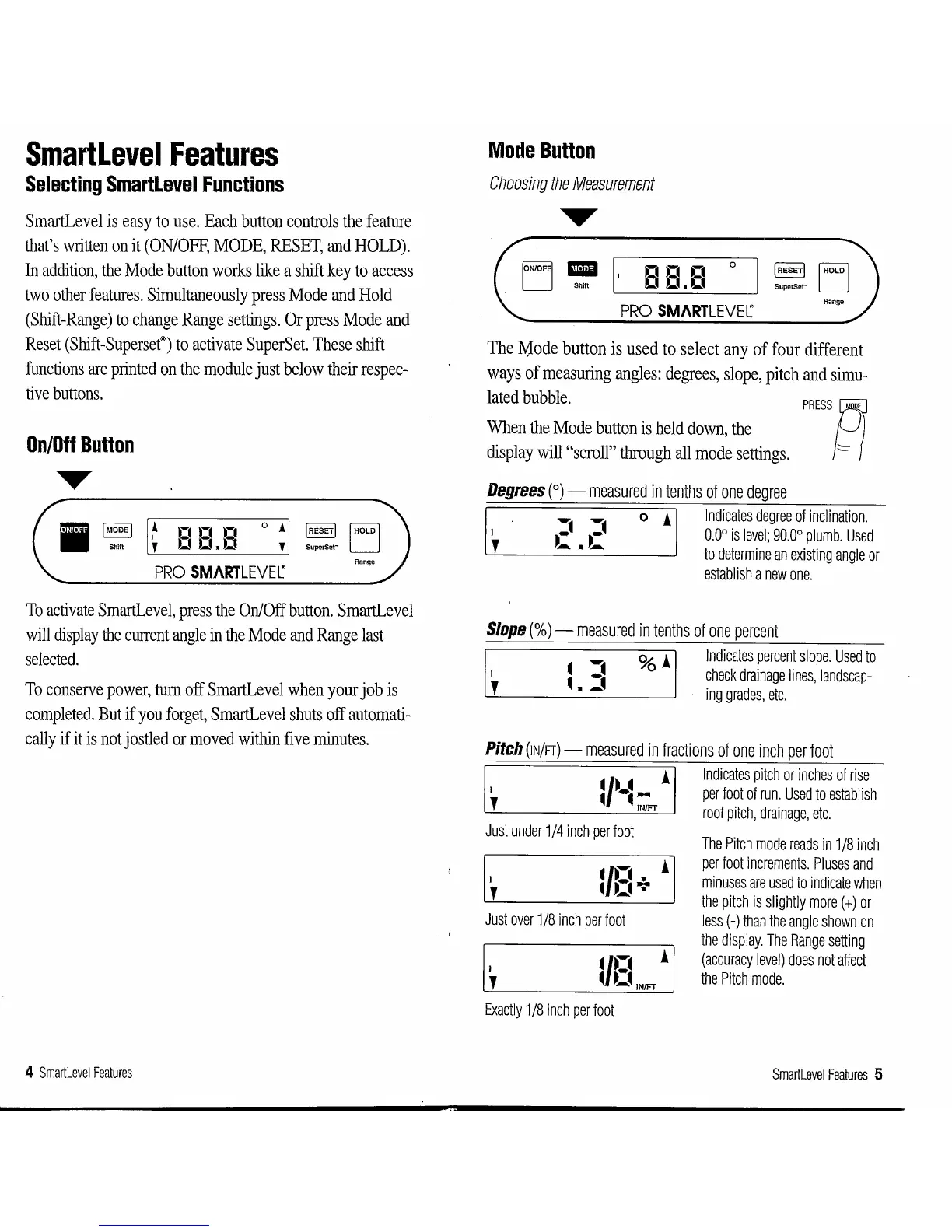
SmartLevel
Features
Selecting
Smartlevel
Functions
SmartLevel
is
easy
to
use.
Each
button
controls
the
feature
that's
written
on
it
(ON/OFF,
MODE,
RESET,
and
HOLD).
In
addition,
the
Mode
button
works
like
a
shift
key
to
access
two
other
features.
Simultaneously
press
Mode
and
Hold
(Shift-Range)
to
change
Range
settings.
Or
press
Mode
and
Reset
(Shift-Superset®)
to
activate
SuperSet.
These
shift
functions
are
printed
on
the
module
just
below
their
respec-
tive
buttons.
On/Off
Button
~
JMooeJ
~
n n n ° i
JRESETI
IHOLDI
Shift f 0 0 0 f
SuperSet-
PRO
SMARTLEVEr
Range
To
activate
SmartLevel,
press
the
On/Off
button.
SmartLevel
will
display
the
current
angle
in
the
Mode
and
Range
last
selected.
To
conserve
power,
turn
off
SmartLevel
when
your
job
is
completed.
But
if
you
forget,
SmartLevel
shuts
off
automati-
cally
if
it
is
not
jostled
or
moved
within
five
minutes.
4
Smartlevel
Features
Mode
Button
Choosing
the
Measurement
Shill
nn
n
00.0
0
I
HOLD
I
PRO
SMARTLEVEr
Range
The
Mode
button
is
used
to
select
any
of
four
different
ways
of
measuring
angles:
degrees,
slope,
pitch
and
simu-
lated
bubble.
PRESS'f/
When
the
Mode
button
is
held
down,
the
=
display
will
"scroll"
through
all
mode
settings.
Degrees
(
0
)-
measured
in
tenths
of
one
degree
Indicates
degree
of
inclination.
0.0°
is
level;
90.0°
plumb.
Used
to
determine
an
existing
angle
or
establish
a
new
one.
Slope(%)-
measured
in
tenths
of
one
percent
Indicates
percent
slope.
Used
to
check
drainage
lines,
landscap-
ing
grades,
etc.
Pitch
(IN/FT)-
measured
in
fractions
of
one
inch
per
foot
I
1 I
Indicates
pitch
or
inches
of
rise
l
~r-~
::r
per
foot
of
run.
Used
to
establish
roof
pitch,
drainage,
etc.
Just
under
1/4
inch
per
foot
I
'
Just
over
1/8
inch
per
foot
I
'
.,..
!
. 0
IN/FT
Exactly
1/8
inch
per
foot
The
Pitch
mode
reads
in
1/8
inch
per
foot
increments.
Pluses
and
minuses
are
used
to
indicate
when
the
pitch
is
slightly
more(+)
or
less
(-)
than
the
angle
shown
on
the
display.
The
Range
setting
(accuracy
level)
does
not
affect
the
Pitch
mode.
Smartlevel
Features
5