EasyManua.ls Logo

Wedge Innovations SmartLevel - Reset and SuperSet Procedures; Reset Procedure; SuperSet Procedure

Default Icon
13 pages
Print Icon
To Next Page IconTo Next Page
To Previous Page IconTo Previous Page
Loading...
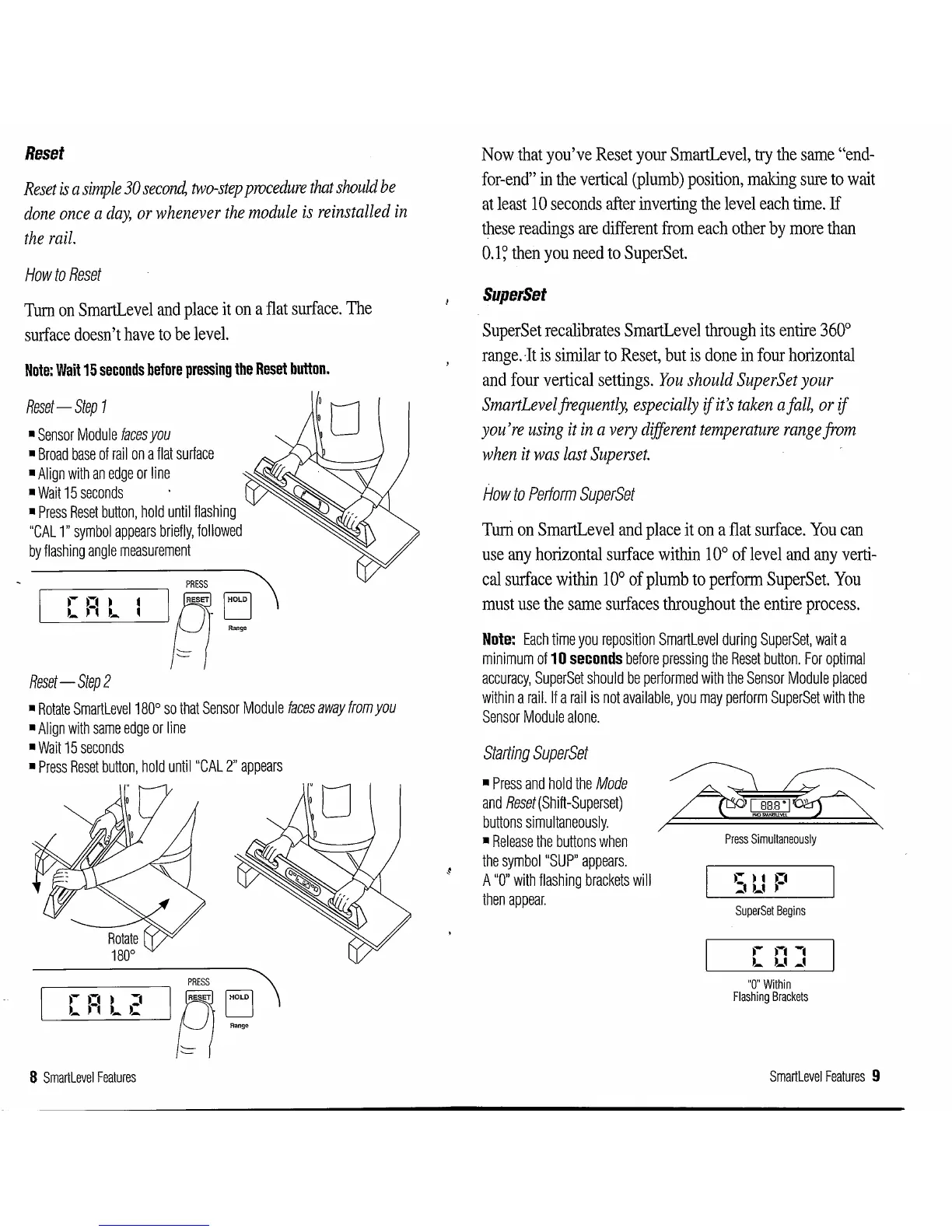
Reset
Reset
is
a
simple
30
secoml
two-step
procedure
that
should
be
done
once
a
day,
or
whenever
the
module
is
reinstalled
in
the
rail.
How
to
Reset
Turn
on
SmartLevel
and
place
it
on
a
flat
surface.
The
surface
doesn't
have
to
be
level.
Note:
Wait
15
seconds
before
pressing
the
Reset
button.
Reset-
Step
1
Sensor
Module
faces
you
Broad
base
of
rail
on
a
flat
surface
Align
with
an
edge
or
line
Wait
15
seconds
Press
Reset
button,
hold
until
flashing
"CAL
1"
symbol
appears
briefly,
followed
by
flashing
angle
measurement
PRESS
~
~A~
Reset-
Step
2
Rotate
Smartlevel180°
so
that
Sensor
Module
faces
away
from
you
Align
with
same
edge
or
line
Wait
15
seconds
Press
Reset
button,
hold
untii"CAL
2"
appears
PRESS
~
L___[~F-~
_:__L_:__-.~2_1
PI
g '
8
Smartlevel
Features
Now
that
you've
Reset
your
SmartLevel,
try
the
same
"end-
for-end"
in
the
vertical
(plumb)
position,
making
sure
to
wait
at
least
10
seconds
after
inverting
the
level
each
time.
If
these
readings
are
different
from
each
other
by
more
than
0.1
~
then
you
need
to
SuperSet.
SuperSet
SuperSet
recalibrates
SmartLevel
through
its
entire
360°
range.
It
is
similar
to
Reset,
but
is
done
in
four
horizontal
and
four
vertical
settings.
You
should
SuperSet
your
SmartLevel
frequently,
especially
if
it's
taken
a
fall,
or
if
you're
using
it
in
a
very
different
temperature
range
from
when
it
was
last
Superset.
flow
to
Perform
SuperSet
Turri
on
SmartLevel
and
place
it
on
a
flat
surface.
You
can
use
any
horizontal
surface
within
10°
of
level
and any
verti-
cal
surface
within
10°
of
plumb
to
perform
SuperSet.
You
must
use
the
same
surfaces
throughout
the
entire
process.
Note:
Each
time
you
reposition
Smartlevel
during
SuperSet,
wait
a
minimum
of
10
seconds
before
pressing
the
Reset
button.
For
optimal
accuracy,
SuperSet
should
be
performed
with
the
Sensor
Module
placed
within
a
rail.
If
a
rail
is
not
available,
you
may
perform
SuperSet
with
the
Sensor
Module
alone.
Starting
SuperSet
Press
and
hold
the
Mode
and
Reset
(Shift-Superset)
buttons
simultaneously.
Release
the
buttons
when
the
symboi"SUP"
appears.
A
"0"
with
flashing
brackets
will
then
appear.
Press
Simultaneously
SuperSet
Begins
"O"Within
Flashing
Brackets
Smartlevel
Features
9