EasyManua.ls Logo

Weego 22 - Page 14

Default Icon
22 pages
Print Icon
To Next Page IconTo Next Page
To Previous Page IconTo Previous Page
Loading...
GETIING
TO
KNOW
WEEGO
22
...•.
··
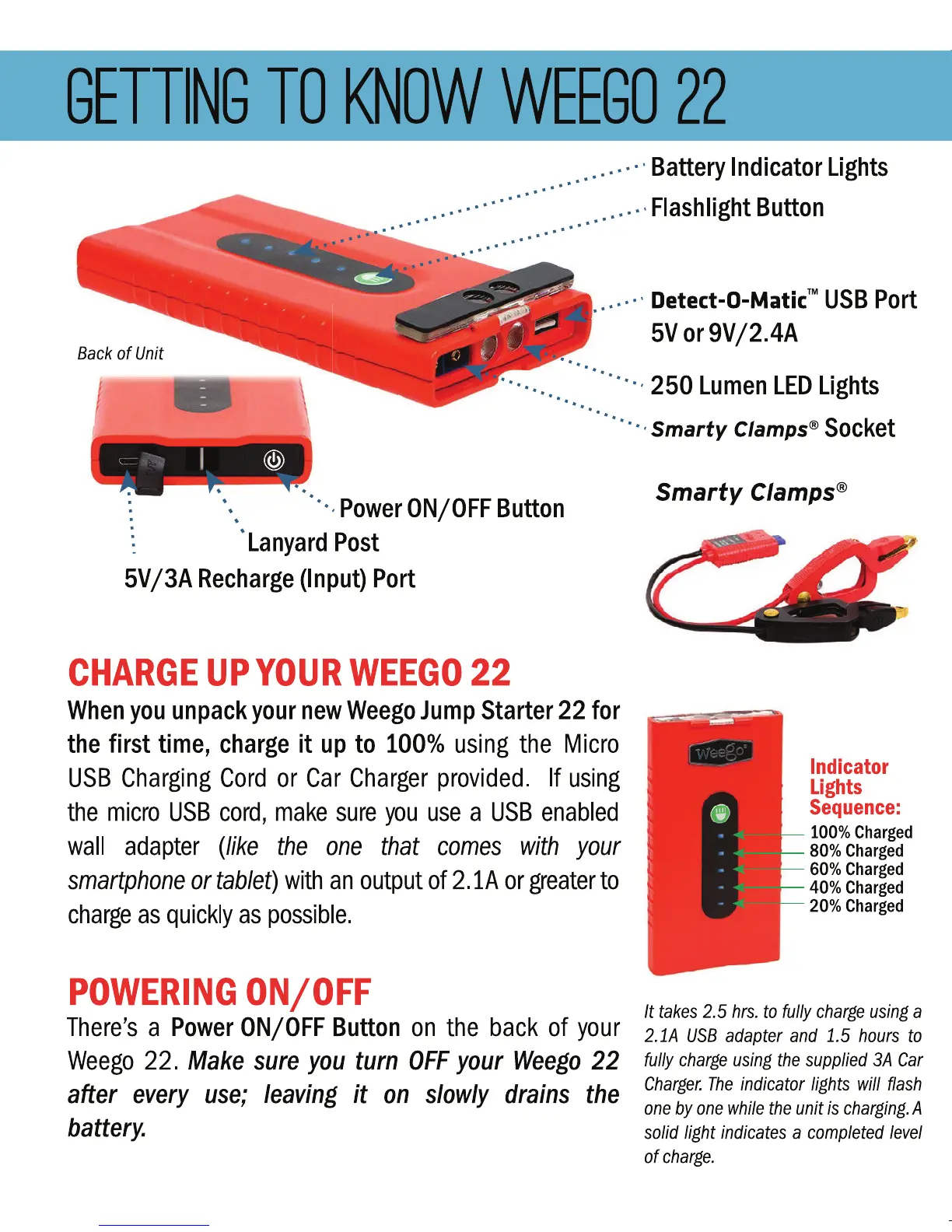
Battery
Indicator
Lights
•.. · · · · · · ·.••• .
.••
·
Flashlight
Button
111.
"'
. . . .
.......
...
Back
of
Unit
. .•• · · ·
Detect-0-MaticlM
USB
Port
5Vor9V/2.4A
· · · · ..... · · · · · · · · · 250
Lumen
LED
Lights
..
••
·······
Smarty
Clamps®
Socket
••
: \ ···
Power
ON/OFF
Button
.
: ·
Lanyard
Post
5V
/3A
Recharge
(Input)
Port
CHARGE
UP
YOUR
WEEGO
22
When
you
unpack
your
new
Weego
Jump
Starter
22
for
the
first
time,
charge
it
up
to
100%
using
the
Micro
USB
Charging
Cord
or
Car
Charger
provided.
If
using
the
micro
USB
cord,
make
sure
}UU
use
a
USB
enabled
wall
adapter
(like
the
one
that
comes
with
your
smartphone
or
tablet)
with
an
output
of
2 .lA
or
greater
to
charge
as
quickly
as
possible.
POWERING
ON/OFF
There's
a
Power
ON/OFF
Button
on
the
back
of
your
Weego
22.
Make
sure
you
turn
OFF
your
Weego
22
after
every
use;
leaving
it
on
slowly
drains
the
battery.
Smarty
Clamps®
Indicator
Lights
Sequence:
100%
Charged
80%Charged
60%Charged
40%Charged
20%Charged
It
takes
2.5
hrs.
to
fully
charge
using
a
2.1A
USB
adapter
and
1.5
hours
to
fully
charge
using
the
supplied
3A
Car
Charger.
The
indicator
lights
will
ffash
one
by
one
while
the
unit
is
charging.
A
solid light
indicates
a
completed
level
of
charge.

Other manuals for Weego 22

Related product manuals