EasyManua.ls Logo

Weider 8225 - Page 6

Weider 8225
25 pages
Print Icon
To Next Page IconTo Next Page
To Previous Page IconTo Previous Page
Loading...
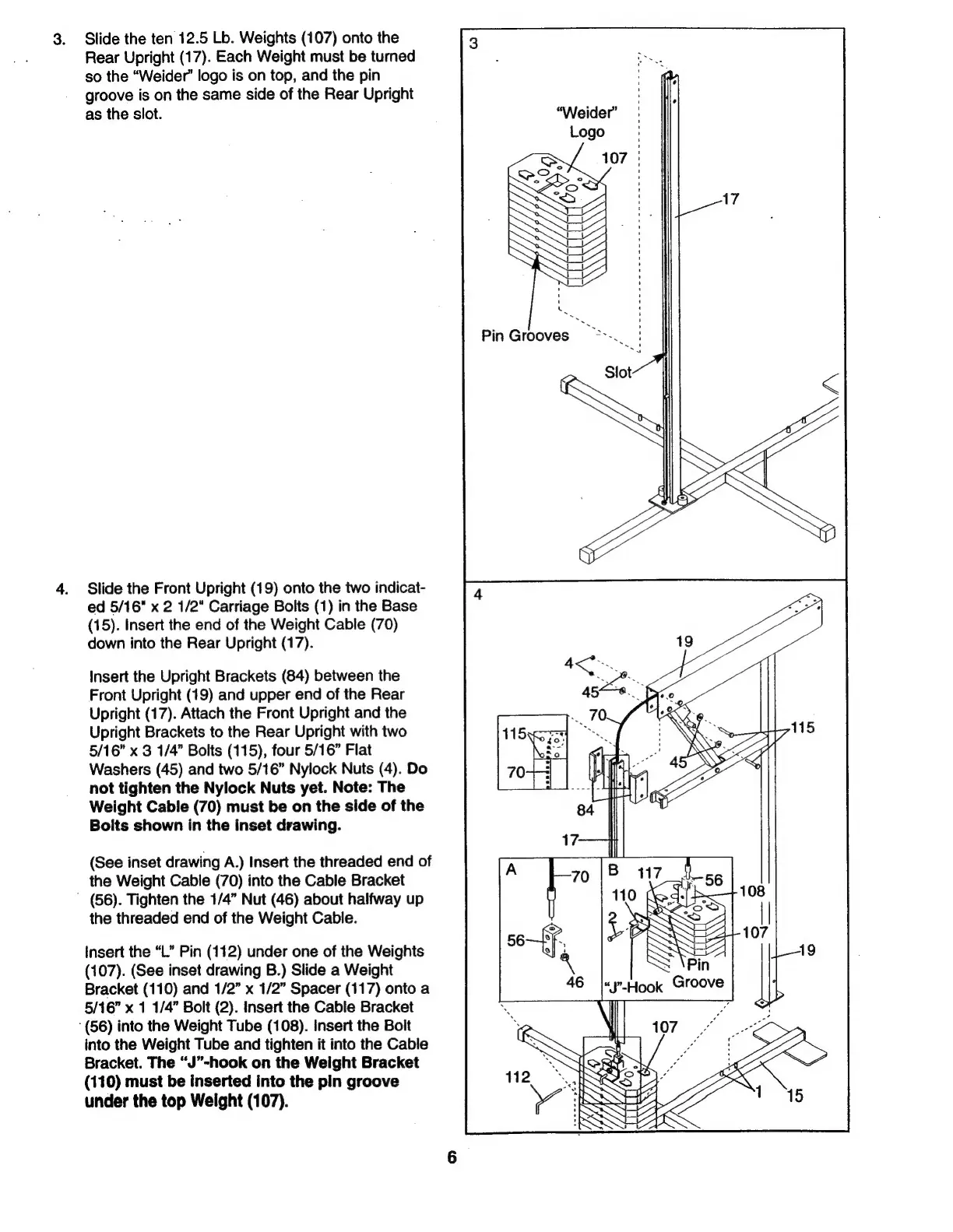
3.
Slide
the
ten
12.5
Lb.
Weights
(107)
onto
the
Rear
Upright
(17).
Each
Weight
must
be
turned
so
the
“Weider”
logo
is
on
top,
and
the
pin
groove
is
on
the
same
side
of
the
Rear
Upright
as
the
slot.
4.
Slide
the
Front
Upright
(19)
onto
the
two
indicat-
ed
5/16"
x
2
1/2"
Carriage
Bolts
(1)
in
the
Base
(15).
Insert
the
end
of
the
Weight
Cable
(70)
down
into
the
Rear
Upright
(17).
Insert
the
Upright
Brackets
(84)
between
the
Front
Upright
(19)
and
upper
end
of
the
Rear
Upright
(17).
Attach
the
Front
Upright
and
the
Upright
Brackets
to
the
Rear
Upright
with
two
5/16”
x
3
1/4”
Bolts
(115),
four
5/16”
Flat
Washers
(45)
and
two
5/16”
Nylock
Nuts
(4).
Do
not
tighten
the
Nylock
Nuts
yet.
Note:
The
Weight
Cable
(70)
must
be
on
the
side
of
the
Bolts
shown
in
the
inset
drawing.
(See
inset
drawing
A.)
Insert
the
threaded
end
of
the
Weight
Cable
(70)
into
the
Cable
Bracket
(56).
Tighten
the
1/4”
Nut
(46)
about
halfway
ир
the
threaded
end
of
the
Weight
Cable.
insert
the
“L”
Pin
(112)
under
one
of
the
Weights
(107).
(See
inset
drawing
B.)
Slide
a
Weight
Bracket
(110)
and
1/2”
x
1/2”
Spacer
(117)
onto
a
5/16”
x
1
1/4”
Bolt
(2).
Insert
the
Cable
Bracket
“(56)
into
the
Weight
Tube
(108).
insert
the
Bolt
into
the
Weight
Tube
and
tighten
it
into
the
Cable
Bracket.
The
“J”-hook
on
the
Weight
Bracket
(110)
must
be
inserted
into
the
pin
groove
under
the
top
Weight
(107).

Related product manuals