14
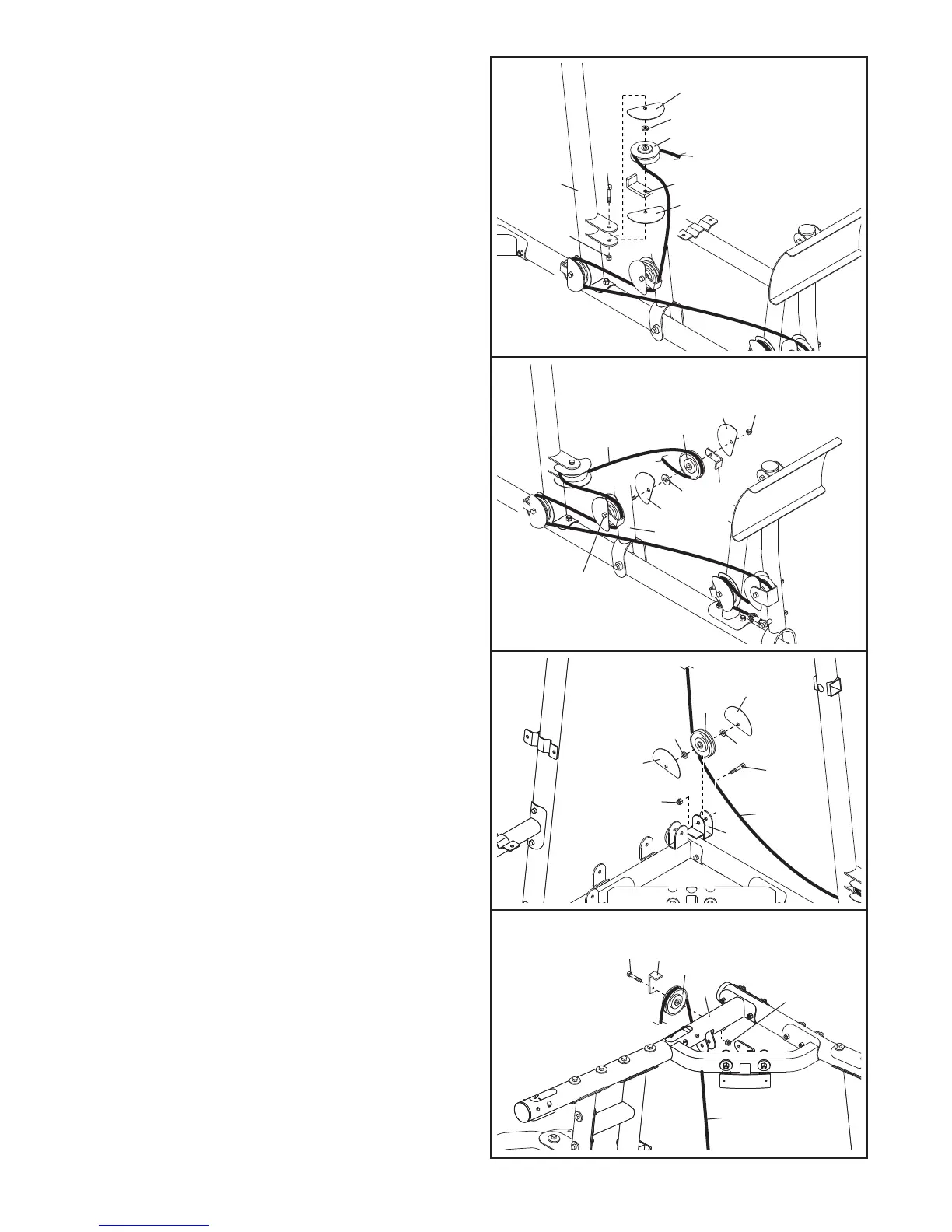
27. Wrap the Press Cable (109) around a “V”-pulley
(62). Attach the “V”-pulley, two Half Finger Guards
(
66), a Large Cable Trap (111), and an M10
Washer (99) inside the bracket on the Left
U
pright (26) with an M10 x 65mm Bolt (77) and
an M10 Nylon Locknut (90). Make sure the
Cable Trap and Finger Guards are oriented as
shown.
29. Wrap the Press Cable (109) under a 90mm
Pulley (63). Attach the Pulley, two M10 Washers
(99), and two Half Finger Guards (66) inside the
bracket on the Left Base (25) with an M10 x
48mm Bolt (64) and an M10 Nylon Locknut (90).
Make sure the Finger Guards are oriented as
shown.
30. Wrap the Press Cable (109) over a 90mm Pulley
(63).
Attach the Pulley and a Cable
T
rap (68) to
the Right Top Frame (5) with an M10 x 43mm
Bolt (80) and an M10 Nylon Locknut (90). Make
sure the Cable T
rap is oriented to hold the
Cable in the groove of the Pulley
.
28. Wrap the Press Cable (109) around a 90mm
Pulley (63). Attach the Pulley, two Half Finger
Guards (66), a Cable Trap (68), and an M10
Washer (99) to the Press Frame (29) with the
M10 x 134mm Bolt (70) used in step 26 and an
M10 Nylon Locknut (90). Make sure the Cable
Trap and Finger Guards are oriented as
shown.
27
28
29
30
66
99
6
2
6
6
90
2
6
109
111
77
63
99
68
90
66
29
66
70
109
64
66
109
66
99
99
90
25
63
109
63
5
68
80
90







 To Next Page