11
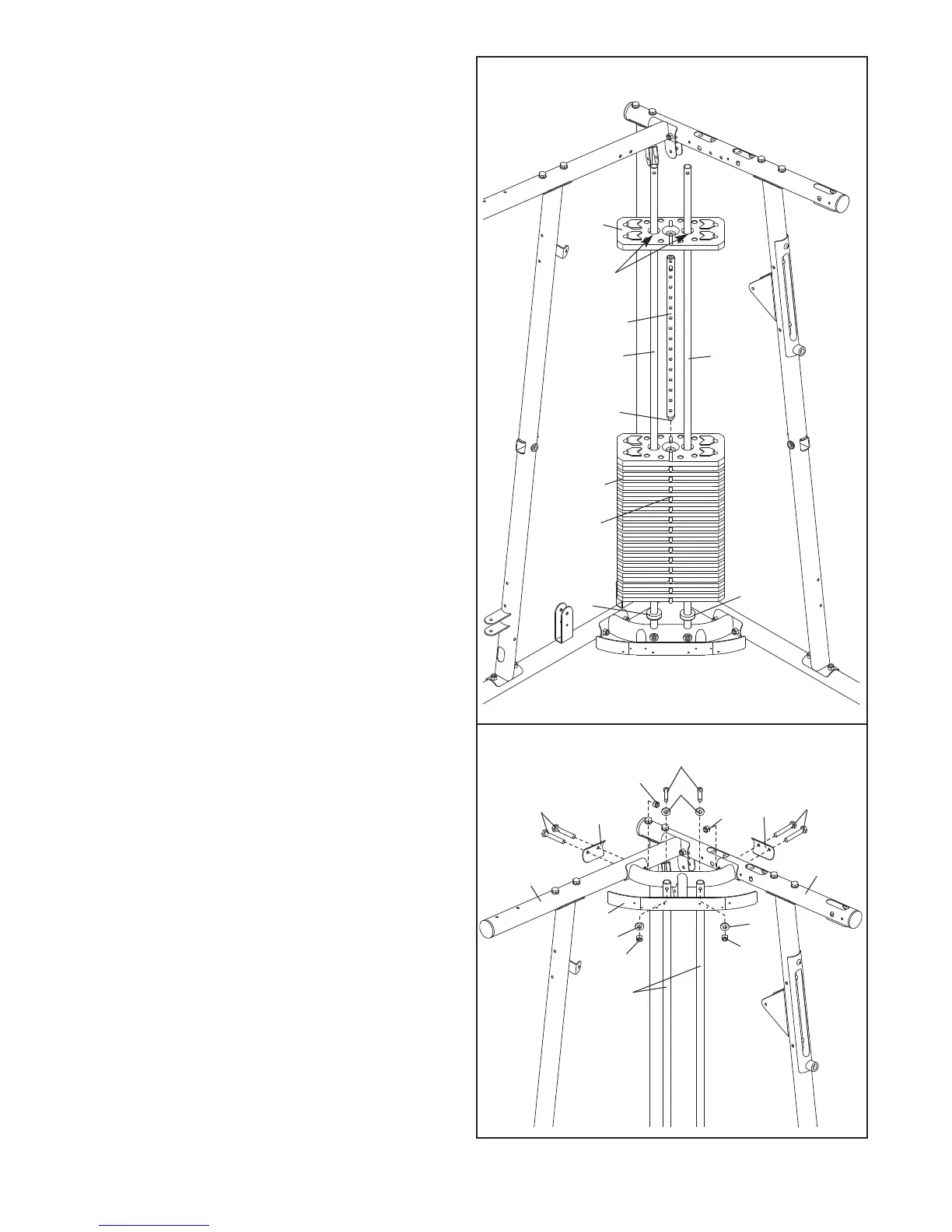
10. Slide the two Weight Bumpers (71) onto the
Weight Guides (18). Orient fourteen Weights
(
19) with the pin holes on the bottom as shown.
Slide the Weights onto the Weight Guides.
Insert the Weight Tube Cap (76) into the Weight
Tube (20). Insert the Weight Tube into the four-
teen Weights (19).
Make sure the pin on the
Weight Tube is oriented as shown.
Lubricate the indicated holes in a Weight (19)
with the included grease packet. Slide the
Weight onto the Weight Guides (18).
11. Attach the Top Center Frame (148) to the Right
and Left Top Frames (4, 126) with four M10 x
82mm Bolts (84), two Top Frame Plates (137),
and two M10 Nylon Locknuts (77).
Do not tight-
en the Nylon Locknuts yet.
Attach the Weight Guides (18) to the Top Center
Frame (148) with two M10 x 90mm Bolts (81),
four M10 Washers (80), and two M10 Nylon
Locknuts (77).
Do not tighten the Nylon
Locknuts yet.
10
19
20
18
18
Grease
Pin Hole
76
19
71
11
148
77
77
77
77
18
80
80
81
84
84
80
126
137
137
4
71











 To Next Page