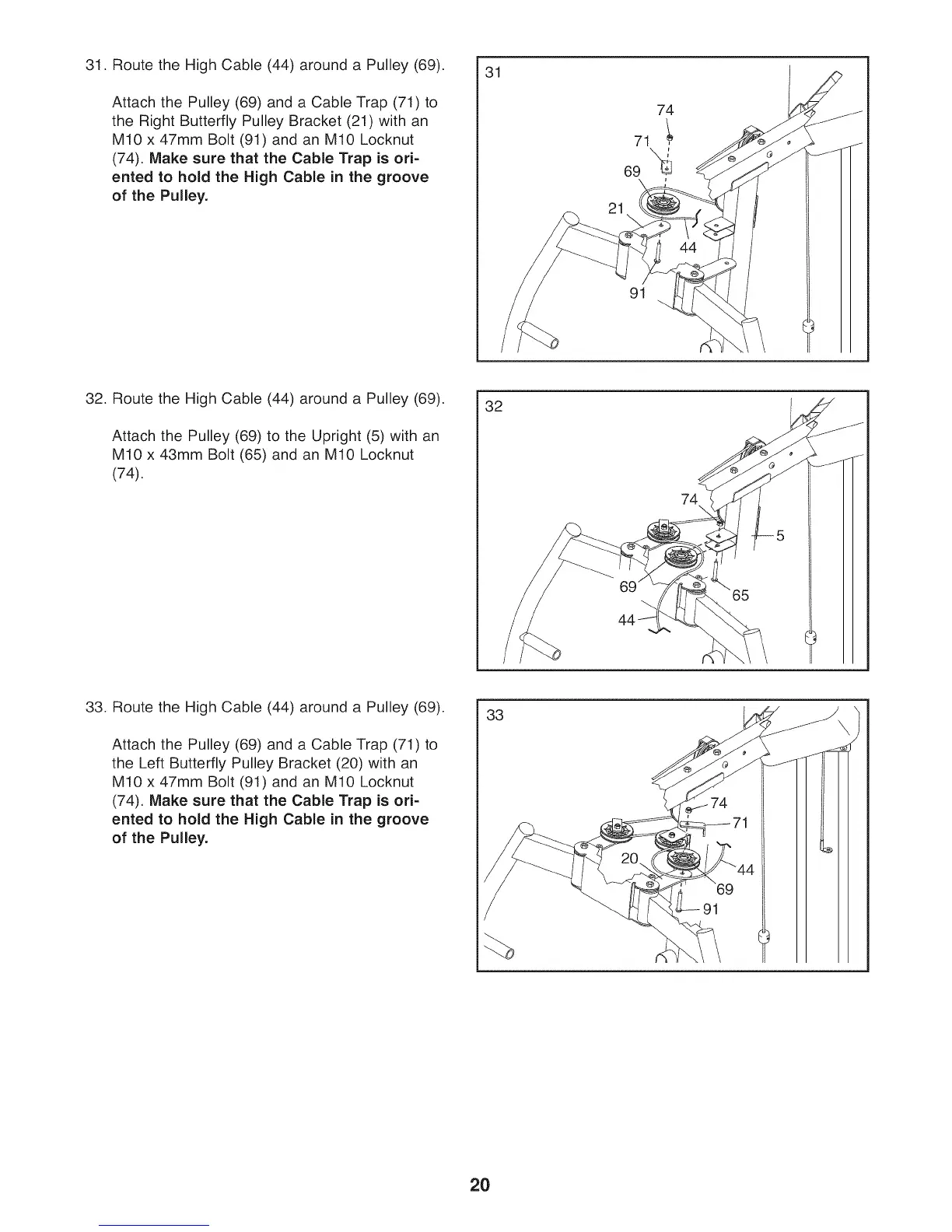
31. Route the High Cable (44) around a Pulley (69).
Attach the Pulley (69) and a Cable Trap (71) to
the Right Butterfly Pulley Bracket (21) with an
M10 x 47mm Bolt (91) and an M10 Locknut
(74). Make sure that the Cable Trap is ori-
ented to hold the High Cable in the groove
of the Pulley.
31
21
74
71 ,_
69
91
32. Route the High Cable (44) around a Pulley (69).
Attach the Pulley (69) to the Upright (5) with an
M10 x 43mm Bolt (65) and an M10 Locknut
(74).
32
74
\
33. Route the High Cable (44) around a Pulley (69).
Attach the Pulley (69) and a Cable Trap (71) to
the Left Butterfly Pulley Bracket (20) with an
M10 x 47mm Bolt (91) and an M10 Locknut
(74). Make sure that the Cable Trap is ori-
ented to hold the High Cable in the groove
of the Pulley.
33
20



 To Next Page