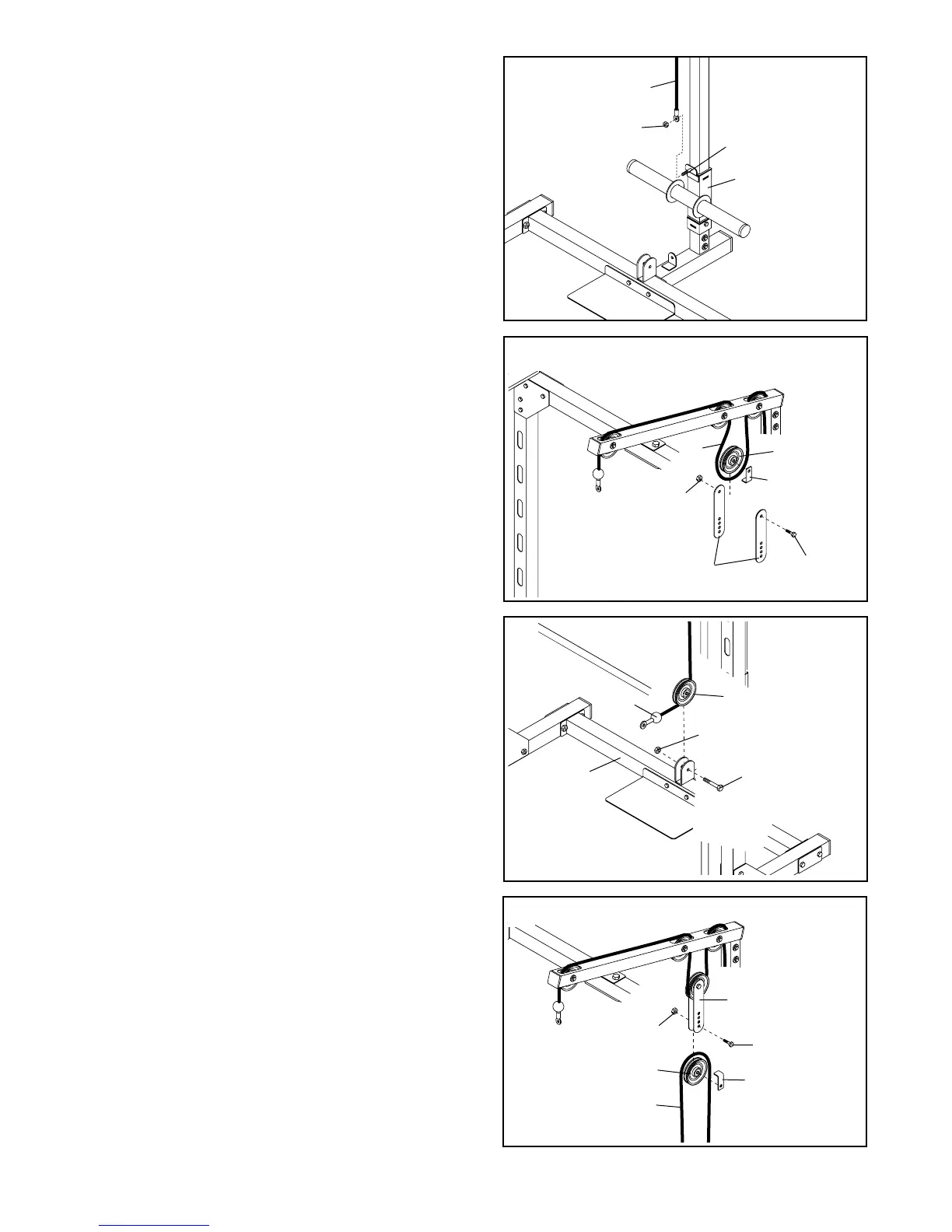
17. Slide the indicated end of the High Cable (13) onto
the M10 x 20mm Bolt (26) in the Weight Carriage
(22). Tighten an M10 Nylon Locknut (11) onto the
Bolt.
18. Route the High Cable (13) around a Pulley (5) as
shown. Hold a Cable Trap (21) against the Pulley
and attach a Pulley Plate (19) to each side of the
Pulley using an M10 x 45mm Bolt (40) and an M10
Nylon Locknut (11). Make sure the Cable Trap
holds the High Cable in the groove of the Pulley.
Do not overtighten the Nylon Locknut; the
Pulley must be able to turn freely.
19. Route the indicated end of the Low Cable (8)
around a Pulley (5). Attach the Pulley to the bracket
on the Base Crossbar (20) using an M10 x 45mm
Bolt (40) and an M10 Nylon Locknut (11). Do not
overtighten the Nylon Locknut; the Pulley must
be able to turn freely.
20. Route the Low Cable (8) around a Pulley (5) as
shown. Hold a Cable Trap (21) against the Pulley
and attach the Pulley and Cable Trap to the lowest
holes in the two Pulley Plates (19) using an M10 x
45mm Bolt (40) and an M10 Nylon Locknut (11).
Make sure the Cable Trap holds the Low Cable in
the groove of the Pulley. Do not overtighten the
Nylon Locknut; the Pulley must be able to turn
freely.
11
5
21
40
11
19
40
20
8
11
5
13
20
19
40
21
8
5
11
18
19
11
22
26
13
17




 To Next Page