©2020 Spectrum Brands, Inc.
66451 Rev 01
4 / 14
Technical Support
1-800-501-9471
www.weiserlock.com
Batteries
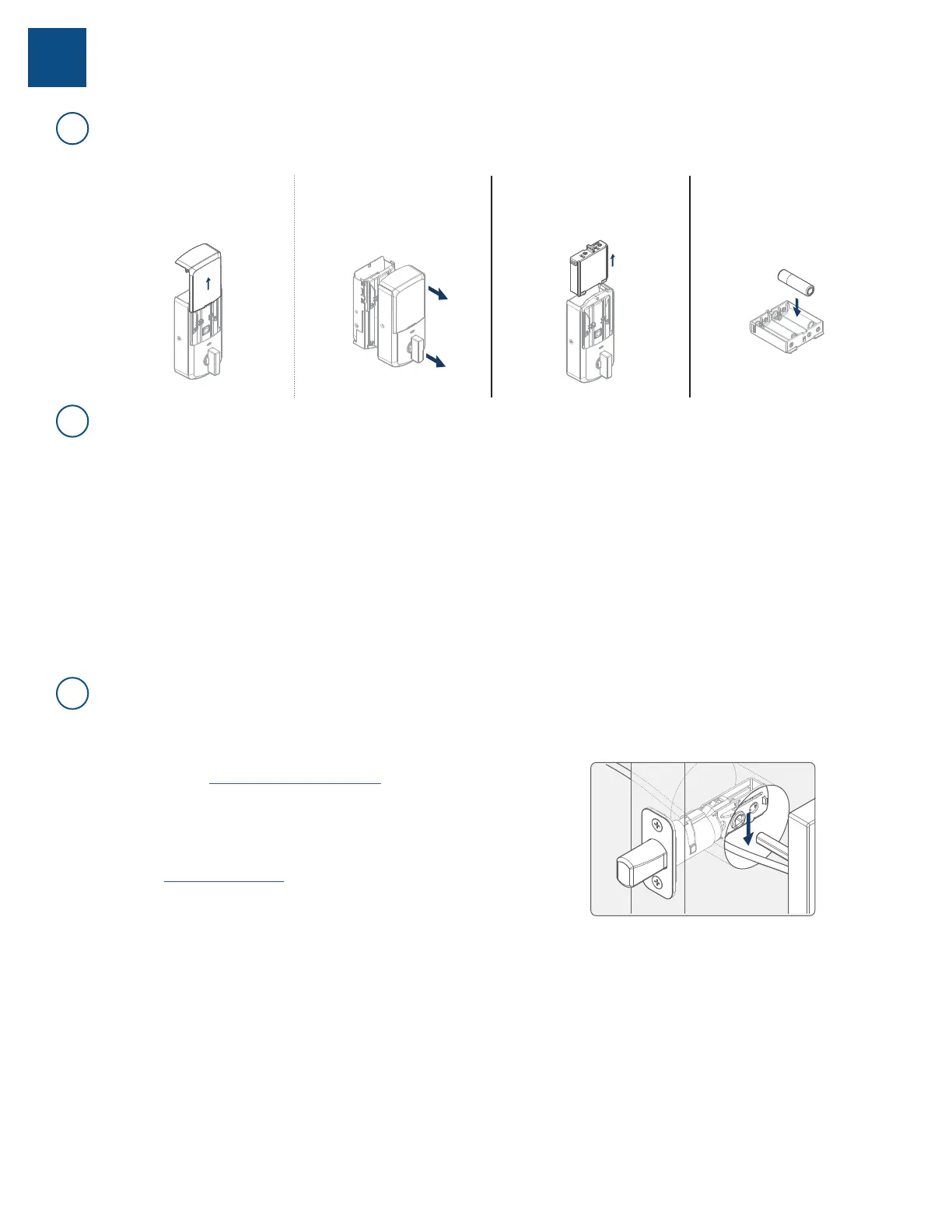
Complete the following steps:
1. If the security screw is not
installed, slide the interior
cover window up.
If the security screw is
installed, remove the entire
interior cover.
2. Remove the battery pack.
3. Replace the batteries.
A1: For Aura and Halo Keypad, the keypad ashes red with fast beeping sound for three to four
seconds after a motorized operation, such as locking or unlocking with an access code.
For Halo Touchscreen, the checkmark and lock symbols ash simultaneously ve times with
ve beeps after a motorized operation, such as locking or unlocking with an access code.
For Halo Touch, the exterior LED ashes red and beeps after a motorized operation, such as locking
or unlocking with a ngerprint.
A2: A battery level indicator is also available in the Weiser app, along with a
notication when the battery level is low. In addition, the interior status LED will
blink red.
A1: Check that the Weiser app is updated to the latest version and that your lock’s
rmware does not need to be updated.
A2: Check that the door is properly aligned. For helpful tips on getting the door to
align, refer to the Warped Door Installation Guide. Resistance to both
locking and unlocking because of door misalignment will reduce both motor
and battery life.
A3: Check that the lock is properly installed, and the cable is routed and
stored correctly (Fig. 3).
A4: Perform Manual Door Handing to make sure that the lock knows the correct
direction for locking and unlocking.
A5: Make sure that the lock has a strong Wi-Fi connection with the router. For
better Wi-Fi coverage within the home, please investigate using a mesh
Wi-Fi network where several endpoints are deployed to provide the best
Wi-Fi coverage.
A6: Call our support center at 1-800-501-9471 for additional help and product
replacement if needed.
3
A
B
C
How do I replace the (4) AA batteries?
How can I tell if the batteries need to be replaced?
What can I do if I frequently need to replace batteries?
Fig. 3



 To Next Page