7
9.Continued.......
a. Presstheprogrambutton on the interior unit twice.
b. Enter
in4to8digitcodeontothekeypad.
c.Pressthe“LOCK”buttontosavecode.
d.
Note: Programming instructions can also be found on interior of lock.
Programmingthe2ndusercode.
Extendtheboltbypressingthe“LOCK”buttonandre-enterthecode
totest.Theboltshouldretracttotheunlockedposition.Ifitdoesnot
unlock,repeatsteps(a)through(c).
10.SmartCodeUserSelectableSettings.
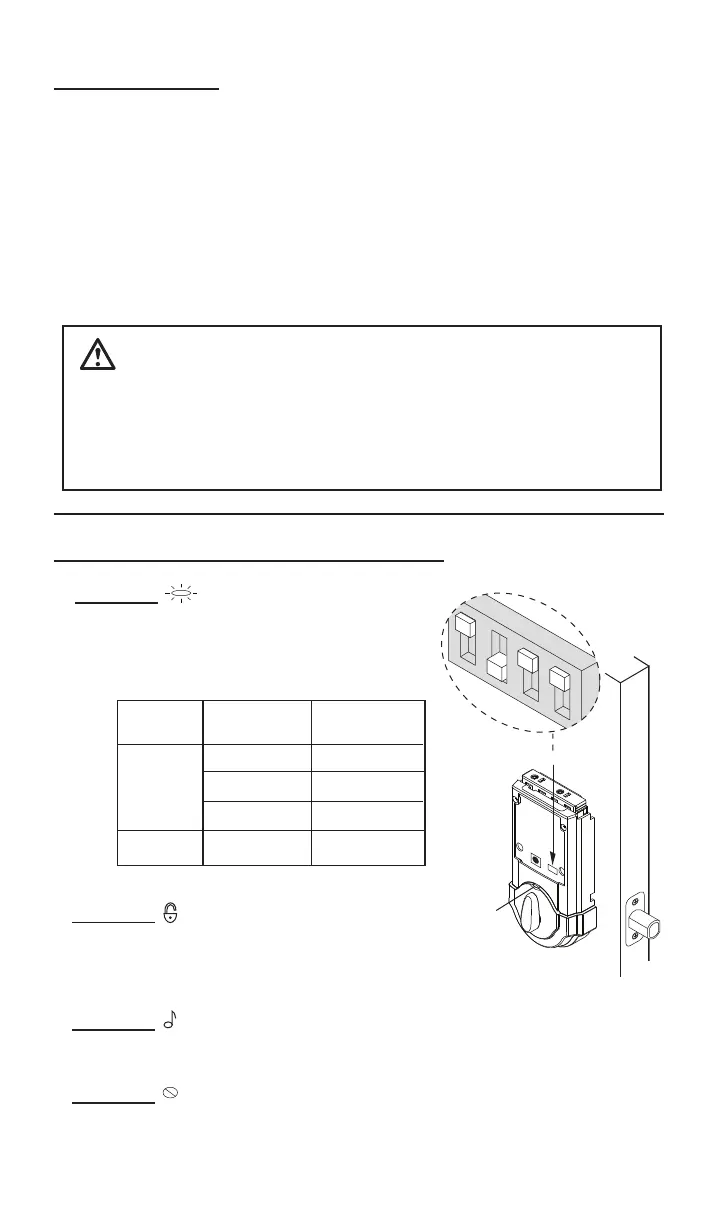
Switch #2 EnablestheAUTOLOCKwhen
intheONposition.WithAutoLockenabled,
SmartCode will automatically relock the door
(extendthebolt)30secondsafterunlocking.
LED
Switch #1 StatusLEDblinksevery
5secondswhenintheONposition.Note:
The low battery RED LED cannot be
disabled.
Switch
Position
OFF
ON
LED
Color
Green
Orange
Red
Unlocked
Locked
Low Battery
Lock
Status
Red
Low Battery
Hint: for easier access, use a ball point pen to operate the switches.
Switch #4 ExtraswitchwithNOFUNCTION.
Switch #3 EnablestheAUDIOsound(Beeper)whenintheON
position.Keypadwillnowlightred/greenwhenbuttonsarepressed.
CAUTION:Preventunauthorizedentry.Thislockcanbeopened
usingtwodifferentcodesthatarerandomlysetatthefactory.Uponin-
stallationandset-up,replacebothofthesecodeswithyourown.Since
anyonewithaccesstothepowerboardcanchangethesecodes,you
mustrestrictaccesstothepowerboardandroutinelycheckbothcodes
toassuretheyhavenotbeenalteredwithoutyourknowledge.


 To Next Page