28
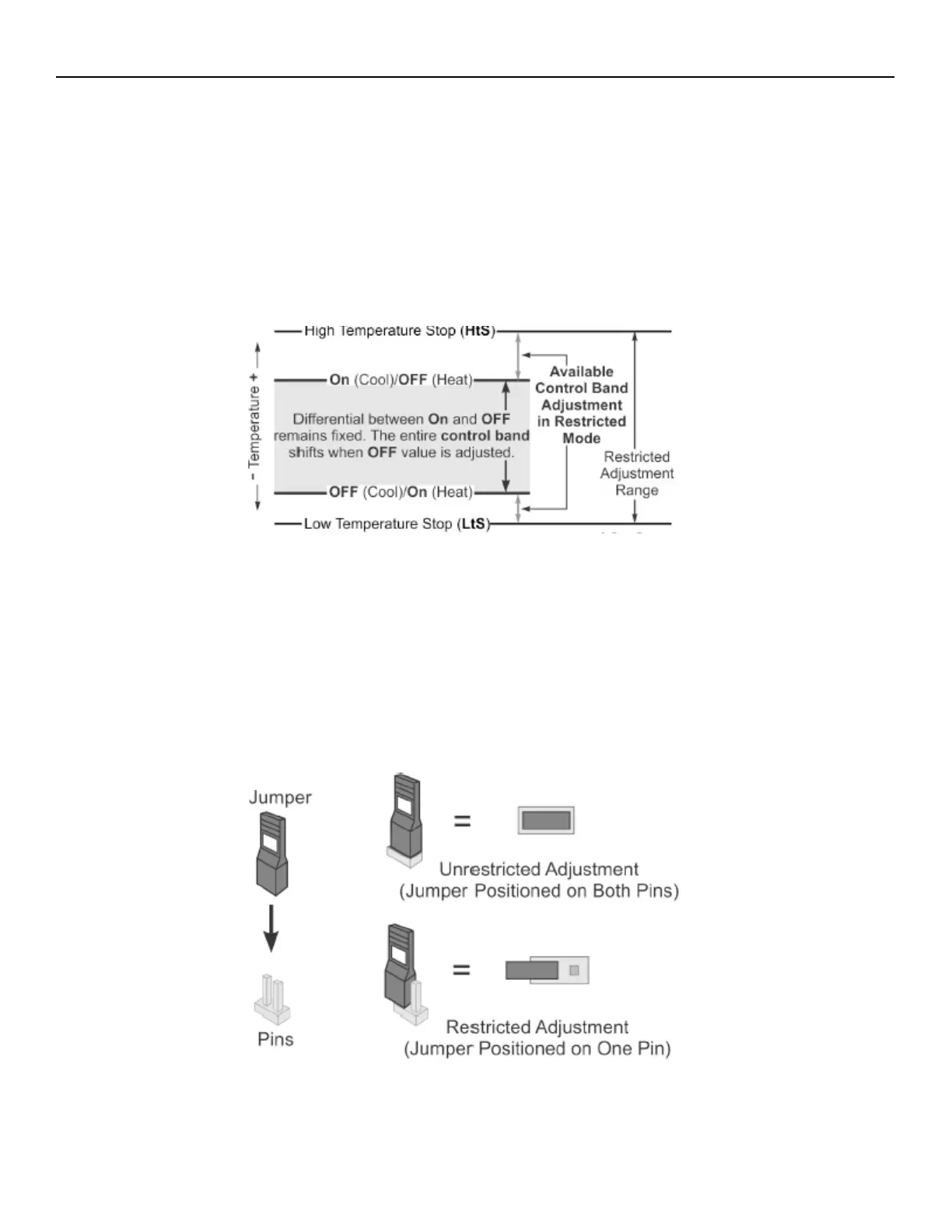
• When the A421 Control is set up in the restricted adjustment mode, the controller enforces the following behavior:
1. The selected HtS and LtS values define the restricted temperature adjustment range.
2. The On and OFF values define the control band differential, and the control band between On and OFF remains
fixed and not adjustable.
3. Only the OFF value can be adjusted, the control band remains fixed, and the On value automatically shifts equal
to the OFF value adjustment.
4. The OFF value can only be adjusted to values that maintain the entire control band within the restricted
temperature adjustment range defined by HtS and LtS.
5. The basic and advanced menus are not available. Only the Restricted Adjustment mode menu is available and
only the OFF value can be adjusted.
Setting the control to Restricted Adjustment mode
• To set up the restricted adjustment feature, complete the following steps:
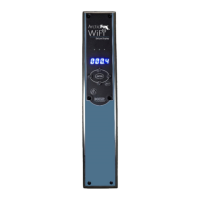
1. To make sure that the A421 is not in restricted mode, position the jumper on both pins.
2. Select the OFF and On values that define the application’s required control band.
3. Change the HtS and LtS temperature values to define the restricted adjustment range.
4. Disconnect power to the control and reposition the jumper to one pin. Reconnect power.
• Control adjustment is now restricted to changing only the OFF value, which shifts the On and OFF control band within
the restricted adjustment range defined by HtS and LtS.


 To Next Page