23
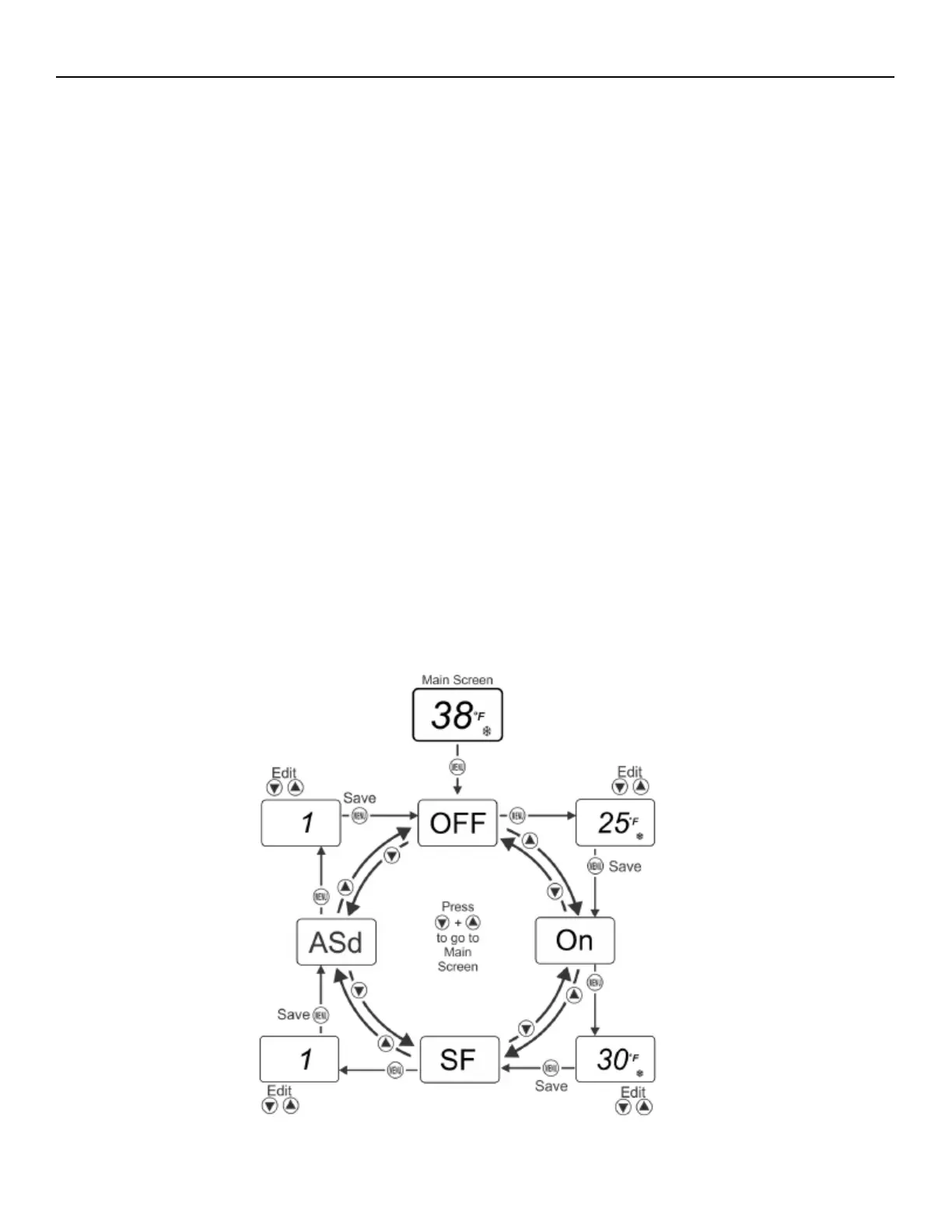
Navigating the Basic and Advanced menus
• The A421 Control buttons and display operate the same way in Basic and Advanced menus. You can observe the
following behavior in any parameter code screen: The parameter code flashes on and off.
• To navigate through all of the parameter code screens, press Down or Up.
• To exit either menu and return to the Main screen, press Down and Up simultaneously.
• You can perform the following actions in any parameter code screen:
• The parameter value flashes on and off.
• To scroll through all of the available parameter values for the associated parameter code, press Down or Up.
• With the preferred parameter value displayed, press MENU to save the value and go to the next parameter code
screen.
Note: If you do not press MENU to save a new value, the control reverts to the last saved value. After 30 seconds of inactivity
while in any screen, the control reverts to the Main screen.
Basic menu
• Use the Basic menu to quickly edit the On and OFF temperature values, as well as the Sensor Failure Mode (SF) and
the Anti-Short Cycle Delay (ASd) value.
• See Parameter codes and modes of operation for more information about parameter codes, usable parameter values,
and default values.


 To Next Page