Weldmatic 215Operators Manual
Model No. CP111-0, Iss A 02/05 7
Quality, Reliability, Performance
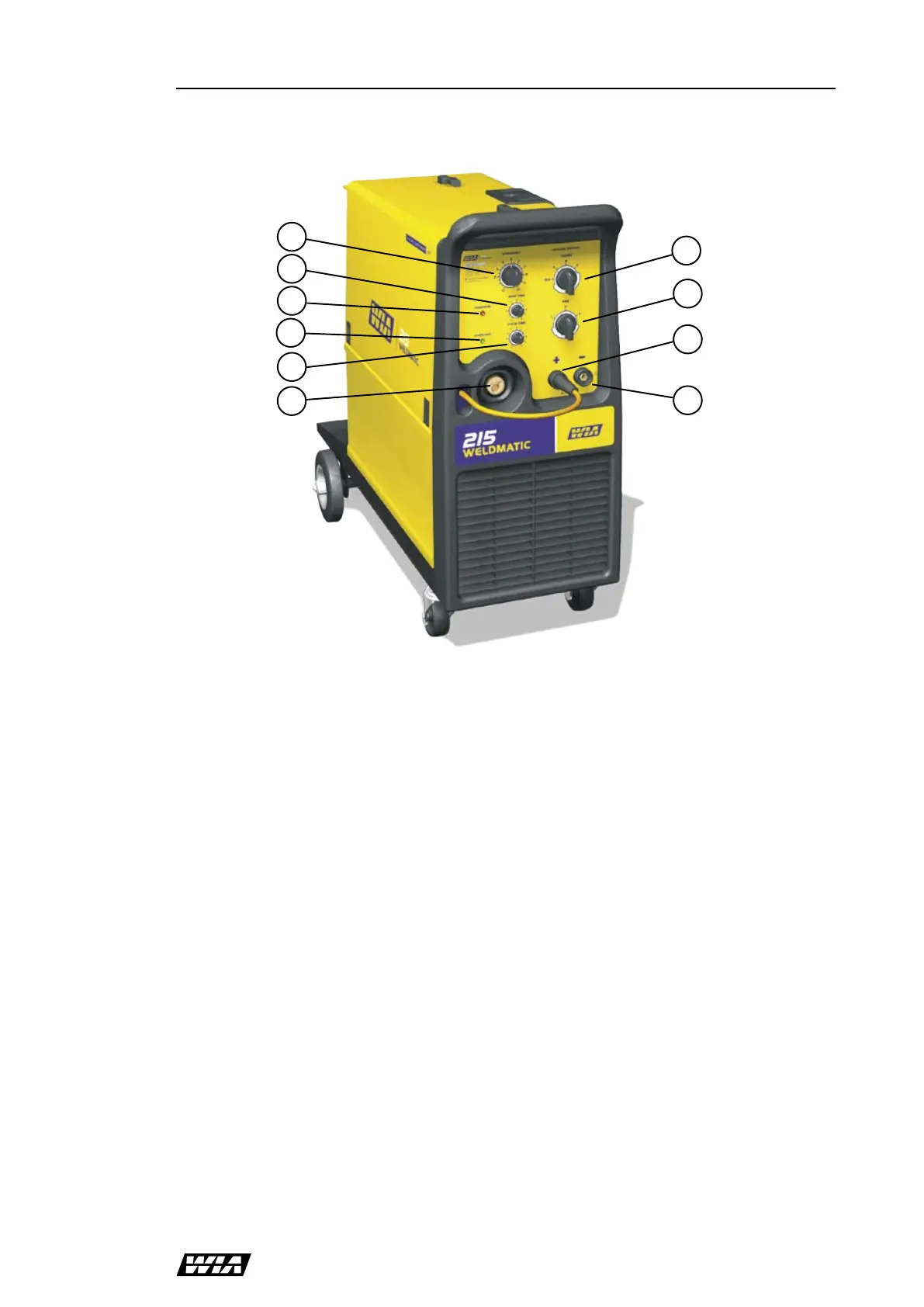
Fig 1 Power Source Controls
Fig 1 Power Source Controls
6
7
9
8
2
1
5
4
3
4 Controls
1 Wire Speed Control
This control provides adjustment of the
wirefeed speed. Rotating the dial in a clockwise
direction will increase the wirefeed speed,
thereby increasing the welding current.
2 Spot Time Control
When operating in Spot Weld mode, this
control will vary the spot weld time. Rotating
the dial in a clockwise direction will increase
the spot weld time, in the range 0.4 – 3.0
seconds. If the Spot Weld mode is not required
this feature may be turned off by rotating the
control anti-clockwise until it ‘clicks’ into the
minimum position.
3 Power On Indicator
This is illuminated when electrical mains power
is connected to the welding power source.
4 Overload Indicator
This is illuminated when the welding load
exceeds the equipment’s operating duty cycle.
In this event the equipment will cease to deliver
welding current until it has cooled sufficiently.
The over-temperature thermostats will reset
automatically - do not switch the equipment off
as the cooling fan will assist the resetting of the
thermostats.
5 Interval Control
When operating in Cycle Arc mode this control
sets the period between welds. The spot time
control sets the welding period. Rotating the
dial in a clockwise direction will increase the
interval time, in the range 0.4 – 1.8 seconds. If
the Cycle Arc mode is not required this feature
may be turned off by rotating both controls
fully anti-clockwise.
6 Coarse Voltage Control
This switch provides mains power ON/OFF
and Coarse adjustment of the output welding
voltage over three ranges.
7 Fine Voltage Control
This switch provides Fine adjustment of the
output welding voltage over three ranges.
8 Positive Welding Output Terminal
9 Negative Welding Output Terminal
10 Euro Gun/Cable Connector
10


 To Next Page