Cod.006.0001.1440
03/06/2013 v2.2
ENGLISH
8/28
5 USER INTERFACE
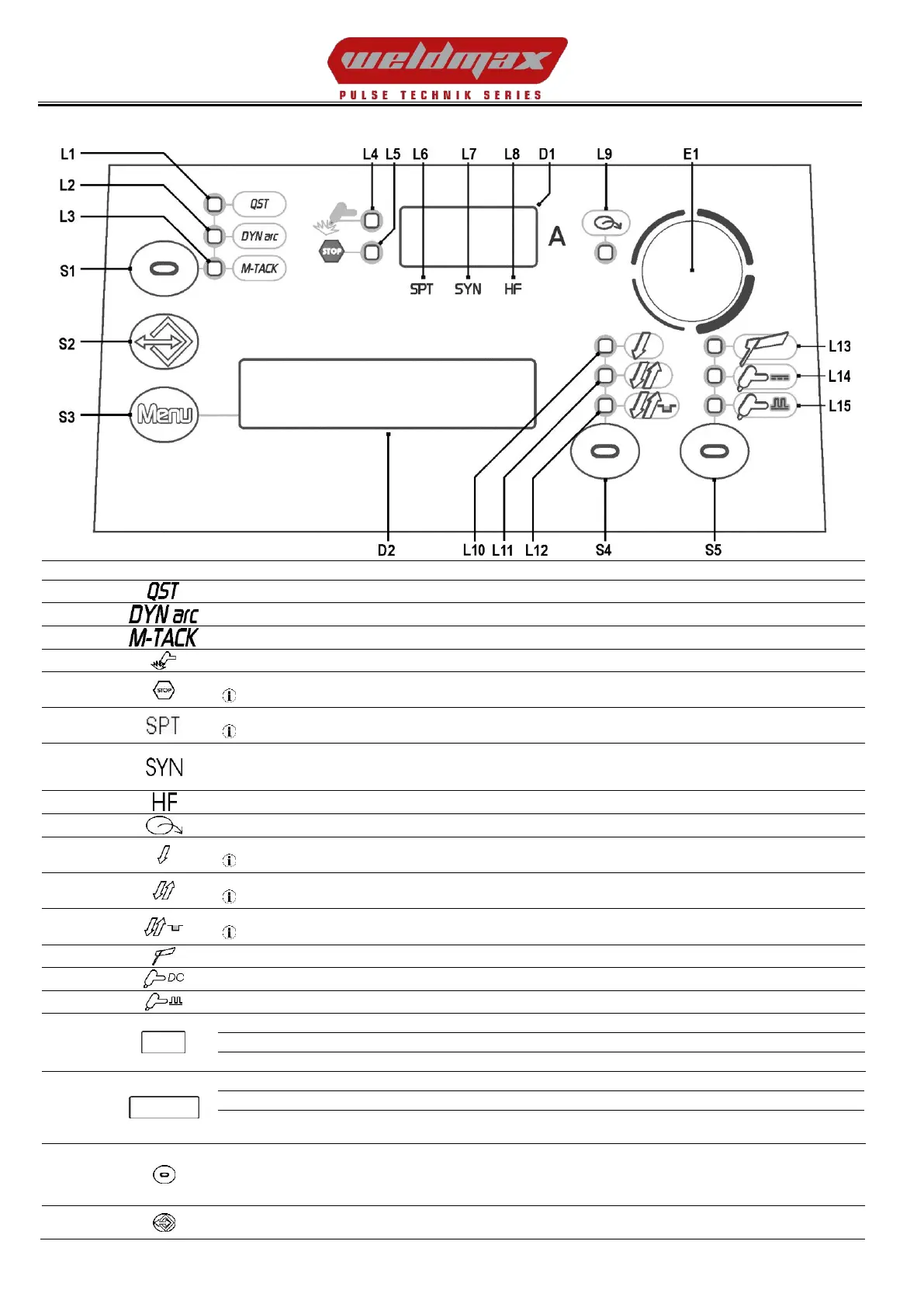
Illumination shows that the following function has been activated: Q-START
Illumination shows that the following function has been activated: DYNAMIC ARC
Illumination shows that the following function has been activated: MULTI TACK
This LED illuminates to confirm the presence of power on the output sockets.
This LED illuminates to show an anomaly in the operating conditions.
See “ALARMS MANAGEMENT”(§ 9 page 12).
Illumination shows that the following function has been activated: 2 times Spot procedure
§ 13.7 page 22 / § 13.8 page 22
When this LED illuminates the following parameter can be set: TIG SYNERGIC PULSE
When this is on, it means that the synergic mode is active and that the operator can set just the welding current while the other parameters are
automatically regulated by the machine. The synergy is optimised by angle welding.
Illumination shows that the following function has been activated: High frequency arc strike (HF)
This LED indicates that the current reference setting is imposed by the remote controller.
Illumination shows that the following function has been activated: 2 times procedure
§ 13.1 page 20 / § 13.2 page 20
Illumination shows that the following function has been activated: 4 times procedure
§ 13.3 page 20 / § 13.4 page 21
Illumination shows that the following function has been activated: 4 times Bi-level procedure
§ 13.5 page 21 / § 13.6 page 21
This LED illuminates to show that the following welding mode is selected: MMA
This LED illuminates to show that the following welding mode is selected: TIG CONTINUOUS
This LED illuminates to show that the following welding mode is selected: TIG PULSED
Parameters/functions setting: 1st level menu: The displays show the value of the following parameter: WELDING CURRENT
Parameters/functions setting: 2nd level menu: The displays show “L.2“.
Welding: The displays show the value of the following parameter: WELDING CURRENT
Parameters/functions setting: The displays show the selected parameter and its value.
Welding: The displays show the average instantaneous voltage value.
HOLD function: The displays show the average voltage value of the last weld executed.
The "HOLD" value is cleared when a new weld is started, or when any action is performed on the user interface.
DC TIG mode: Press the button to select the parameter to be set. Possible choices:
- Q-START
- DYNAMIC ARC
- MULTI-TACK
Press the button once to open the JOB upload menu.
Hold down the button for 3 seconds to gain access to the JOB save/delete menu.


 To Next Page