CONTROL YOUR IN.MIX 300
This menu is only available if an in.mix 300 is detected
in your hot tub accessories
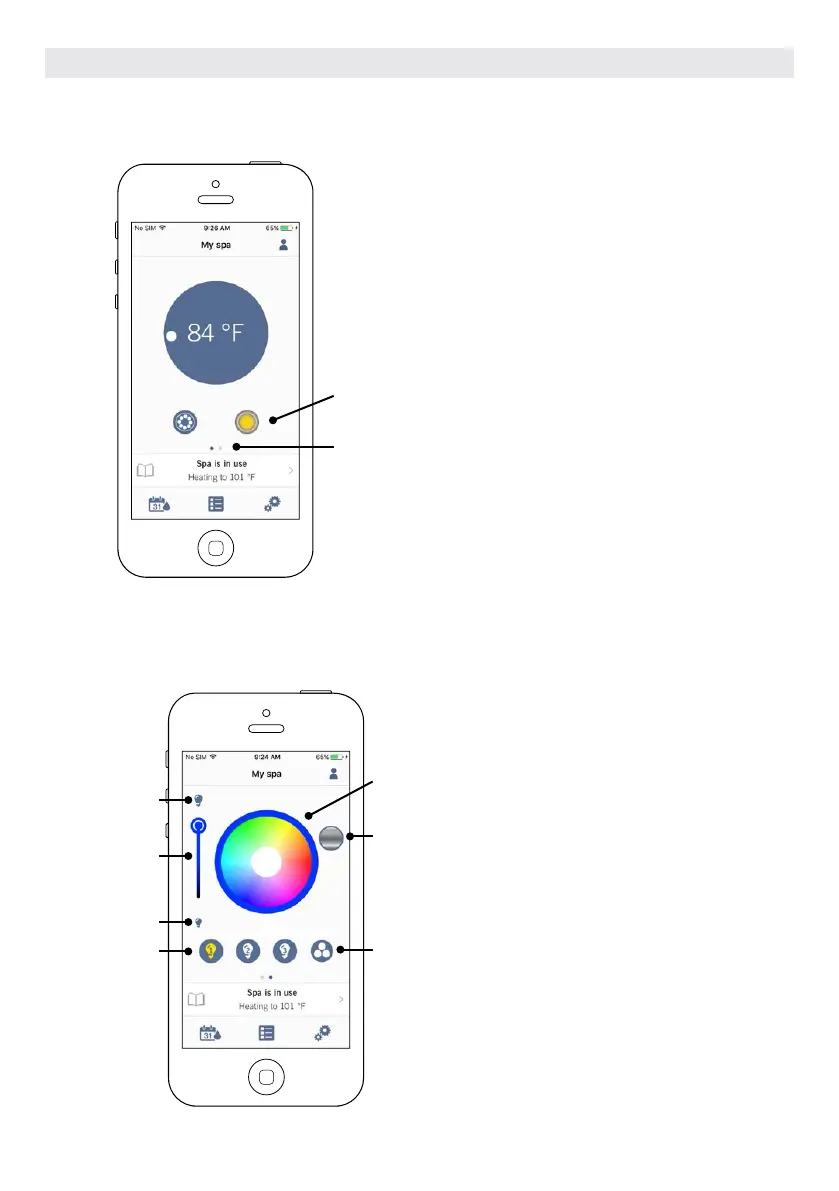
To turn on or off the in.mix 300, you can use, if you
want, the light icon on your home page. To go to
your in.mix 300 page, simply swap to the left.
Turn on/off in.mix 300
Swap to in.mix 300
The in.mix 300 page allows you to
customize your color zones in or
around your hot tub.
The light bulb icons allow you to turn
on and off your in.mix 300.
To select a zone, click on the wanted
one in the “zone selection” stripe. To
change the color, use the color wheel
to choose the one you want. On the
left side, the intensity slider allows
you to modify the brightness of your
lights. Use the rainbow icon to get
color gradation.
The synchronization / desynchroniza-
tion icon gives you the possibility to
match the color of the selected zone
with the other zones
On
Intensity
Off
Zone selection
Color wheel
Rainbow icon
Synchronization/
desynchronization
icon
OPTIONAL ACCESSORIES IN.TOUCH 2
111



 To Next Page