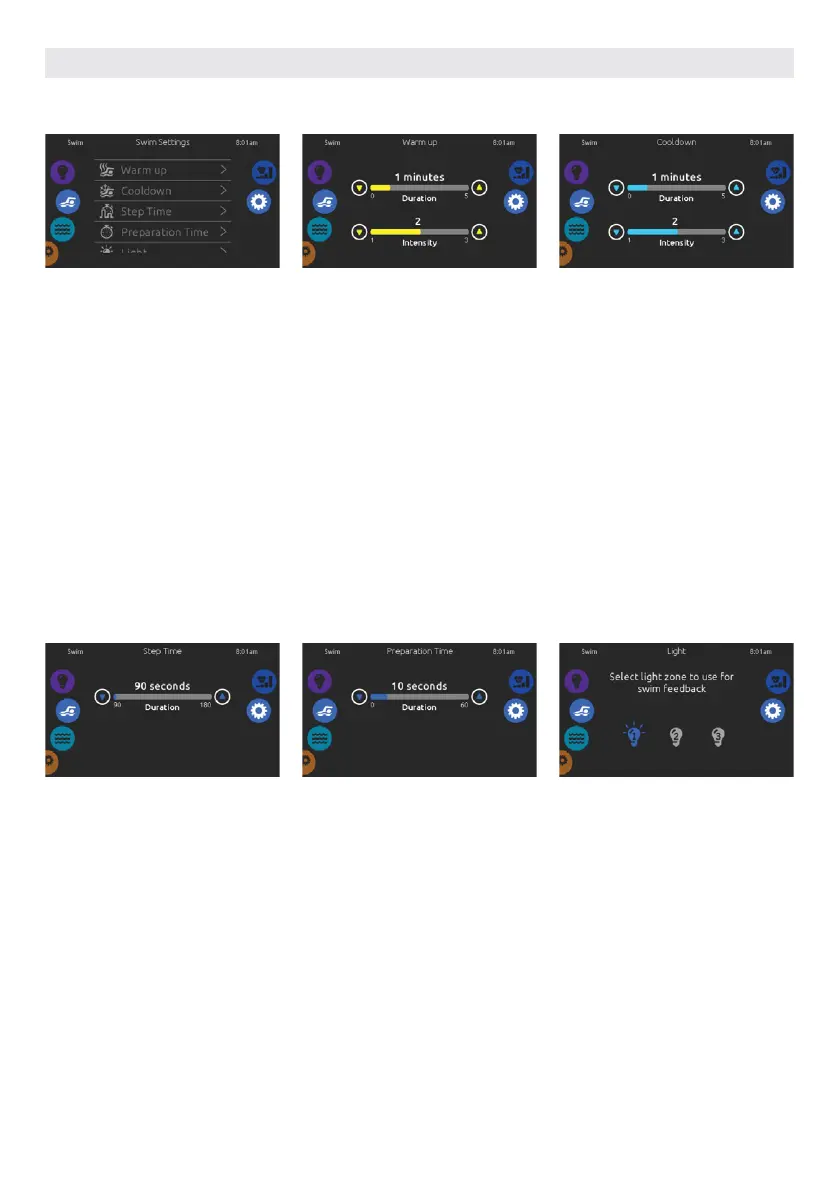
SWIM SETTINGS
To access your swim hot tub training
drills, touch the swimmer icon on the
left.
Before choosing one, we recommend
to adjust the parameters. Touch the
settings icon on the right icon wheel.
From there, you can access 5 different
parameters.
The first one is Warm up. There, you
can adjust the duration and intensity of
your training warm-up by touching the
up and down arrows.
Once done, touch the settings icon to
go back to the main settings menu.
The second one is Cooldown. There,
you can adjust the duration and
intensity of your training cooldown by
touching the up and down arrows.
Adjust the training drill Step Time
duration by touching the up and down
arrows.
Preparation Time gives you some time
to get into swimming position after
touching the start button and before
the pumps actually start. You can set
the duration of your preparation time
by touching the up and down arrows.
Finally, the light option gives you the
possibility to select which in.mix zones
you want to use for your swim feedback
(requires an installed in.mix)
USER INTERFACE SMART TOUCH
55



 To Next Page