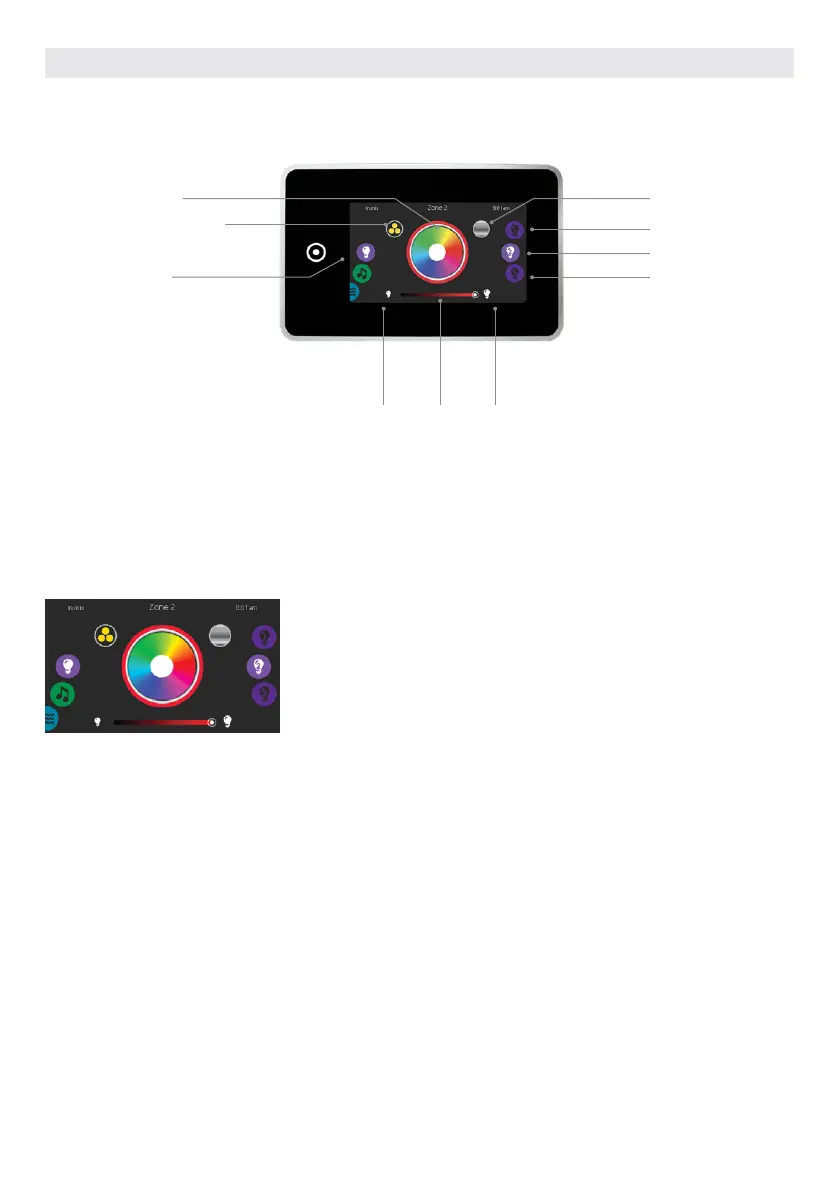
By default, the in.mix selects Zone 2 when you access the menu. To select the color mode, slide the left wheel up
or down until the in.mix icon menu is highlighted in the middle.
In the color page you can access the following:
• zone selection • synchronizing zones
• changing colors • intensity
• on/off
mode selection
wheel:
in.mix icon
synchronization/
desynchronization icon
zone 3
zone 2
zone 1
off intensity on
color wheel
rainbow icon
COLOR MODE
(only available if the in.mix is detected among the hot tub accessories)
ZONE SELECTION
To select a zone, turn the right wheel
until the desired icon is highlighted in
the middle.
This selection allows you to modify its
color.
CHANGING COLORS
Once a zone has been selected, use the
color wheel to choose the desired color,
or the rainbow icon to get changing
colors.
The rainbow icon alternates between
slow transitions, fast transitions and
normal color selection.
IN.MIX FUNCTIONS
ON/OFF
There are two ways to turn the in.mix
on or off. The first one is by using the
Light icon on the SPA Screen. The
second way is by touching the light
bulb icons located each side of the
intensity bar.
SYNCHRONIZING ZONES
The synchronization/desynchroniza-
tion icon allows you to match the color
of the selected zone with the other
zones.
INTENSITY
Located at the bottom of the screen,
the slider allows you to modify the
intensity of the color.
USER INTERFACE SMART TOUCH
75



 To Next Page