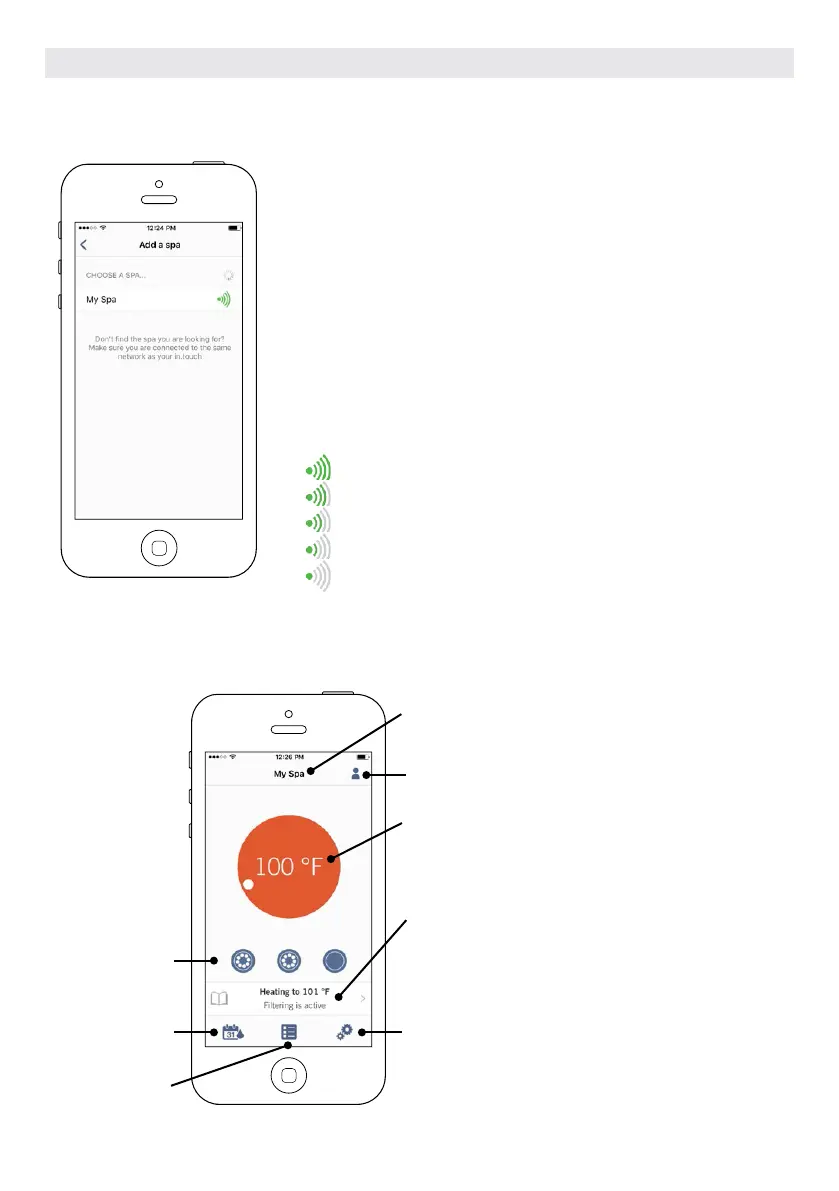
CHOOSE A SPA
This page displays all the hot tubs detected by your application.
To detect your hot tub, you need to connect your mobile device to the
same network to which you connected your Home Transmitter.
Once you have done a connection with the hot tub its name will be saved on
this page to allow you to connect to this hot tub from anywhere.
To add a hot tub later on, go to p. 26 of this techbook for instructions. The RF
signal strength (communication between the two in.touch 2 transmitters) is
illustrated on the Select a spa page. There are 5 possibile states:
• Signal superior to 80%
• Signal between 80% and 51%
• Signal between 50% and 31%
• Signal below 30%
• The Hot tub Transmitter is not available
HOME PAGE
The main screen gives you access to your accessories, water temperature, water care and settings.
Hot tub name
Accessories control
line
Water Care
menu
Reminders menu
Indicates current hot tub water temperature. Color
varies according to most important active state. Touch
to change set point
Message center that indicates status of your hot tub:
heating, filtration, error... if you click on the message
center you will access the Spa state page
Settings menu
Account setting
OPTIONAL ACCESSORIES IN.TOUCH 2
108



 To Next Page