8
OPERATION
CONTINUED
WIRELESS SYSTEM
Warning! Do not expose the equipment to moisture, rain, or mechanical shock (such as
dropping onto a hard surface).
The Wireless System consists of a 16-channel Wireless Receiver and a 16-channel Wireless
Microphone.
WIRELESS RECEIVER CHANNEL SELECTION
Before using the Wireless System, select a wireless frequency
channel on the Wireless Receiver Panel.
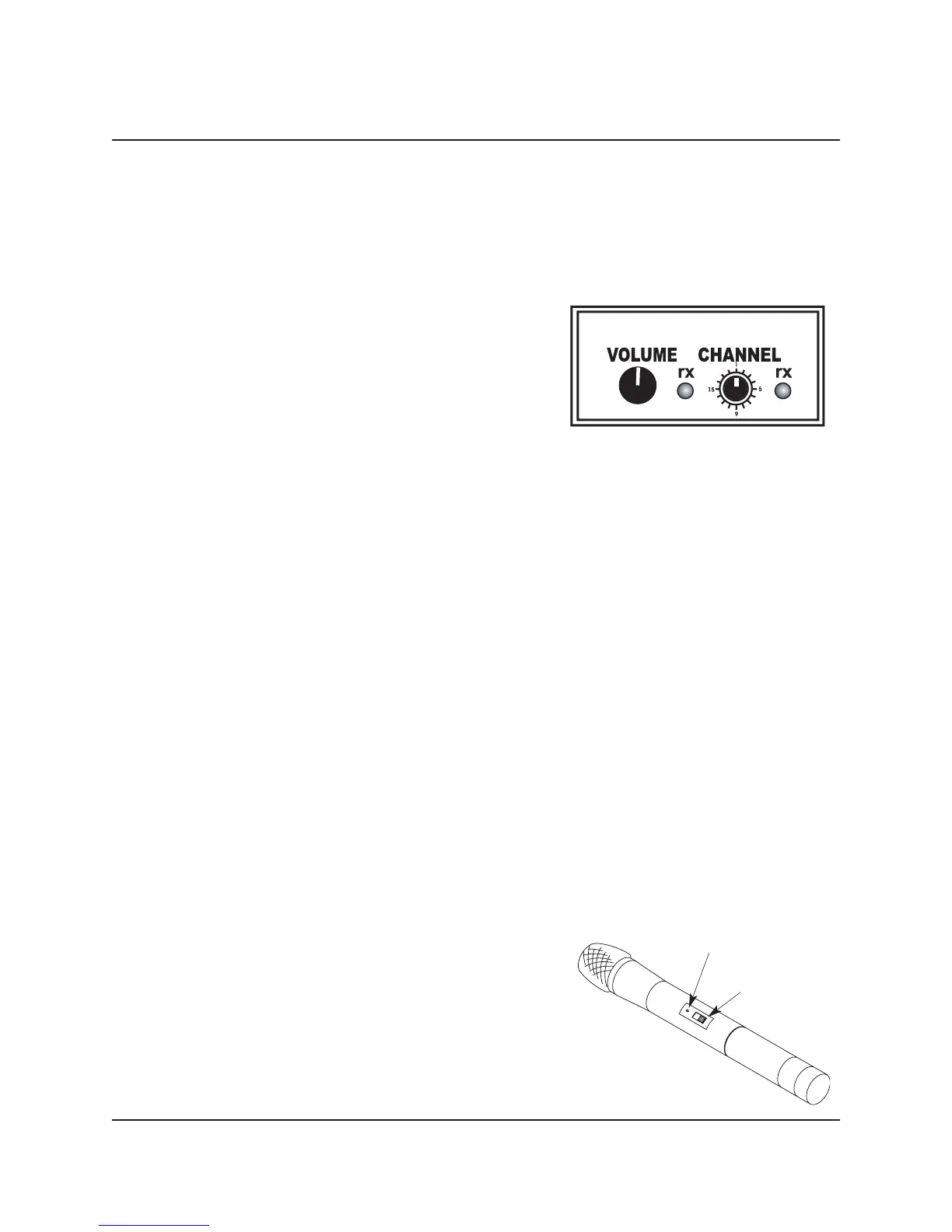
1. Locate the receiver CHANNEL selector knob on the Series
100 Panel.
2. Turn the
CHANNEL selector knob to one of the 16-
channels.
WIRELESS RECEIVER OPERATION
VOLUME . . . . . . . . . .Wireless Receiver VOLUME control knob. Turn the knob clockwise to increase the
signal level.
rx . . . . . . . . . . . . . . . .LED illuminates when a wireless signal is transmitted and received.
CHANNEL . . . . . . . . .Selects one of the Wireless Receiver 16 frequency channels.
Note: Signal interference on the selected channel from other RF systems in the area may cause
problems with the selected frequency channel. Change the selected channel on both the
Receiver and Microphone if a problem develops with Wireless Microphone transmission.
WIRELESS MICROPHONE OPERATION
Warning! Do not expose the wireless microphone to moisture, rain, or mechanical shock (such
as dropping onto a hard surface).
1. Make sure that the Wireless Microphone
CHANNEL SELECTOR is set to the same Wireless Receiver
frequency channel. Refer to Wireless Receiver Channel Selection.
2. Place the Wireless Microphone ON-STANDBY-OFF POWER Switch into the ON position.
a. The Red Power On LED will flash.
b. If the Red Power On LED illuminates continuously the Microphone Batteries have a low charge
and should be replaced.
3. Place the Audio System Main Power Switch into the
ON position.
4. Either of the two
rx Indicator LED’s on the Wireless Receiver illuminate when wireless signals are
being transmitted and received.
Caution: Harmful feedback can occur when walking in
front of a sound system or loudspeaker with a
wireless microphone. Always point the
microphone away from loudspeakers.
Wireless Receive Panel
Red Power LED
On-Standby-Off Switch
Wireless Microphone



 To Next Page