6
3
53
42
15
13
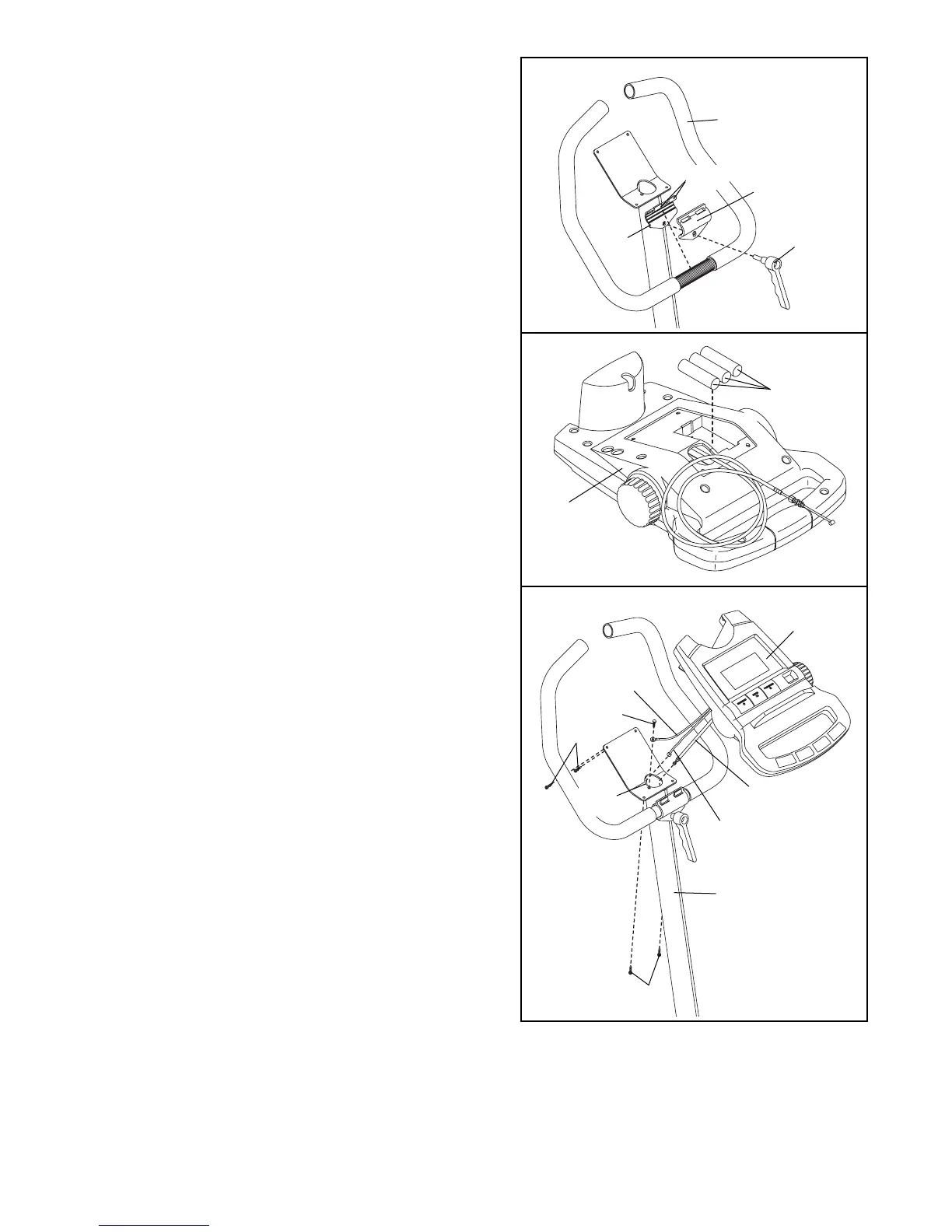
3. Slide the two slots in the Handlebar Clamp (42) onto the
two indicated tabs on the Upright (13). Lift the bottom of
the Handlebar Clamp away from the Upright. Insert the
Handlebar (15) between the Handlebar Clamp and the
Upright. Centre the Handlebar and rotate it to the desired
position.
Tighten the Adjustment Handle (53) onto the Upright
(13). Note: The adjustment handle works like a spanner.
Turn the Handle counterclockwise, pull it away from the
Upright, turn it clockwise, push it toward the upright,
and then turn it counterclockwise again.
4
4. The Console (16) requires three “AA” batteries; alka-
line batteries are recommended. Insert three batteries
into the Console. Make sure that the batteries are
oriented as shown by the diagram inside the
Console.
16
Batteries
5. Hold the Console (16) near the Upright (13). Insert the
console cable and the console wire into the indicated
hole and down through the Upright. Attach the ground
wire to the Upright with the Ground Screw (27).
Insert the excess wire and cable into the Upright.
Attach the Console (16) to the Upright (13) with four
M5 x 12mm Screws (49). Be careful to avoid pinch-
ing the wires.
16
5
Be careful to
avoid pinching
the wires.
13
49
49
27
Ground
Wire
Console
Wire
Console
Cable
Hole
Tabs






 To Next Page