
 To Next Page
J
Joann MckeeSep 23, 2025
How to get hazard alerts on West Marine Marine Radio?
- SShawn GouldSep 23, 2025
To receive hazard alerts on your West Marine Marine Radio, ensure that the Weather Alert Watch is turned on.

How to get hazard alerts on West Marine Marine Radio?
To receive hazard alerts on your West Marine Marine Radio, ensure that the Weather Alert Watch is turned on.
What to do if West Marine VHF155 won’t transmit?
If your West Marine Marine Radio won’t transmit, ensure you are not in Weather or Scan mode. Also, verify that you are not attempting to transmit on a receive-only channel or using the incorrect power level for the channel. Check the battery power level; if it's low, charge it before transmitting. Finally, ensure each transmission lasts less than 5 minutes.
Why does noise come out of the West Marine VHF155 speaker all the time?
If noise constantly emits from your West Marine Marine Radio speaker, the squelch level is likely too low. Adjust the squelch level to resolve this.
What to do if I can’t hear anything from the West Marine Marine Radio speaker?
If you can’t hear anything from the West Marine Marine Radio speaker, the squelch level is probably too high. Try adjusting the squelch level.
Why is the West Marine Marine Radio display flashing?
If the display on your West Marine Marine Radio is flashing, the radio might be in a Watch or Scan mode. Try turning off scanning, Weather Alert Watch, Triple Watch, or Dual Watch.
Why does the display flash on my West Marine VHF155?
If the display on your West Marine Marine Radio flashes, it is likely in a Watch or Scan mode. Try deactivating scanning, Weather Alert Watch, Triple Watch, or Dual Watch.
What to do if I can't hear anything from the West Marine VHF155 speaker?
If you can't hear anything from the West Marine Marine Radio speaker, the squelch level is likely too high. Adjust the squelch level accordingly.
Why is there constant noise coming from the West Marine VHF155 Marine Radio speaker?
If noise constantly emits from the speaker of your West Marine Marine Radio, the squelch level is probably too low. Try adjusting the squelch level.
Why is the display flashing on my West Marine Two-Way Radio?
If the display on your West Marine Two-Way Radio is flashing, it might be in watch or scan mode. The channel number flashes when the radio is in one of these modes. Try turning off scanning, Weather Alert Watch, Triple Watch, or Dual Watch.
What to do if I can't hear anything from my West Marine Two-Way Radio speaker?
If you can't hear anything from the speaker of your West Marine Two-Way Radio, the squelch level is probably too high. Try adjusting it.
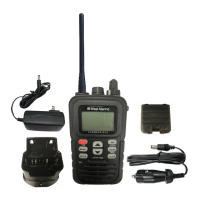
Lists all the components that come with the VHF160 radio package.
Explains how to use the radio in its default Normal mode for communication.
Describes how to use the Scan mode to monitor saved channels for activity.
Guide on how to install the rechargeable Li-Ion Polymer battery.
Instructions on how to place the radio in the charger and what to expect.
Guide on adjusting the squelch to filter out background noise.
Steps for selecting a channel and transmitting a message.
How to increase transmission power for longer range.
Addresses common problems and provides solutions for the radio.
Information on operating marine radio services and licensing requirements.
Provides information on FCC/Industry Canada certification and compliance.
Safety precautions and warnings related to the Lithium-Ion Polymer battery.
Details what defects and conditions are covered under the West Marine limited warranty.
Lists exclusions and conditions not covered by the limited warranty.
Steps to follow when requesting warranty service for the product.
 General
| Category | Marine Radio |
|---|---|
| Display | LCD |
| Waterproof Rating | IPX7 |
| DSC Capability | Yes |
| NOAA Weather Channels | Yes |
| Speaker Output | 700mW |
| GPS | No |
| Channels | USA, International, and Canadian |
| Scan Modes | Dual watch |
| Included Accessories | belt clip |
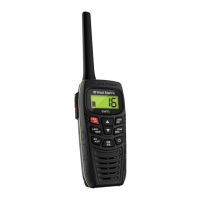
| Type | Handheld VHF Marine Radio |
| Battery Type | Rechargeable Li-ion battery pack |