5
OPENING THE AURORA ENCLOSURE (UNMOUNTED)
1. When opening an Aurora prior to mounting, place the unit top-down on a
smooth, flat, surface.
2. Make sure the unit is disconnected from power.
3. Remove the captive screws from the bottom of the enclosure.
4. Angle the Electronics Carriage so the tabs are at opposite corners of the
Main Enclosure opening.
5. Guide the Electronics Carriage out of the Main Enclosure, being careful to
avoid bending any LED leads. Each LED is mounted very close to the
PCB to prevent bending.
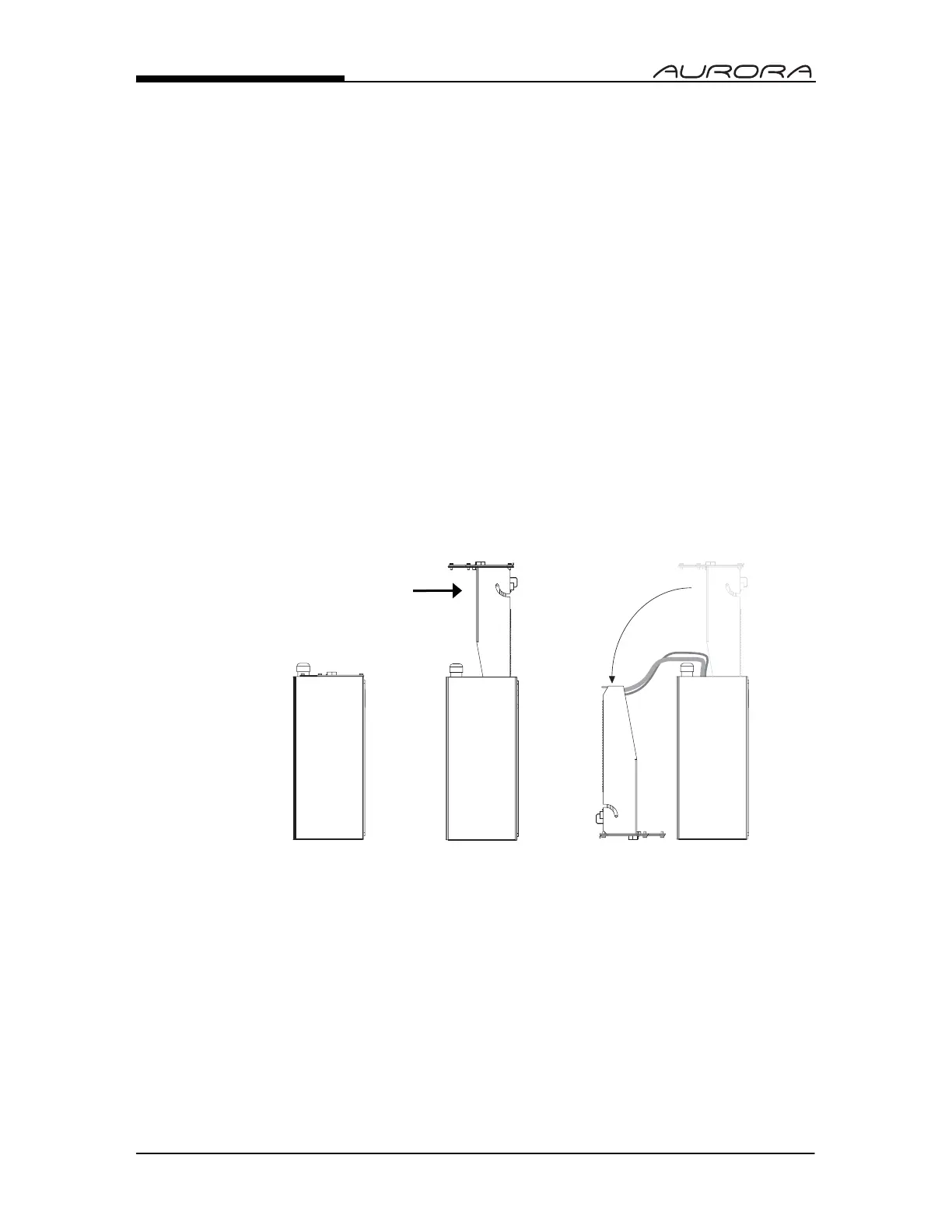
6. Place the Electronics Carriage bottom-down on the flat surface as
illustrated (As seen in Fig. 2).
REMOVING THE ELECTRONICS CARRIAGE
1. Once the Electronics Carriage has been removed from the Main
Enclosure, disconnect the AC power and ground connections from the
Power Supply board.
2. Disconnect the green ground wire from the Electronics Carriage frame.
Fig. 2: Open Aurora (side)
BOTTOM COVER/
ELECTRONICS CARRIAGE


 To Next Page