6
INSTALLATION & TECHNICAL MANUAL
MOUNTING INSTRUCTIONS
1. Inspect the installation site for properly grounded power.
2. Ensure that mounting structures (walls, pole brackets, etc.) will bear the weight of
the display (Aurora 45: 20 lbs, Aurora 65 & 45SL: 32 lbs).
3. Allow proper clearance for lowering and removing the Electronics Carriage.
4. Use proper hardware, including wall anchors where necessary, when mounting
the enclosure. Secure the Main Enclosure to wall or pole mounted bracket with
5/16
ths
bolts.
5. Run power and communication cables into the enclosure via strain reliefs (as
required).
Wall Mounting
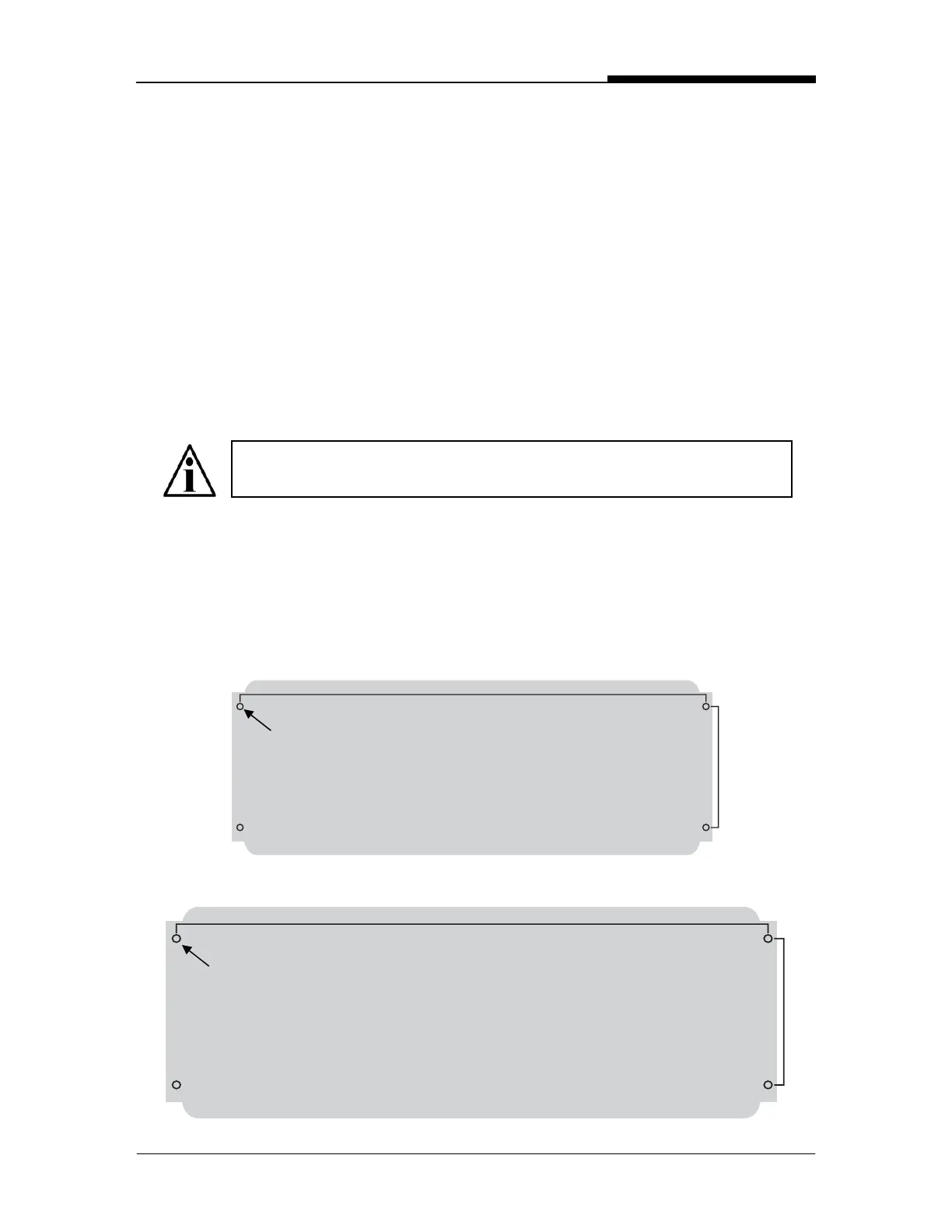
Hole patterns for the Aurora Remote Displays are given in the diagram below:
Aurora 45:
Aurora 65 & Aurora 45 SL:
NOTE: The Electronics Carriage may be removed to reduce weight
when installing.
23 inches
31 inches
6 inches
7 ¾ inches
Hole: 3/8 inch
Hole: 3/8 inch
Fig. 3: Hole patterns


 To Next Page