10 | Westinghouse Portable Power
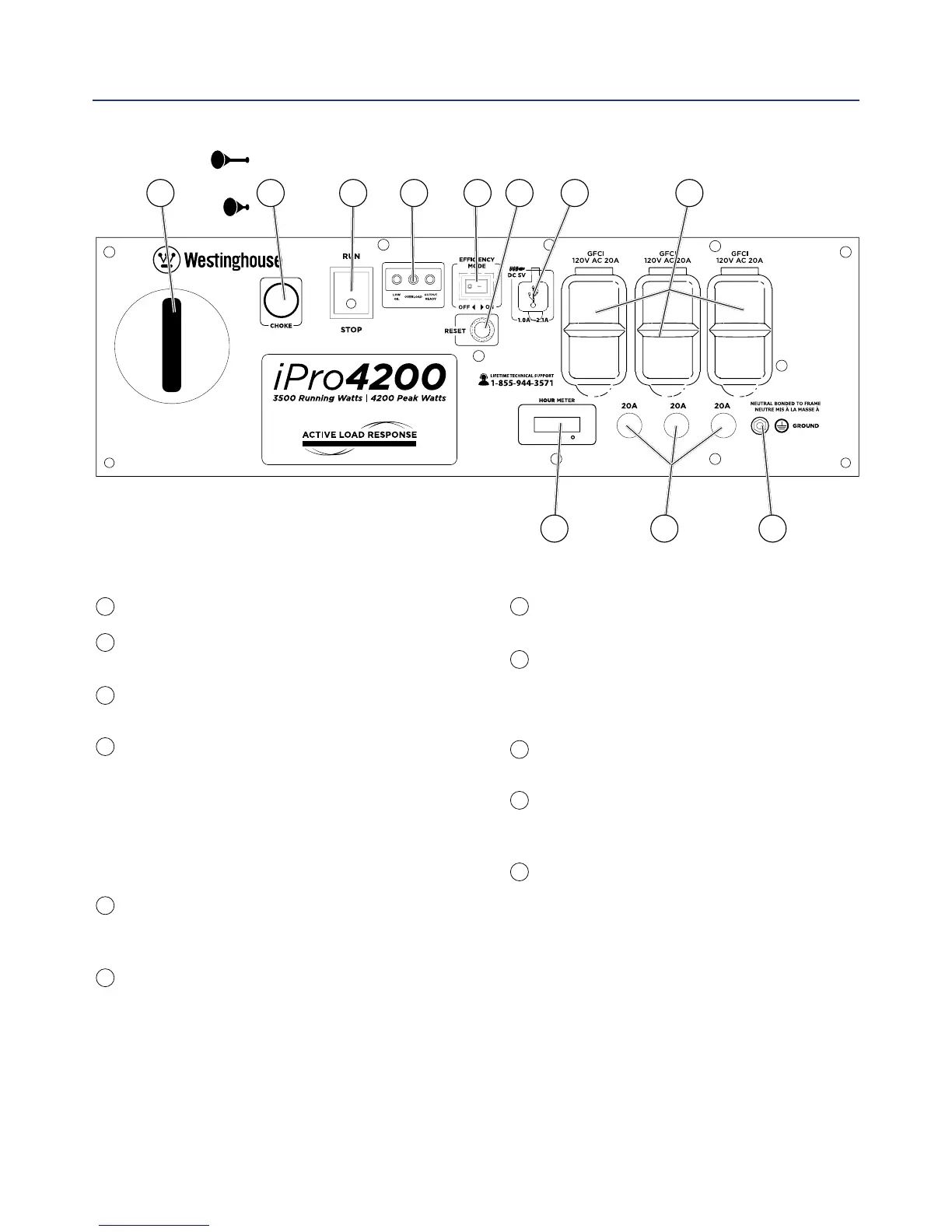
USB Duplex: 5V DC that come in 1 amps
and 2.1 amps.
120-Volt, 20-Amp Duplex GFCI Outlets
(NEMA 5-20R): Each outlet is capable of carrying
a maximum of 20 amps on a single receptacle or
a combination of both receptacles.
Hour Meter: Displays how many hours the
generator has been run when under load.
20-Amp Circuit Breakers: Each circuit breaker
limits the current that can be delivered through
the 120-volt duplex outlets to 20amps.
Ground Terminal: The ground terminal is used to
ground the generator.
Pull Cord Starter: Pull to start engine.
Choke Lever: Pull to set choke before starting and
push in to run once the engine has started.
Engine Control Switch: Switch to “Stop” to stop
the engine. Switch to “Run” before starting engine.
Indicator Lights:
Low Oil LED: Indicates low oil level.
Overload LED: Indicates that the inverter is
overloaded.
Output Ready LED: Indicates the inverter is
ready to be used.
Eciency Mode Switch: When turned to the ON
position, the engine will sense the load needed and
run at a slower RPM to save fuel.
Reset Breaker: If the inverter is overloaded, the
reset breaker will trip. The engine will continue to run,
but there will be no electrical power output from the
inverter. Unplug the devices and reduce the load.
Push in the reset breaker to reset it.
CONTROL PANEL FEATURES
1
8
9
10
11
2
3
4
5
6
7
3 4 5 6 7 821
11109
FEATURES
Choke On
Choke O


 To Next Page