Westinghouse Portable Power | 19
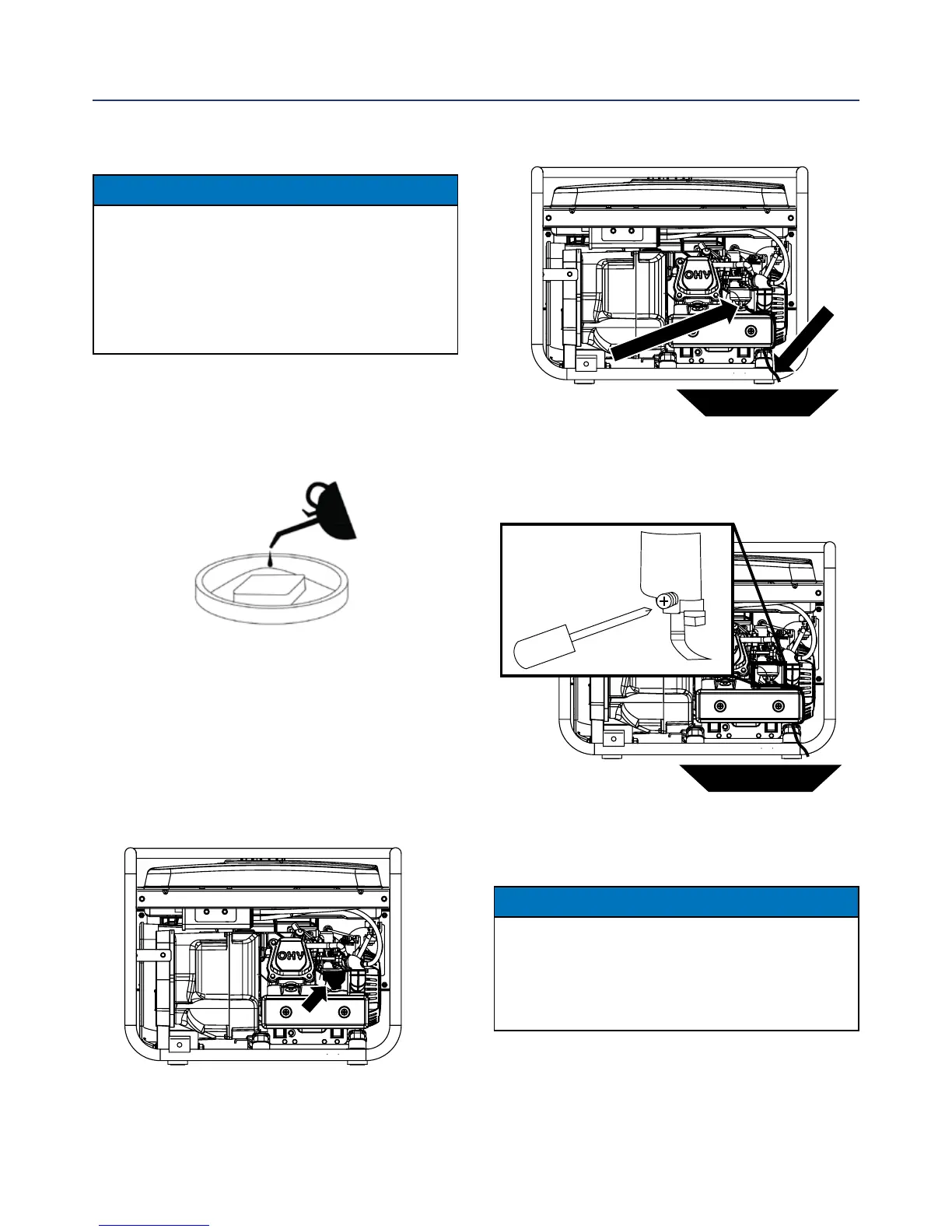
3. Loosen the oat bowl drain screw (see Figure 18)
until fuel is seen draining from the oat bowl.
4. Allow fuel to drain into the container, and then
tighten the oat bowl drain screw.
NOTICE
Never dispose of fuel by dumping fuel into a sewer,
on the ground, or into groundwater or waterways.
Always be environmentally responsible. Follow the
guidelines of the EPA or other governmental agencies
for proper disposal of hazardous materials. Consult
local authorities or reclamation facility.
Cleaning the Air Filter - Continued from Page 18
NOTICE
Never dispose of soap cleaning solution used to
clean the air lter by dumping the solution into
a sewer, on the ground, or into ground water or
waterways. Always be environmentally responsible.
Follow the guidelines of the EPA or other
governmental agencies for proper disposal of
hazardous materials. Consult local authorities or
reclamation facility.
7. Dispose of used soap cleaning solution properly.
8. Dry the air lter elements by again applying a slow
rm squeezing action.
9. Once the air lters are dry, coat the air lters with
clean engine oil (see Figure 15 below).
Figure 15
10. Squeeze the lters to remove any excess oil.
11. Install the lters back into the unit.
12. Install the air lter cover and secure the air
lter assembly.
DRAINING THE FLOAT BOWL
1. Locate carburetor oat bowl above air lter (see
Figure 16).
Figure 16: Carburetor oat bowl
2. Locate the clear plastic hose from the oat that is
exiting out the bottom of the inverter, and place a
suitable container under it to catch the drained fuel
(see Figure 17).
MAINTENANCE
Figure 17: Fuel drain hose
fuel pan
Fuel Drain Hose
Float Bowl Drain Screw
Figure 18: Loosen oat bowl screw
fuel pan


 To Next Page