WD-151E - WD-421E Rev. 00 (202310)
Operating instructions touch
42
Symbols
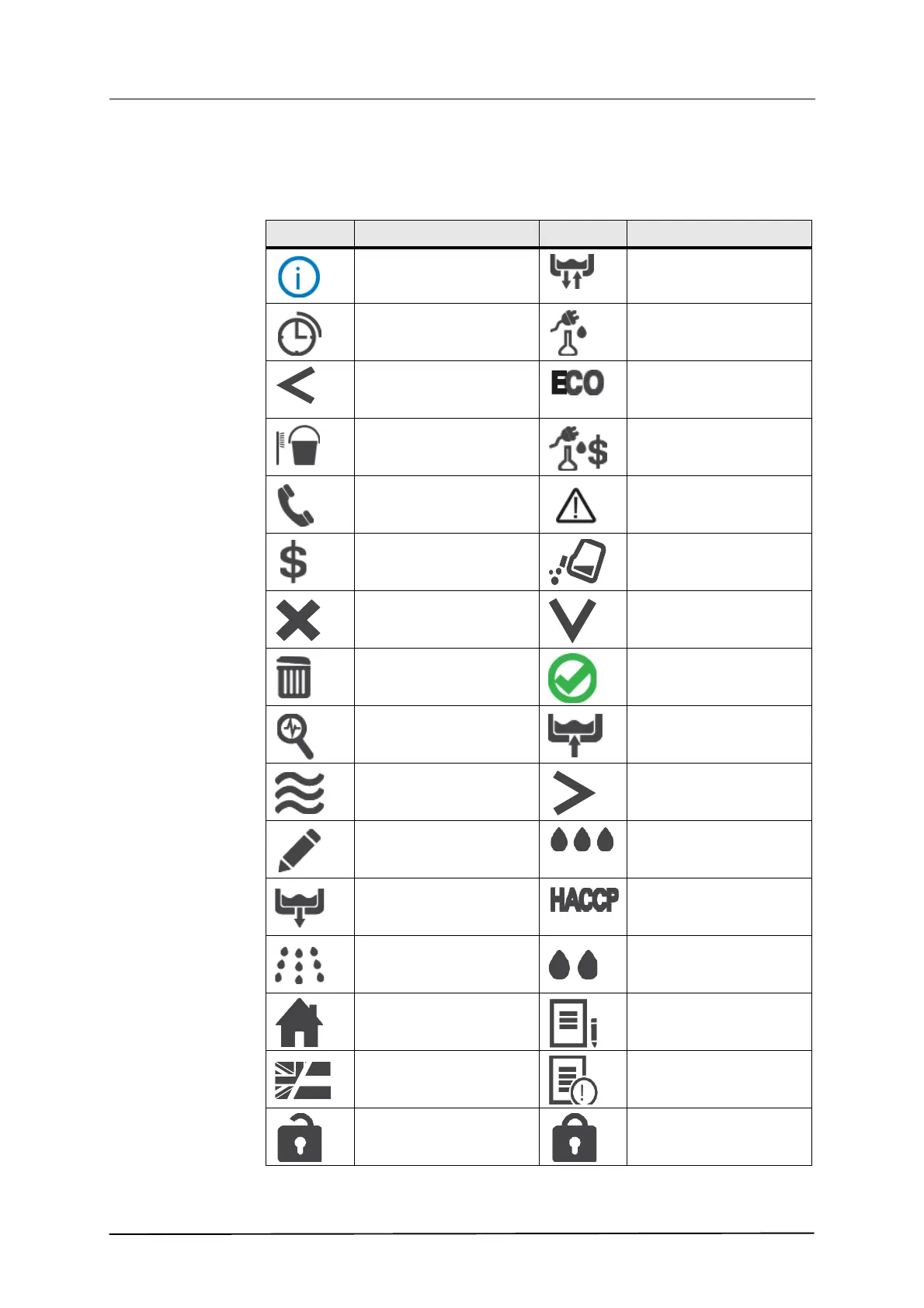
The following symbols and a brief description may be displayed in the various
fields of the panel (some depending on machine type).
Symbol Explanation Symbol Explanation
Black: Information
Blue: About the machine
Change the water
Autostart of filling and
washing
Consumption
Back to previous figure /
Reduce
Environmentally friendly/
Lowest consumption
Cleaning the machine Consumption costs
Contact details Warning / Alarm for opera-
tor
Cost Detergent
Cancel / Reset Down / Reduce
Remove / Clear Yes / Confirm / Ready
Diagnosis Fill tank
Drying Forward to next figure / In-
crease
Edit Strong/ Highest consump-
tion
Empty tank HACCP
Final rinse Medium / Normal con-
sumption
Home Journal
Language Log
Logged in Logged out


 To Next Page