Operating Instruction
4. Panel Descriptions
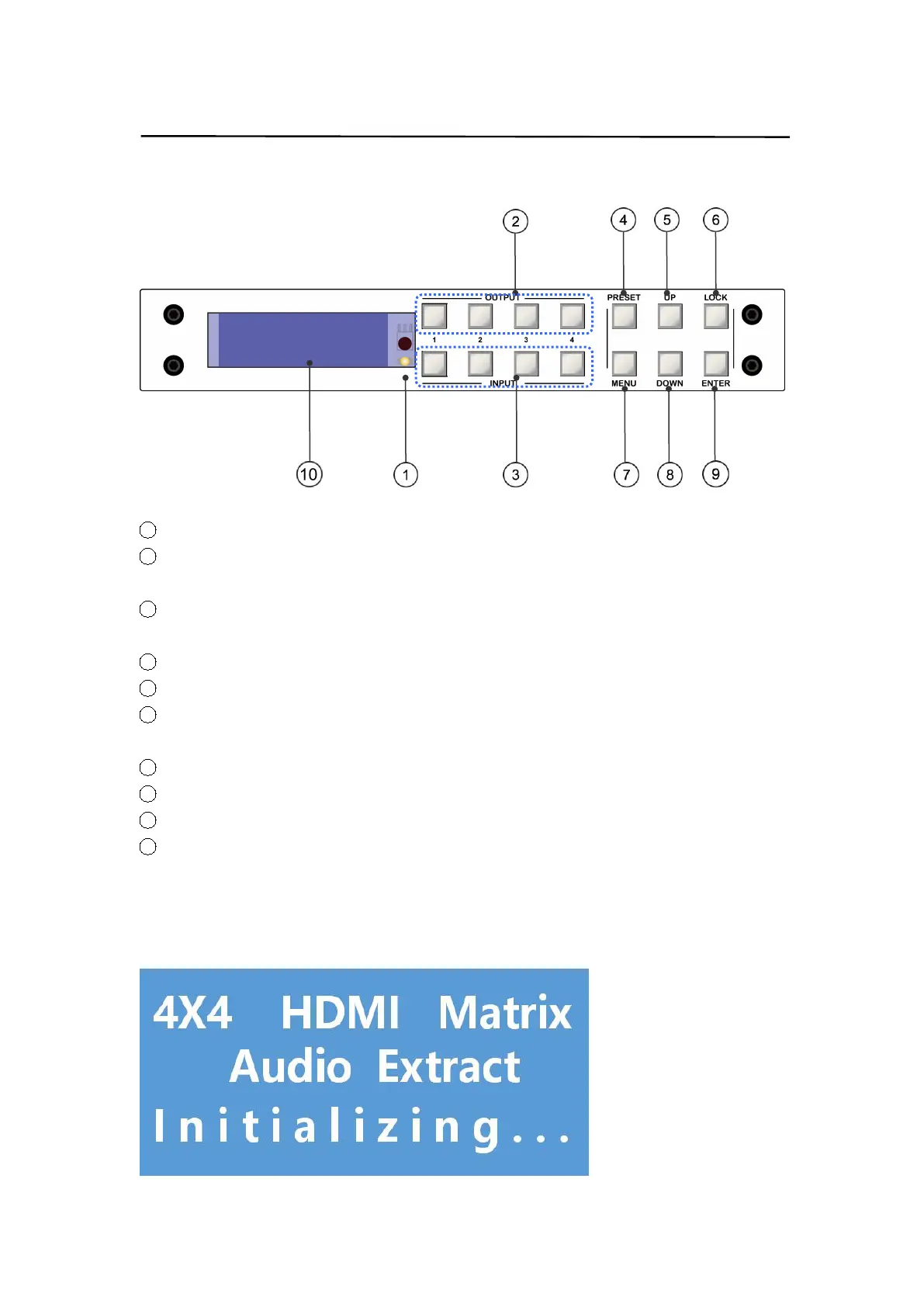
`4.1 Front panel
1 IR receive window.
2 Output 1-4:short press to choose one output,press again to cancel; long press to
choose all output, long press again to cancel.
3 Input 1-4:short press to choose one input(workable only if choose the output
already);long press to choose one input for all output.
4 PRESET: short press to preset
5 UP: short press to up
6 LOCK:long press to lock,long press again to unlock;when lock, all button is unworkable
except for lock button.
7 MENU: press to main menu interface or return to the previous menu interface.
8 DOWN: short press to down
9 ENTER:short press to confirm
10 LCD screen
Note: Unit can be controlled by front panel button, like:video switch,EDID switch,baud
rate switch,etc.... when enter into menu interface, should press button within 30s; if
exceed 30s, LCD screen will return to audio channel interface automatically; if exceed 60s,
LCD screen will be off.


 To Next Page