7.
Troubleshooting
Error Messages
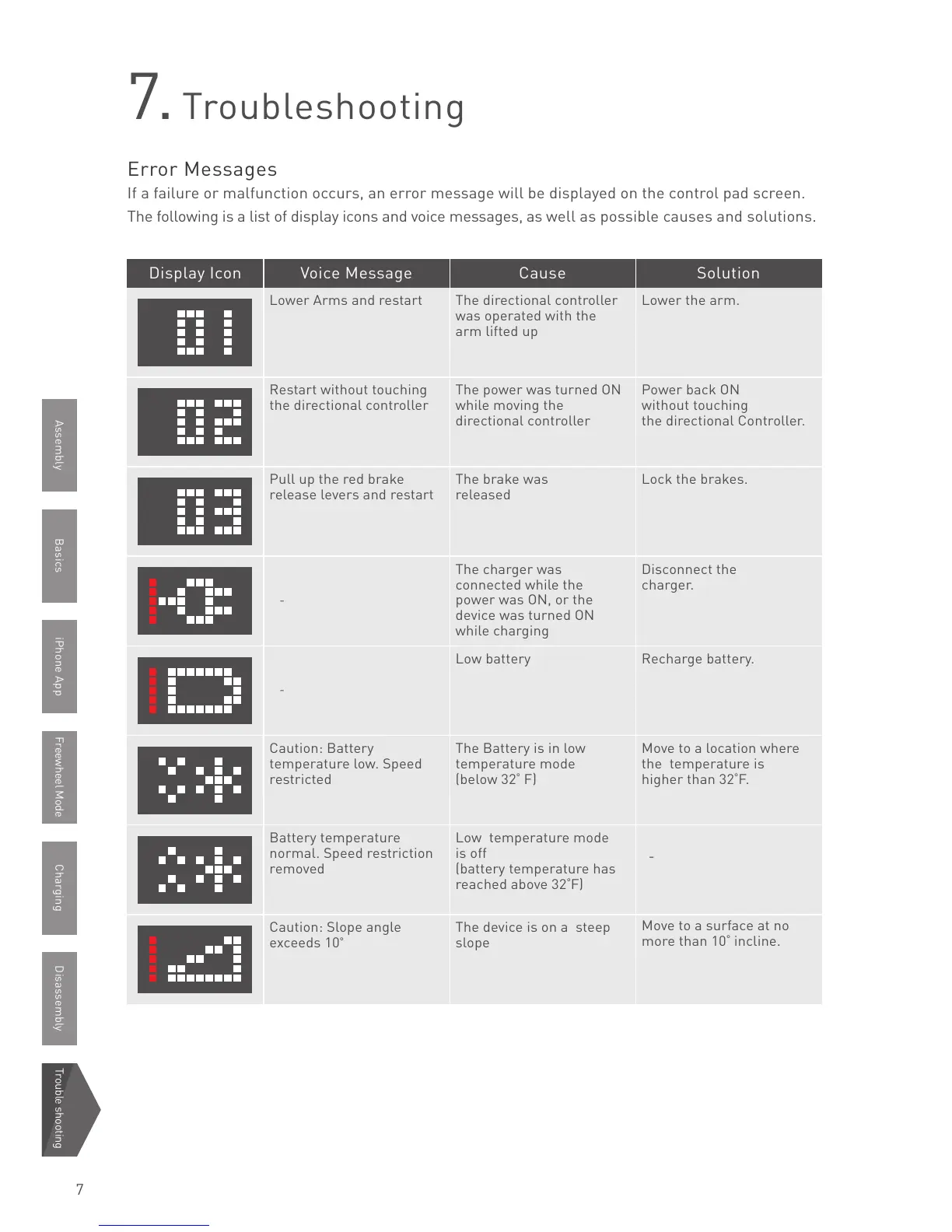
If a failure or malfunction occurs, an error message will be displayed on the control pad screen.
The following is a list of display icons and voice messages, as well as possible causes and solutions.
Lower Arms and restart
Restart without touching
the directional controller
Pull up the red brake
release levers and restart
-
-
Caution: Battery
temperature low. Speed
restricted
Battery temperature
normal. Speed restriction
removed
Caution: Slope angle
exceeds 10
The directional controller
was operated with the
arm lifted up
The power was turned ON
while moving the
directional controller
The brake was
released
The charger was
connected while the
power was ON, or the
device was turned ON
while charging
Low battery
The Battery is in low
temperature mode
(below 32
F)
Low temperature mode
is off
(battery temperature has
reached above 32
F)
The device is on a steep
slope
Lower the arm.
Power back ON
without touching
the directional Controller.
Lock the brakes.
Disconnect the
charger.
Recharge battery.
Move to a location where
the temperature is
higher than 32
F.
-
Move to a surface at no
more than 10
incline.
Display Icon Voice Message Cause Solution
BasicsAssembly iPhone App Freewheel Mode Charging Disassembly Trouble shooting
7



 To Previous Page