Using the Automatic MEALTIMER* Control
The automatic MEALTIMER control will turn the
lower oven
on and off at times
you set...even when you are not around.
Automatic baking is ideal for foods which do not require a preheated oven
(meats, casseroles, etc.).
Do not use the automatic cycle for cakes, cookies,
or other recipes that require preheating the oven before baking...
undercooking will result.
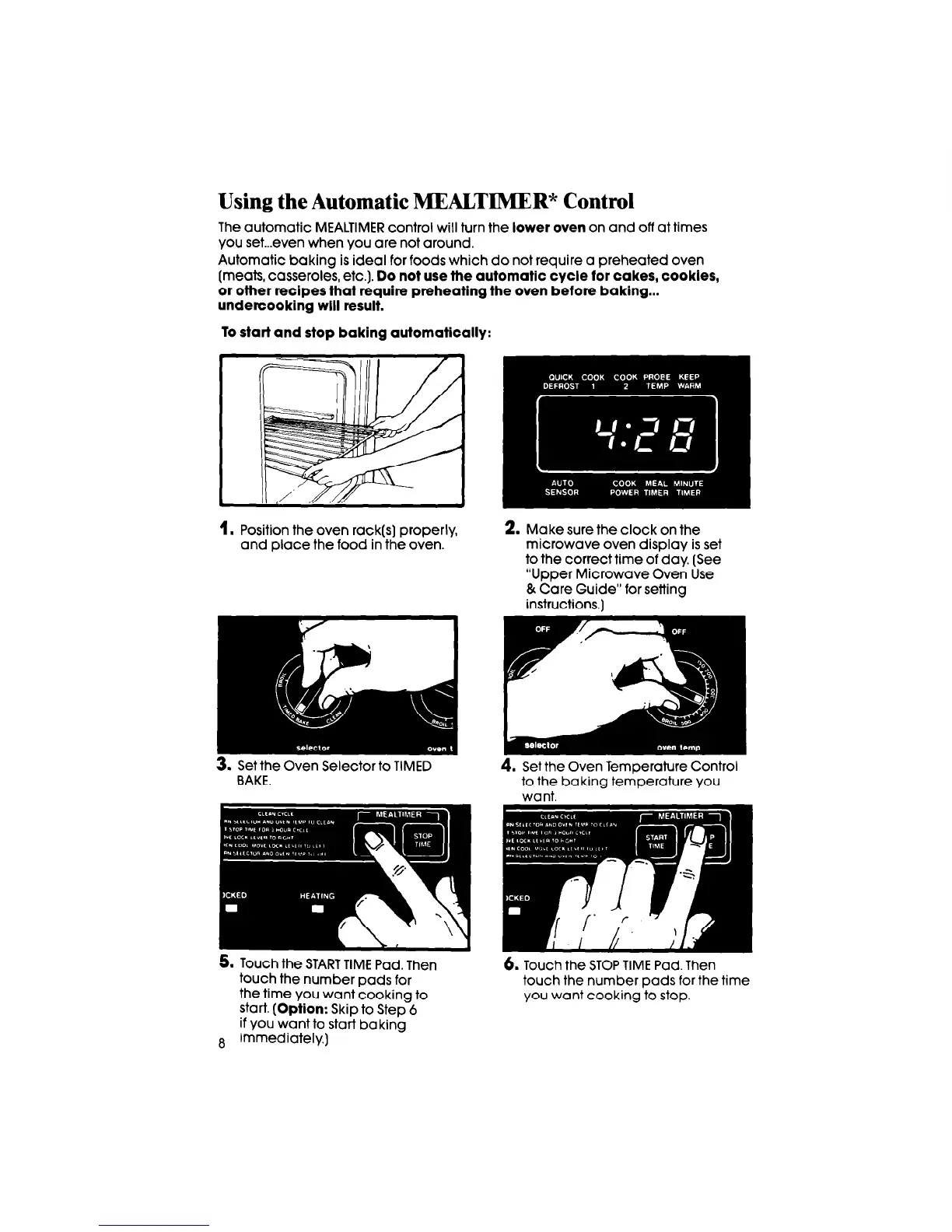
To start and stop baking automatically:
I.
Position the oven rack(s) properly,
and place the food in the oven.
2. Make sure the clock on the
microwave oven display is set
to the correct time of day. (See
“Upper Microwave Oven Use
& Care Guide” for setting
instructions.]
3. Set the Oven Selector to TIMED
BAKE.
4. Set the Oven Temperature Control
to the baking temperature you
want.
5. Touch the START TIME Pad. Then
touch the number pads for
the time you want cooking to
start.
(Option:
Skip to Step 6
if you want to start baking
S immediately.)
6.
Touch the STOP TIME Pad. Then
touch the number pads for the time
you want cooking to stop.



 To Next Page