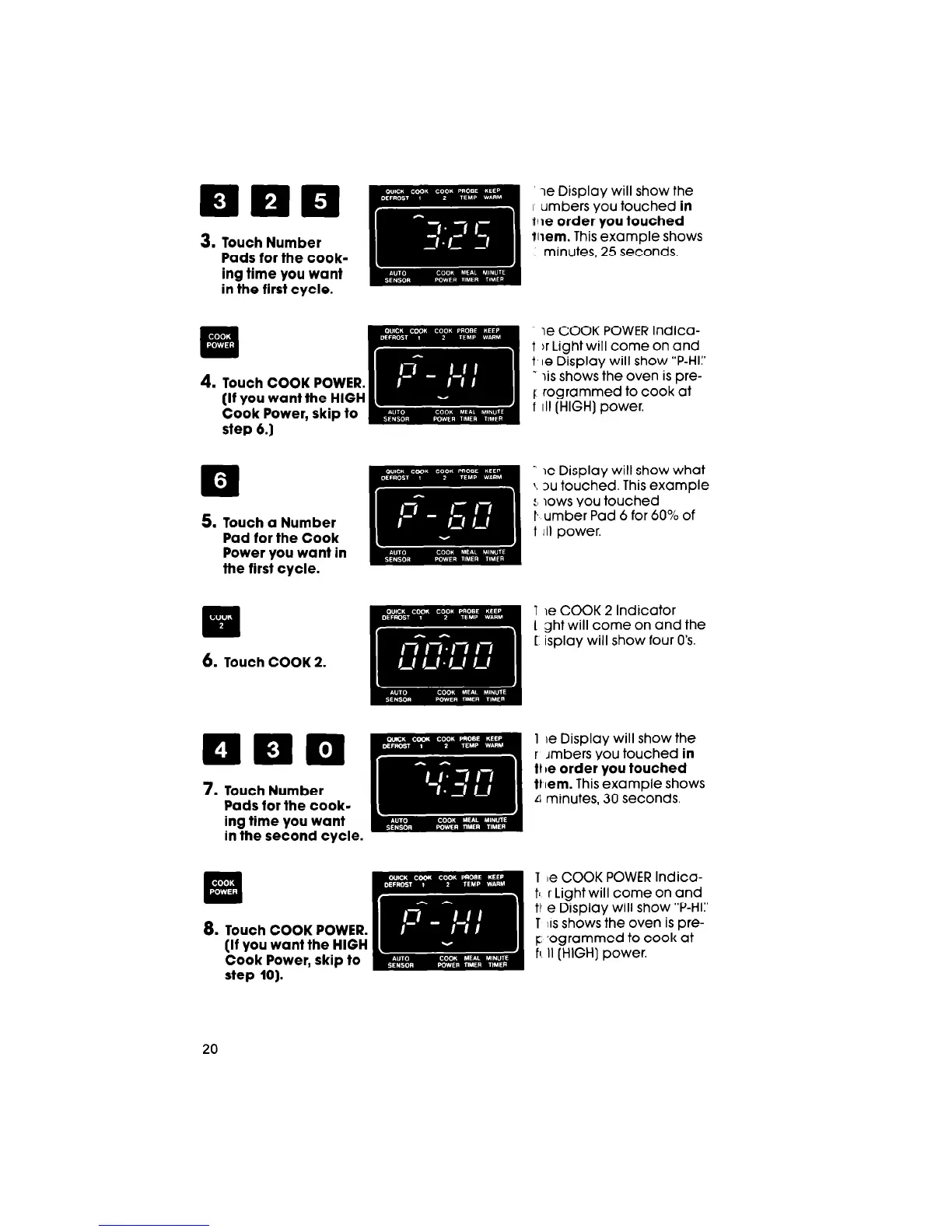
step 6.1
q
.
5. Touch a Number
Pad for the Cook
Power you want in
the first cycle.
II
q
6. Touch COOK 2.
ie Display will show the
I umbers you touched in
file order you touched
Xliem. This example shows
minutes, 25 seconds.
ie COOK POWER Indica-
t )r Light will come on and
t le Display will show “P-HI:’
T iis shows the oven is pre-
f rogrammed to cook at
f III (HIGH] power.
T le Display will show what
j, N touched. This example
:, lows you touched
t umber Pad 6 for 60% of
t III power.
Y le COOK 2 Indicator
1 ght will come on and the
T isplay will show four 0’s.
7. Touch Number
Pads for the cook-
ing time you want
in the second cycle.
1 be Display will show the
r Jmbers you touched in
11 be order you touched
tt [em. This example shows
d minutes, 30 seconds.
. .
El
. .
8.
Touch COOK POWER.
(if you want the HIGH
Cook Power, skip to
step 10).
1 le COOK POWER Indica-
tl r Light will come on and
tl e Display will show “P-HI:’
T IIS shows the oven is pre-
c: .ogrammed to cook at
ft. II (HIGH] power.
20




 To Next Page