PAGE 3
FOR SERVICE TECHNICIAN’S USE ONLY
DO NOT REMOVE OR DESTROY
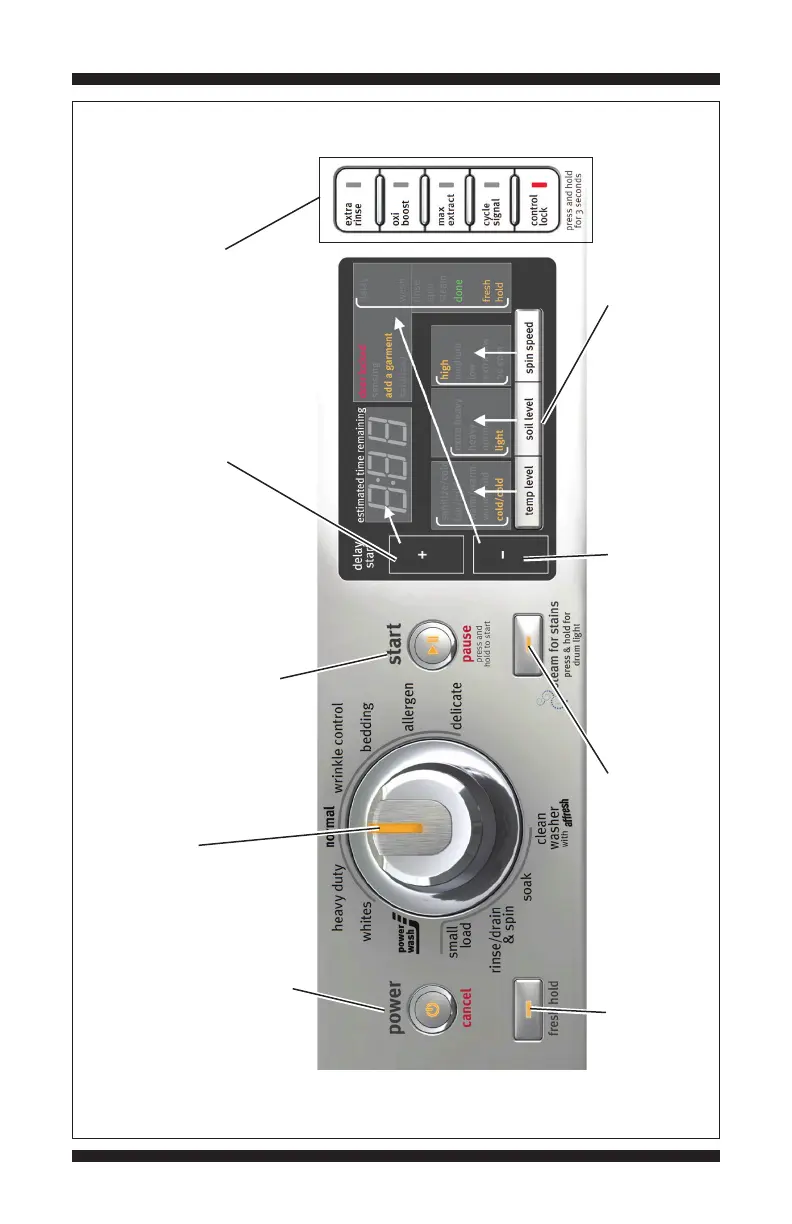
The cycle selector LED will turn off after slowly rotating
the knob through all of its positions. (Features and
appearances vary between models).
“power/cancel” button: press once to
turn off indicator. Press twice to exit
most service diagnostic modes and
return to standby mode.
“start/pause” button: begin
or continue test. Press once
to turn off indicator.
“delay start (+)” button:
press once to turn off
seven-segment display.
“fresh hold” button: press
once to turn off indicator.
Not available on all models.
“steam for stains” button:
press once to turn off indicator.
Not available on all models.
Figure 2 - User Interface Test
Option buttons: press each
button once to turn off its
respective indicator.
“delay start (–)” button:
press once to turn off the
upper right corner of display.
Press each modifier button once to
turn off its respective display segment.
(Recommended buttons to access
Diagnostic Mode).
MAYTAG CONTROL PANEL (features and appearances may vary between models)










 To Next Page