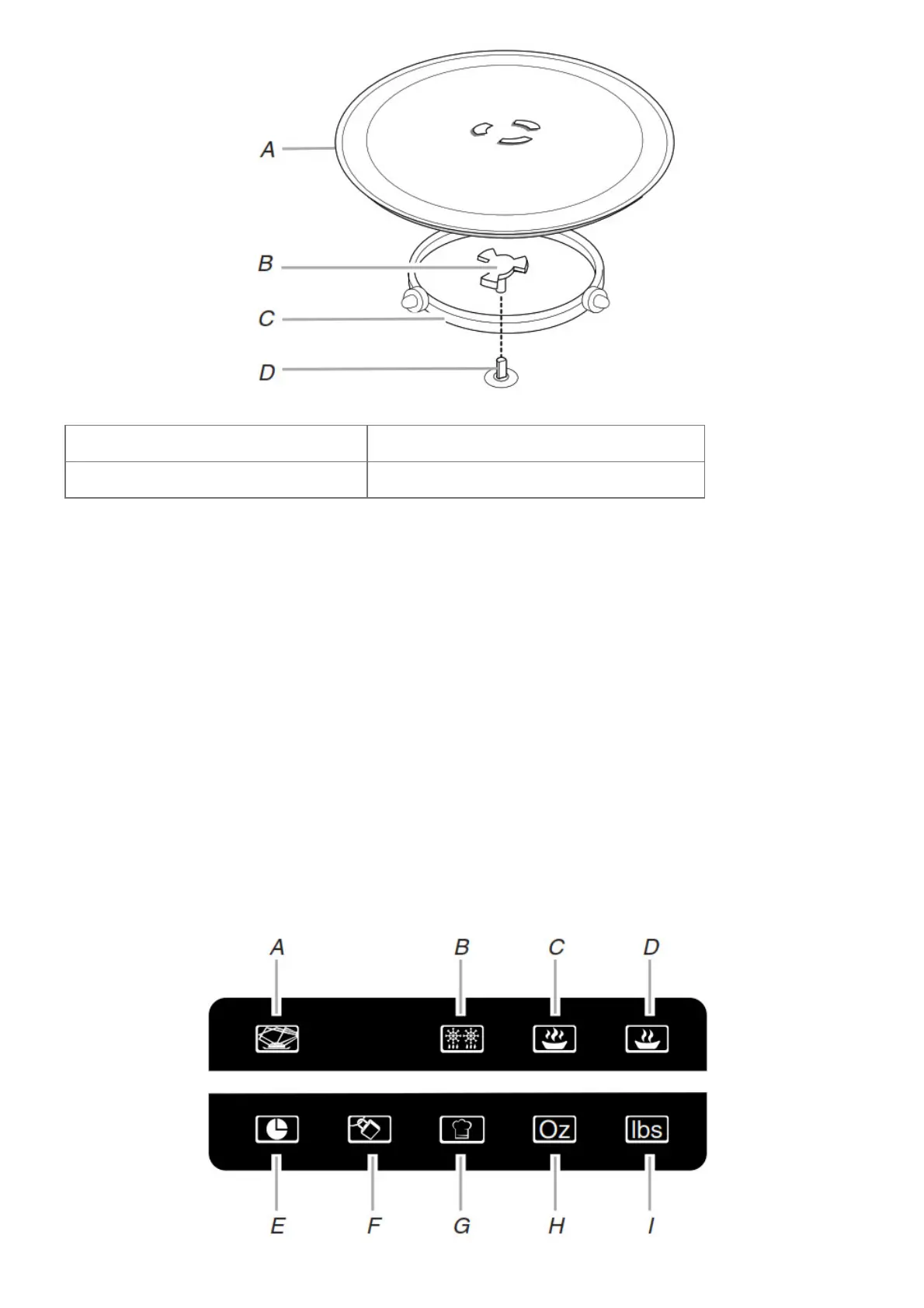
A. Turntable C. Support
B. Hub D. Shaft
The turntable can rotate in either direction to help cook food more evenly. For best cooking results, do not operate
the microwave oven without having the turntable in place. See the “Assistance or Service” section to reorder any
of the parts.
To Install:
1. Place the support on the microwave oven cavity bottom.
2. Place the turntable on the support.
Fit the raised, curved wedges in the center of the turntable bottom between the three spokes of the hub. The
rollers on the support should fit inside the turntable bottom ridge.
Display
When power is first supplied to the microwave oven, “0:00” will appear in the display. If the “0:00” appears in the
display at any other time, a power failure has occurred. Reset the clock if needed. See the “Clock” section.
NOTE: The display language may be set to French, and the weight entry mode may be set to metric within the first
5 minutes of power-up. See the “Language” and “Weight Entry Mode” sections.
Function Icons




 To Next Page