EasyManua.ls Logo

White 1066 - Inserting and Removing the Bobbin Case

Default Icon
26 pages
Print Icon
To Next Page IconTo Next Page
To Previous Page IconTo Previous Page
Loading...
5.
INSERTING
AND
REMOVING
THE
BOBBIi
CASE
1.
Raise
the
presser
bar
by
lifting
the
presser
bar
lifter.
2.
Raise
the
needle
bar
to
its
highest
position
by
turning
the
balance
wheel
towards
you.
3.
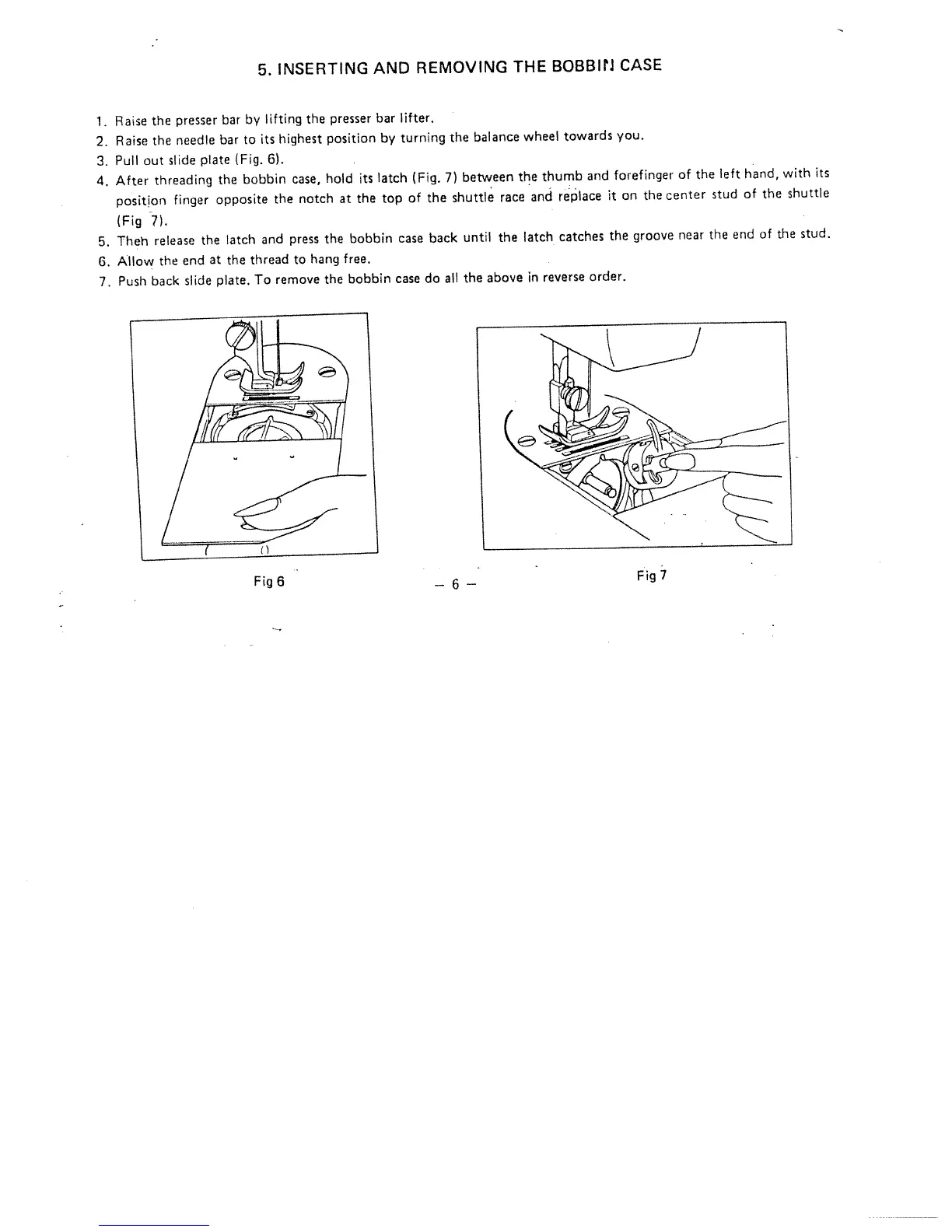
Pull
Out
slide
plate
(Fig.
6).
4.
After
threading
the
bobbin
case,
hold
its
latch
(Fig.
7)
between
the
thumb
and
forefinger
of
the
left
hand,
with
its
position
finger
opposite
the
notch
at
the
top
of
the
shuttle
race
and
replace
it
on
the
center
stud
of
the
shuttle
(Fig
7).
5.
Theh
release
the
latch
and
press
the
bobbin
case
back
until
the
latch
catches
the
groove
near
the
end
of
the
stud.
6.
Allow
the
end
at
the
thread
to
hang
free.
7.
Push
back
slide
plate.
To
remove
the
bobbin
case
do
all
the
above
in
reverse
order.
Fig
6
—6---
Fig
7

Related product manuals