EasyManua.ls Logo

White 951 - SETTING THE STITCH LENGTH

Default Icon
44 pages
Print Icon
To Next Page IconTo Next Page
To Previous Page IconTo Previous Page
Loading...
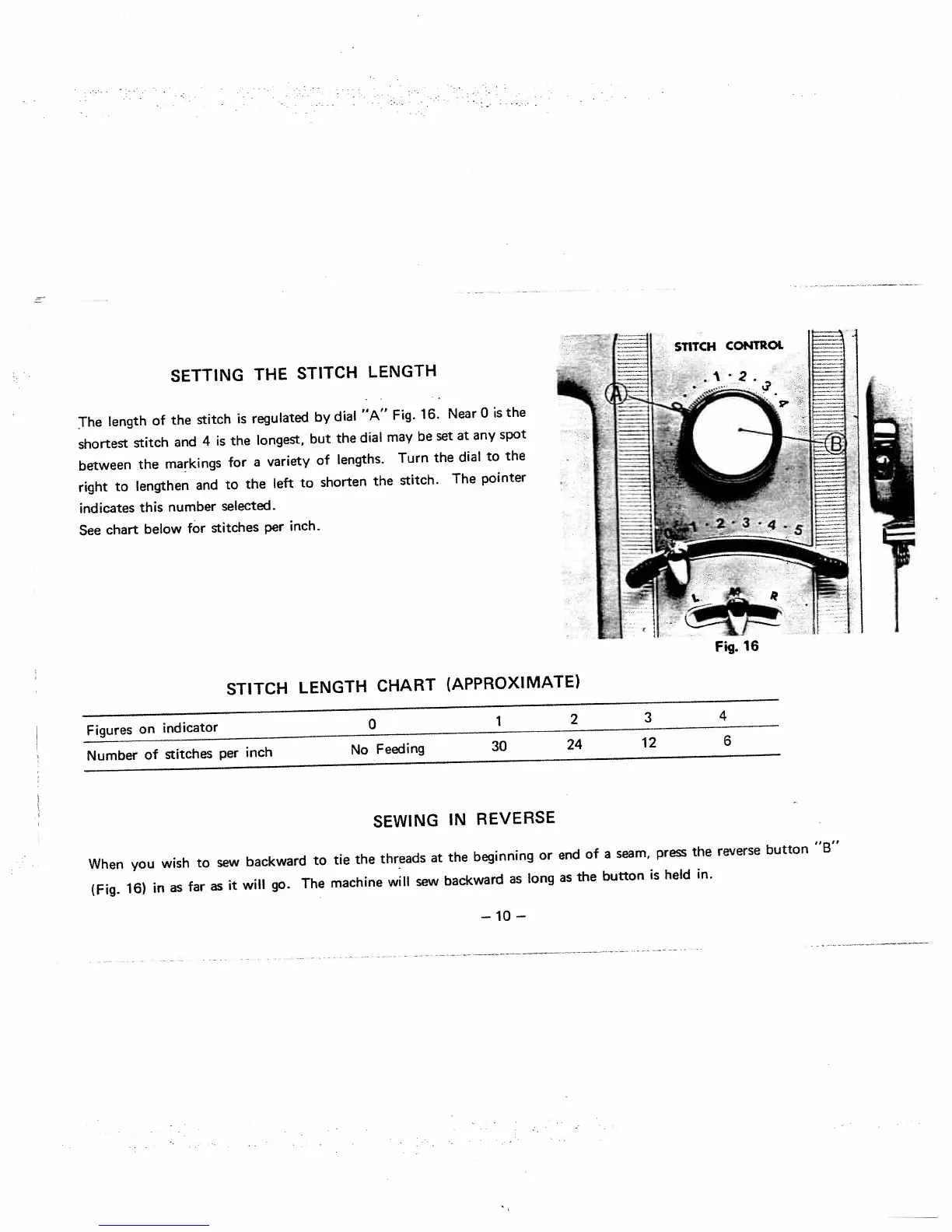
SETTING
THE
STITCH
LENGTH
The
length
of
the
stitch
is
regulated
by
dial
‘IA”
Fig.
16.
Near
0
is
the
shortest
stitch
and
4
is
the
longest,
but
the
dial
may
be
set
at
any
spot
between
the
markings
for
a
variety
of
lengths.
Turn
the
dial
to
the
right
to
lengthen
and
to
the
left
to
shorten
the
stitch.
The
pointer
indicates
this
number
selected.
See
chart
below
for
stitches
per
inch.
Figures
on
indicator
0
1
2
3
4
Number
of
stitches
per
inch
No
Feeding
30
24
12
6
SEWING
IN
REVERSE
When
you
wish
to
sew
backward
to
tie
the
threads
at
the
beginning
or
end
of
a
seam,
press
the
(Fig.
16>
in
as
far
as
it
will
go.
The
machine
will
sew
backward
as
long
as
the
button
is
held
in.
reverse
button
“B”
STITCH
LENGTH
CHART
(APPROXIMATE)
—10—

Related product manuals